Section-15, Cable bundle 1, installing the UPS cable tie bar
Procedure
-
Locate the cable bundle 1 UPS cable tie bar.
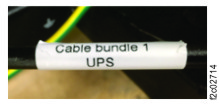
- The right end of the cable tie bar has a white label with
Cable bundle 1,
UPS
. See Figure 1.
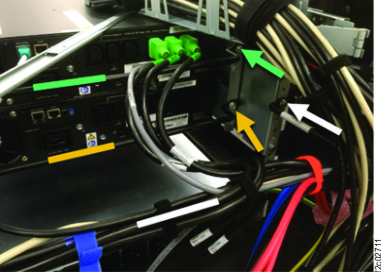
- The cable tie bar is shared. It has cables with green connectors for the upper UPS and
yellow connectors for the lower UPS.
- Remove the orange hook-and-loop cable ties as needed.
Figure 1. UPS cable tie bar label
- Install he cable tie bar between the lower and upper UPS.
- Two screws fasten the rear of the UPS 4U rail to the rack.
- Remove the upper screw (white arrow). See Figure 2
- Hold the cable tie bar in position and use the same screw to fasten it to the rack.
- Repeat for the other end of the cable tie bar.
Figure 2. UPS cable tie bars