Disconnecting the flash PCIe cables in the rack being installed
Procedure
-
At the rear of Rack-2, unseat all I/O enclosure PCIe storage interface cards R2-XIn-P1-C3 and
R2-XIn-P1-C6. See Figure 1, Figure 2, and Figure 3. Leave the PCIe cable connected to
each card. These cards are reinserted later when the flash enclosures are installed.
-
Slide the card out approximately 1 inch (2.5 cm).
Figure 1. Point-to-point cabling diagram for storage enclosure Flash PCIe cables (Models 982, 98F, rear view, racks 1, 2) 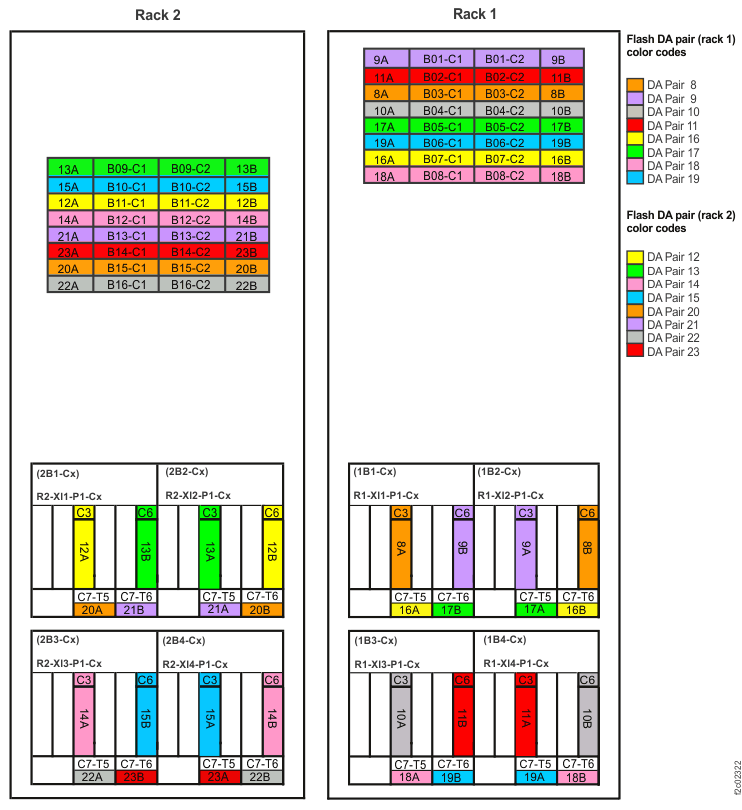
Figure 2. I/O enclosure locations (rear) (models 98x) 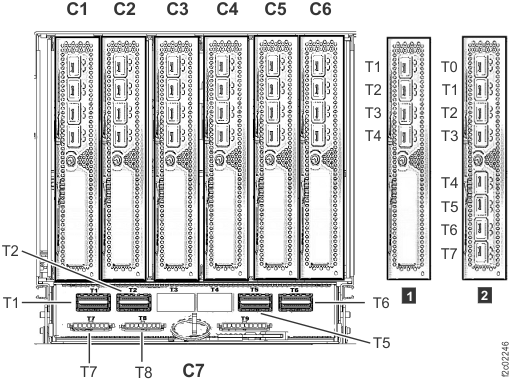 Note: I/O enclosure PCIe storage interface card (locations C3 and C6) not shown.Note: The older generation I/O enclosure PCIe and PCN card might not include T3, T4, and T10 ports.
Figure 3. PCIe storage interface card 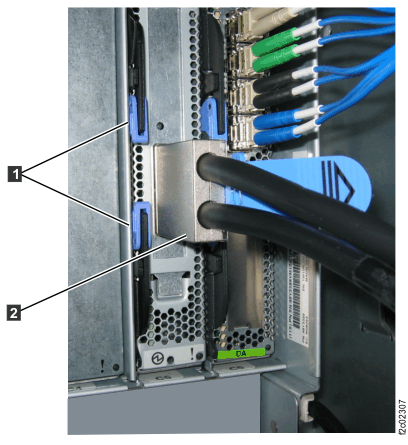
-
Slide the card out approximately 1 inch (2.5 cm).
-
At the rear of Rack-2, gently push on each PCIe cable connected to storage enclosure RAID
controller cards C1 and C2 in R2-B09 through R2-B16 to ensure they are connected. See Figure 1, Figure 2 and Figure 4.
Figure 4. Flash PCIe cable connector - RAID controller card end (P1-C1-T3 / P1-C2-T3) 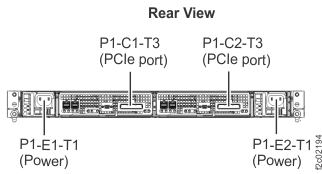
-
At the rear of Rack-2, disconnect the storage enclosure PCIe cables from all I/O enclosure PCIe
storage interface ports R2-XIn-P1-C7-T5 and T6. See Figure 5,
Figure 6,
Figure 7, and Figure 8. These cables are reconnected
later when the flash enclosures are installed.
Attention: Do not disconnect CEC enclosure PCIe cables from the I/O enclosure PCIe and PCN card ports R2-XIn-P1-C7-T1 and T2.
Figure 5. Point-to-point cabling diagram for storage enclosure FC-AL and Flash PCIe cables (Models 981, 98E, single-phase power, rear view, racks 1, 2) 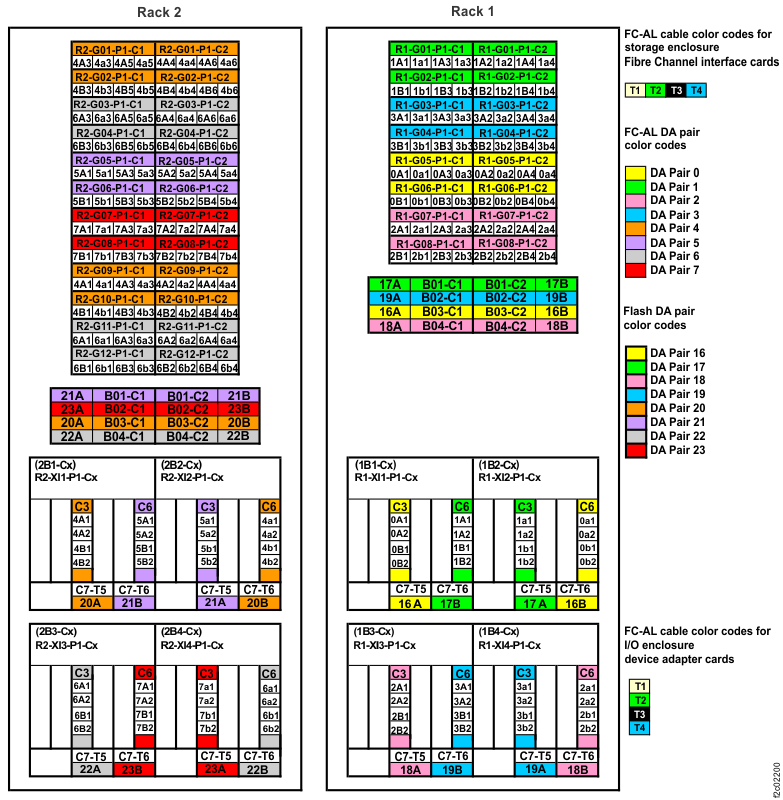
Figure 6. Point-to-point cabling diagram for storage enclosure FC-AL and Flash PCIe cables (Models 981, 98E three-phase power, rear view, racks 1, 2) 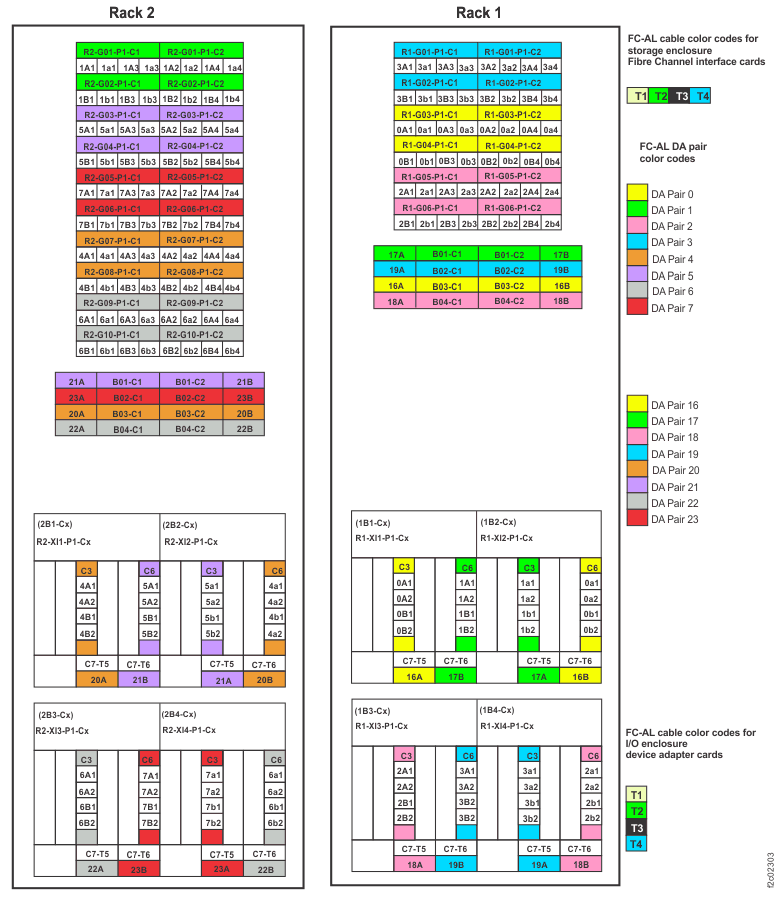
Figure 7. Point-to-point cabling diagram for storage enclosure PCIe and FC-AL cables (Models 980, 98B, rear view, racks 1, 2) 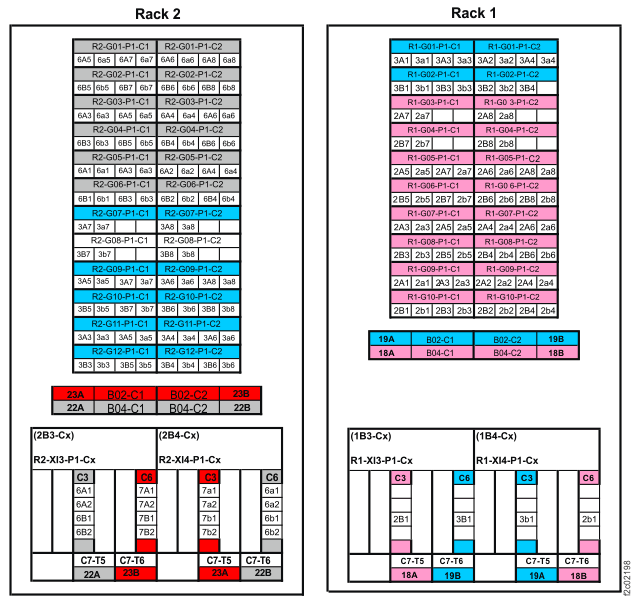
Figure 8. I/O enclosure locations (rear) (models 98x) Note: I/O enclosure PCIe storage interface card (locations C3 and C6) not shown.Note: The older generation I/O enclosure PCIe and PCN card might not include T3, T4, and T10 ports. -
At the rear of Rack-2, gently push on each PCIe cable that is connected to storage enclosure
RAID controller cards C1 and C2 in R2-B04, R2-B03, R2-B02, and R2-B01 to ensure that they are
connected. See Figure 5,
Figure 6,
Figure 7, and Figure 9.
Figure 9. Flash PCIe cable connector - RAID controller card end (P1-C1-T3 / P1-C2-T3)