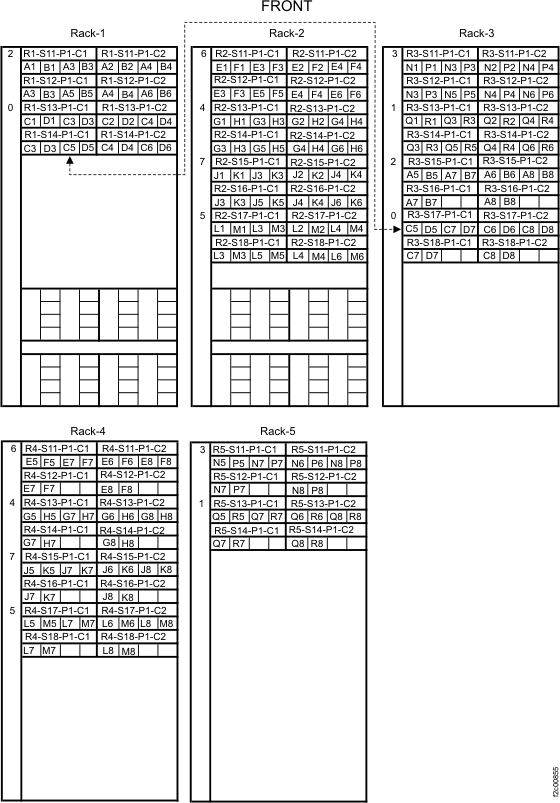
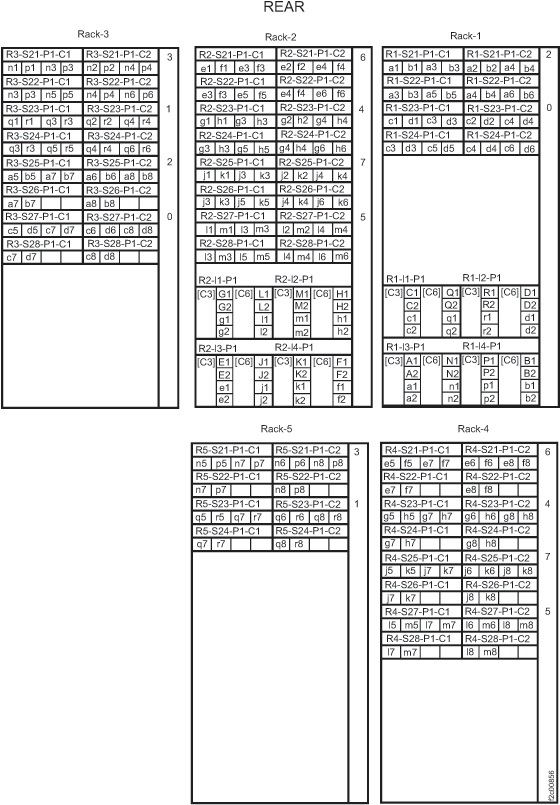
Point-to-point cabling diagrams for FC-AL cables, Models 941, 94E
Use the point-to-point cabling diagrams below to route the FC-AL cables on a Model 941, with up to five 94E expansion racks.
Notes:
- Racks are shown with the maximum number of storage enclosures and device adapter cards. Your rack might contain fewer storage enclosures or device adapter cards.
- The figures that follow show the maximum number of racks in a storage facility with these rack models.
- The connector at each end of the same cable has the same designator (for example, A2).
- An example of one cable is shown with the dotted line.
- Some connectors are for cables that would go to an optional expansion rack. In that case, only one instance of that designator is on the rack.