Routing and connecting customer cables to the storage facility
Procedure
-
This step provides information useful for connecting customer host cables to the I/O enclosure
host adapter card ports.
Figure 1. DS Storage Manager HA card port ID and location code 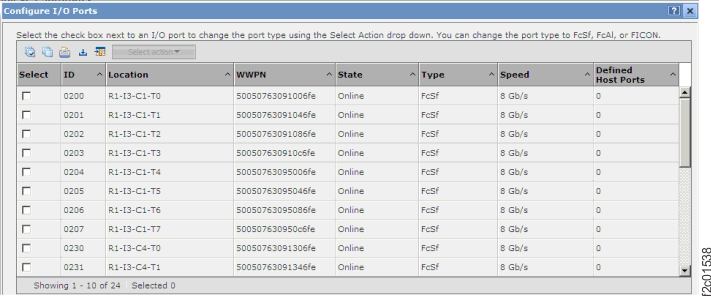
Figure 2. DS CLI Host adapter card port ID dscli> lsioport -dev IBM.2107-75RA271 Date/Time: July 13, 2010 2:40:33 PM PDT IBM DSCLI Version: 5.4.2.460 DS: IBM.2107-75RA271 ID WWPN State Type topo portgrp =============================================================== I0200 50050763091006FE Online Fibre Channel-SW SCSI-FCP 0 I0201 50050763091046FE Online Fibre Channel-SW SCSI-FCP 0Figure 3. DS CLI zHyperLink ports dscli> lszhyperlinkport Date/Time: July 19, 2018 2:47:41 PM PDT IBM DSCLI Version: 7.8.50.417 DS: IBM.2107-75DLR51 ID State loc Speed ===================================================== HL0028 Disconnected U1500.1B3.RJA1382-P1-C7-T3 0 GB/s HL0029 Disconnected U1500.1B3.RJA1382-P1-C7-T4 0 GB/sFigure 4. Location codes for device adapter and host adapter cards 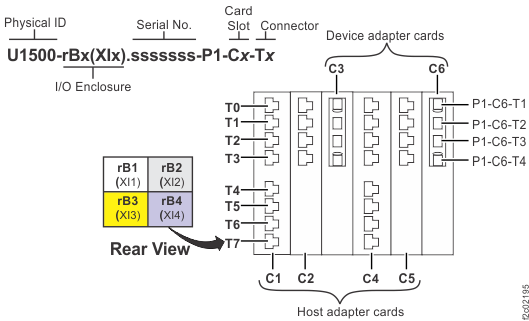
Figure 5. I/O enclosure locations (rear) (models 98x, 8xE) 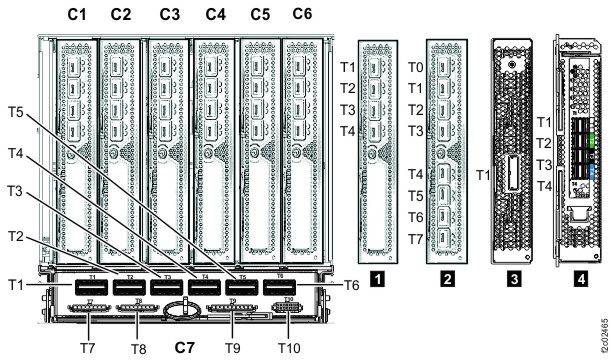
Table 1. Rack-1 rear view of I/O enclosure HA Port locations and IOPORT numbers R1-XI1 I/O Enclosure R1-XI2 I/O Enclosure HA Card Slot C1 HA Card Slot C2 DA Card Slot C3 HA Card Slot C4 HA Card Slot C5 DA Card Slot C6 HA Card Slot C1 HA Card Slot C2 DA Card Slot C3 HA Card Slot C4 HA Card Slot C5 DA Card Slot C6 C1-T0
I0000C2-T0
I0010C4-T0
I0030C5-T0 I0040 C1-T0
I0100C2-T0 I0110 C4-T0
I0130C5-T0 I0140 C1-T1
I0001C2-T1
I0011C4-T1
I0031C5-T1 I0041 C1-T1
10I01C2-T1 I0111 C4-T1
I0131C5-T1 I0141 C1-T2
I0002C2-T2
I0012C4-T2
I0032C5-T2 I0042 C1-T2
I0102C2-T2 I0112 C4-T2
I0132C5-T2 I0142 C1-T3
I0003C2-T3 I0013 C4-T3
I0033C5-T3 I0043 C1-T3
I0103C2-T3 I0113 C4-T3
I0133C5-T3 I0143 C1-T4
I0004C2-T4 I0014 C4-T4
I0034C5-T4 I0044 C1-T4
I0104C2-T4 I0114 C4-T4
I0134C5-T4 I0144 C1-T5
I0005C2-T5 I0015 C4-T5
I0035C5-T5 I0045 C1-T5
I0105C2-T5 I0115 C4-T5
I0135C5-T5 I0145 C1-T6
I0006C2-T6 I0016 C4-T6
I0036C5-T6 I0046 C1-T6
I0106C2-T6 I0116 C4-T6
I0136C5-T6 I0146 C1-T7
I0007C2-T7 I0017 C4-T7
I0037C5-T7 I0047 C1-T7
I0107C2-T7 I0117 C4-T7
I0137C5-T7 I0147 R1-XI3 I/O Enclosure R1-XI4 I/O Enclosure HA Card Slot C1 HA Card Slot C2 DA Card Slot C3 HA Card Slot C4 HA Card Slot C5 DA Card Slot C6 HA Card Slot C1 HA Card Slot C2 DA Card Slot C3 HA Card Slot C4 HA Card Slot C5 DA Card Slot C6 C1-T0
I0200C2-T0 I0210 C4-T0
I0230C5-T0 I0240 C1-T0
I0300C2-T0 I0310 C4-T0
I0330C5-T0 I0340 C1-T1
I0201C2-T1 I0211 C4-T1
I0231C5-T1 I0241 C1-T1
I0301C2-T1 I0311 C4-T1
I0331C5-T1 I0341 C1-T2
I0202C2-T2 I0212 C4-T2
I0232C5-T2 I0242 C1-T2
I0302C2-T2 I0312 C4-T2
I0332C5-T2 I0342 C1-T3
I0203C2-T3 I0213 C4-T3
I0233C5-T3 I0243 C1-T3
I0303C2-T3 I0313 C4-T3
I0333C5-T3 I0343 C1-T4
I0204C2-T4 I0214 C4-T4
I0234C5-T4 I0244 C1-T4
I0304C2-T4 I0314 C4-T4
I0334C5-T4 I0344 C1-T5
I0205C2-T5 I0215 C4-T5
I0235C5-T5 I0245 C1-T5
I0305C2-T5 I0315 C4-T5
I0335C5-T5 I0345 C1-T6
I0206C2-T6 I0216 C4-T6
I0236C5-T6 I0246 C1-T6
I0306C2-T6 I0316 C4-T6
I0336C5-T6 I0346 C1-T7
I0207C2-T7 I0217 C4-T7
I0237C5-T7 I0247 C1-T7
I0307C2-T7 I0317 C4-T7
I0337C5-T7 I0347 Table 2. Rack-2 rear view of I/O enclosures HA Port locations and IOPORT numbers R2-XI1 I/O Enclosure R2-XI2 I/O Enclosure HA Card Slot C1 HA Card Slot C2 DA Card Slot C3 HA Card Slot C4 HA Card Slot C5 DA Card Slot C6 HA Card Slot C1 HA Card Slot C2 DA Card Slot C3 HA Card Slot C4 HA Card Slot C5 DA Card Slot C6 C1-T0
I0400C2-T0 I0410 C4-T0
I0430C5-T0 I0440 C1-T0
I0500C2-T0 I0410 C4-T0
I0530C5-T0 I0440 C1-T1
I0401C2-T1 I0411 C4-T1
I0431C5-T1 I0441 C1-T1
I0501C2-T1 I0411 C4-T1
I0531C5-T1 I0441 C1-T2
I0402C2-T2 I0412 C4-T2
I0432C5-T2 I0442 C1-T2
I0502C2-T2 I0412 C4-T2
I0532C5-T2 I0442 C1-T3
I0403C2-T3 I0413 C4-T3
I0433C5-T3 I0443 C1-T3
I0503C2-T3 I0413 C4-T3
I0533C5-T3 I0443 C1-T4
I0404C2-T4 I0414 C4-T4
I0434C5-T4 I0444 C1-T4
I0504C2-T4 I0414 C4-T4
I0534C5-T4 I0444 C1-T5
I0405C2-T5 I0415 C4-T5
I0435C5-T5 I0445 C1-T5
I0505C2-T5 I0415 C4-T5
I0535C5-T5 I0445 C1-T6
I0406C2-T6 I0416 C4-T6
I0436C5-T6 I0446 C1-T6
I0506C2-T6 I0416 C4-T6
I0536C5-T6 I0446 C1-T7
I0407C2-T7 I0417 C4-T7
I0437C5-T7 I0447 C1-T7
I0507C2-T7 I0417 C4-T7
I0537C5-T7 I0447 R2-XI3 I/O Enclosure R2-XI4 I/O Enclosure HA Card Slot C1 HA Card Slot C2 DA Card Slot C3 HA Card Slot C4 HA Card Slot C5 DA Card Slot C6 HA Card Slot C1 HA Card Slot C2 DA Card Slot C3 HA Card Slot C4 HA Card Slot C5 DA Card Slot C6 C1-T0
I0600C2-T0 I0610 C4-T0
I0630C5-T0 I0640 C1-T0
I0700C2-T0 I0710 C4-T0
I0730C5-T0 I0740 C1-T1
I0601C2-T1 I0611 C4-T1
I0631C5-T1 I0641 C1-T1
I0701C2-T1 I0711 C4-T1
I0731C5-T1 I0741 C1-T2
I0602C2-T2 I0612 C4-T2
I0632C5-T2 I0642 C1-T2
I0702C2-T2 I0712 C4-T2
I0732C5-T2 I0742 C1-T3
I0603C2-T3 I0613 C4-T3
I0633C5-T3 I0643 C1-T3
I0703C2-T3 I0713 C4-T3
I0733C5-T3 I0743 C1-T4
I0604C2-T4 I0614 C4-T4
I0634C5-T4 I0644 C1-T4
I0704C2-T4 I0714 C4-T4
I0734C5-T4 I0744 C1-T5
I0605C2-T5 I0615 C4-T5
I0635C5-T5 I0645 C1-T5
I0705C2-T5 I0715 C4-T5
I0735C5-T5 I0745 C1-T6
I0606C2-T6 I0616 C4-T6
I0636C5-T6 I0646 C1-T6
I0706C2-T6 I0716 C4-T6
I0736C5-T6 I0746 C1-T7
I0607C2-T7 I0617 C4-T7
I0637C5-T7 I0647 C1-T7
I0707C2-T7 I0717 C4-T7
I0737C5-T7 I0747 Table 3. Rear view of I/O enclosure zHyperLink Port locations and HL Port numbers I/O enclosure Location HL Port R1-XI1 U1500.1B1.sssssss.P1-C7-T3 HL0008 U1500.1B1.sssssss.P1-C7-T4 HL0009 R1-XI2 U1500.1B2.sssssss.P1-C7-T3 HL0018 U1500.1B2.sssssss.P1-C7-T4 HL0019 R1-XI3 U1500.1B3.sssssss.P1-C7-T3 HL0028 U1500.1B3.sssssss.P1-C7-T4 HL0029 R1-XI4 U1500.1B4.sssssss.P1-C7-T3 HL0038 U1500.1B4.sssssss.P1-C7-T4 HL0039 R2-XI1 U1500.2B1.sssssss.P1-C7-T3 HL0048 U1500.2B1.sssssss.P1-C7-T4 HL0049 R2-XI2 U1500.2B2.sssssss.P1-C7-T3 HL0058 U1500.2B2.sssssss.P1-C7-T4 HL0059 R2-XI3 U1500.2B3.sssssss.P1-C7-T3 HL0068 U1500.2B3.sssssss.P1-C7-T4 HL0069 R2-XI4 U1500.2B4.sssssss.P1-C7-T3 HL0078 U1500.2B4.sssssss.P1-C7-T4 HL0079 -
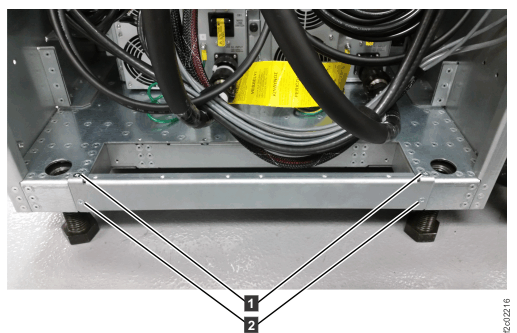
Reinstall the tailgate brackets in all frames by using the screws removed earlier. Tighten all
screws. See Figure 6.
Figure 6. Tailgate frame bracket