Information
about I/O enclosure parts is listed below. Use Table 1 as a directory.
Note: The following part numbers are the most recent for this version of the
Parts Catalog. Your storage facility or serviceable event FRU list might contain an older or newer
part number. The parts-ordering system recognizes all valid part numbers and automatically
substitutes an available part number as needed.
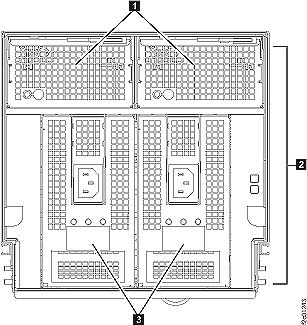
Table 2. I/O enclosure FRUs, front of rack (Models
951, 95E)
Index
Part name
CCIN1
Part number
1
I/O enclosure fan
63C2
45W1232
2
I/O enclosure backplane assembly
63C1
45W1231
3
I/O enclosure power supply
74Y6726
Notes:
Important, read this entire paragraph as there are exceptions
to what part number to order. The custom card identification number
(CCIN) identifies the physical features and logical behavior of a
part. If two parts appear physically identical but have different
CCINs, they are not interchangeable unless stated elsewhere in the
maintenance package or by the next level of support. If two parts
have different part numbers and yet have the same CCIN, they are interchangeable.
When you order a part number that is reported in a serviceable event
or call-home record, check whether the parts ordering system has a
conditional substitute for DS8000® series.
There are a couple of exceptions where the part number on the DS8000 FRU part
number is not the same one that is reported and called home. The part
number reported and called home may be the original eServer part number
which may have firmware that is not appropriate for the DS8000 series.
You must order the DS8000 FRU part
number to ensure that the correct firmware is present.
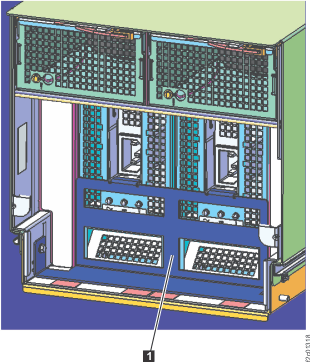
Figure 2. I/O enclosure sheet metal, front
of rack
Table 3. I/O enclosure
sheet metal, front of rack (Models 951, 95E)
Index
Part name
Part number
1
I/O enclosure power supply retention bracket1
45W6535
Notes:
This bracket is only present on some early racks to ensure the
power supplies are properly retained. Latter racks do not use it.
Important, read this entire paragraph as there are exceptions
to what part number to order. The custom card identification number
(CCIN) identifies the physical features and logical behavior of a
part. If two parts appear physically identical but have different
CCINs, they are not interchangeable unless stated elsewhere in the
maintenance package or by the next level of support. If two parts
have different part numbers and yet have the same CCIN, they are interchangeable.
When
you order a part number that is reported in a serviceable event or
call-home record, check whether the parts ordering system has a conditional
substitute for DS8000 series.
There are a couple of exceptions where the part number on the DS8000 FRU part
number is not the same one that is reported and called home. The part
number reported and called home may be the original eServer part number
which may have firmware that is not appropriate for the DS8000 series.
You must order the DS8000 FRU part
number to ensure that the correct firmware is present.
When a serviceable event is opened against a host card that has
not yet been configured (for example, during an expansion rack or
host card install), the serviceable event will display the default
CCIN and will not show a FRU part number. Use the table to select
the part number which matches the card type being installed.
Cable, Fibre Channel (FC-AL), optical, orange,
1.3 m (4 ft. 3 in.)2, 3
OCBL
45W8817
2
Cable, Fibre Channel (FC-AL), optical, blue,
2.5 m (8 ft. 2 in.)2
OCBL
45W8818
3
Cable, Fibre Channel (FC-AL), optical, blue,
5.6 m (18 ft. 4 in.)2
OCBL
45W8819
Notes:
Important: read this entire paragraph as there are exceptions
to what part number to order. The custom card identification number
(CCIN) identifies the physical features and logical behavior of a
part. If two parts appear physically identical but have different
CCINs, they are not interchangeable unless stated elsewhere in the
maintenance package or by the next level of support. If two parts
have different part numbers and yet have the same CCIN, they are interchangeable.
When you order a part number (P/N) reported in a serviceable event
or call home record, check if the parts ordering system has a conditional
substitute for DS8000 series.
Fibre Channel cables are bundled in groups from the factory. There
are many cable bundles, each with custom-length cables that are individually
labeled for specific racks, enclosures, and connectors. It is not
possible to order individual cables bundles. There are three cables
the field can order, each is a different length and without any labeling.
You need to find the part number on the cable bundle that contains
the cable that needs replaced. The parts ordering system will take
the cable bundle part number and convert it to a single cable part
number that is longer than the longest cable in the cable bundle.
Only used in Rack-1 with Rack Configuration: AB1, "business class"
cabling.