Rack power and cooling LED indicators (Models 941, 94E)
This section contains rack power and cooling FRUs that have LED indicators. Each listed assembly is shown with a description of its LEDs. Although LED indicators may indicate a failure, they should not be used as a starting point for a repair.
Rack power and cooling FRUs with LEDs
| Assembly | Reference |
|---|---|
| DASD fan tray assembly | Figure 5 |
| Fan sense card | Figure 6 |
| Local remote switch card | Figure 7 |
|
PPS
Overview (front) 5/12V DDM power module Booster power module Sequencer module |
|
| Rack identity card | Figure 8 |
| Rack operator panel UEPO switch assembly | Figure 9 |
| RPC card | Figure 10 |
LEDs on the primary power supply (front)
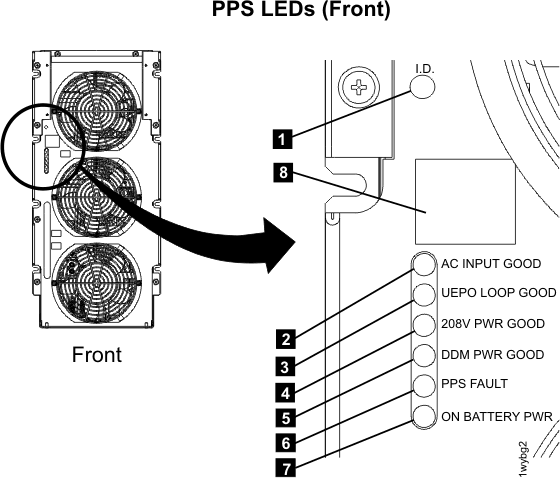
| Index | LED Function | Color | LED Off | LED On | LED Flash |
|---|---|---|---|---|---|
| 1 | Identify for primary power supply | Amber | normal | n/a | Identify |
| 2 | AC input good | Green | missing input or CB00 off | normal | n/a |
| 3 | UEPO loop good | Green | PPS off or UEPO switch is tripped | normal | n/a |
| 4 | 208VDC output power good | Green | PPS off | normal | n/a See note 3 |
| 5 | DDM output power good | Green | PPS off | normal | n/a See note 3 |
| 6 | PPS fault | Amber | normal | error See note 1 |
n/a |
| 7 | On battery | Amber | normal | error See note 2 |
n/a |
| 8 | Status display (see MAP2340 Codes on the PPS status display) | n/a | n/a | n/a | n/a |
Notes:
|
|||||
LEDs on the 5/12V DDM power module
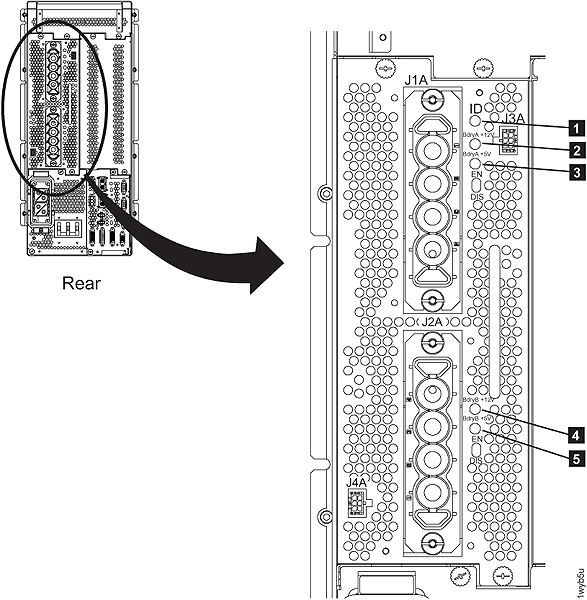
| Index | LED Function | Color | LED Off | LED On | LED Flash |
|---|---|---|---|---|---|
| 1 | Identify | Amber | normal | n/a | Identify |
| 2 | Boundary A
+12V output |
Green | PPS off | normal | n/a |
| Amber | fault | ||||
| 3 | Boundary A
+5V output |
Green | normal | ||
| Amber | fault | ||||
| 4 | Boundary B
+12V output |
Green | normal | ||
| Amber | fault | ||||
| 5 | Boundary B
+5V output |
Green | normal | ||
| Amber | fault |
LEDs on the booster power module
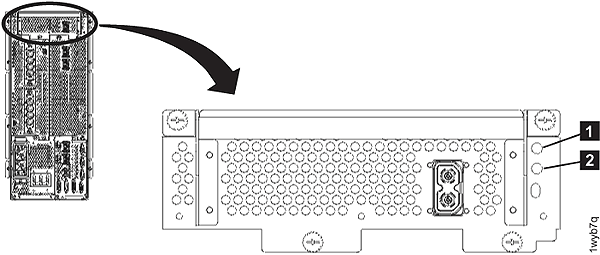
| Index | LED Function | Color | LED Off | LED On | LED Flash |
|---|---|---|---|---|---|
| 1 | Identify | Amber | normal | n/a | Identify |
| 2 | 208VDC output | Green | PPS off | normal | n/a |
| Amber | fault |
LEDs on the sequencer module
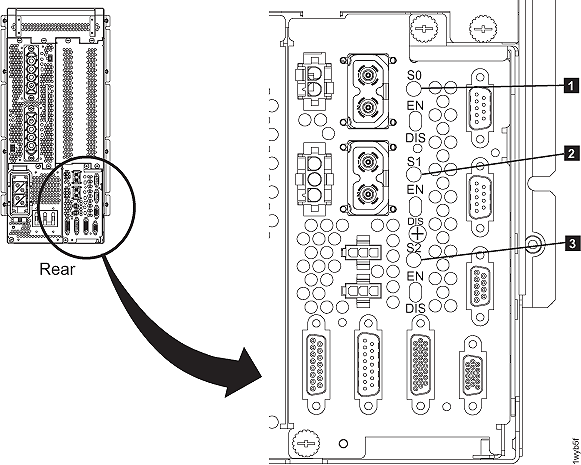
| Index | LED Function | Color | LED Off | LED On | LED Flash |
|---|---|---|---|---|---|
| 1 | Main 208VDC output | Green | PPS off | normal | n/a |
| Amber | fault | ||||
| 2 | Protected 208 VDC output 0 | Green | normal | ||
| Amber | fault | ||||
| 3 | Protected 208 VDC output 1 | Green | normal | ||
| Amber | fault |
LEDs on the DASD fan tray
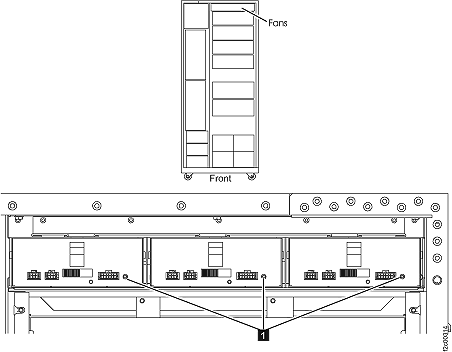
| Index | LED Function | Color | LED Off | LED On | LED Flash |
|---|---|---|---|---|---|
| 1 | Identify | Amber | Normal | n/a | Identify |
LEDs on the fan sense card
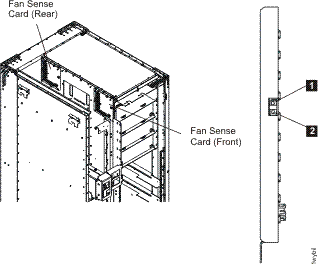
| Index | LED Function | Color | LED Off | LED On | LED Flash |
|---|---|---|---|---|---|
| 1 | Operational | Green | fenced or no input power | operational | n/a |
| 2 | Identify | Amber | normal | n/a | Identify |
LED on the local remote switch card
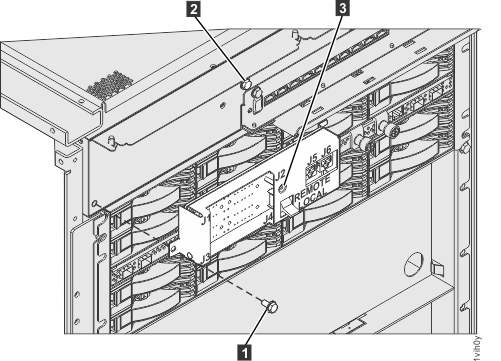
| Index | LED Function | Location | Color | LED Off | LED On | LED Flash |
|---|---|---|---|---|---|---|
| 3 | Identify | C6 | Amber | Normal | N/A | Identify |
LEDs on the rack identity card
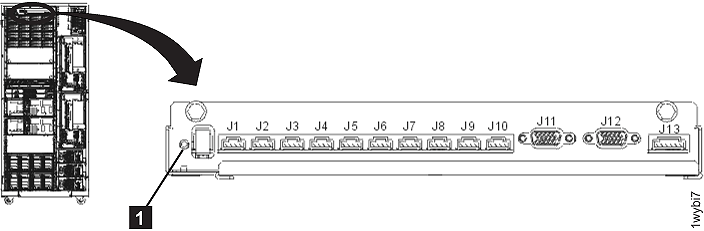
| Index | LED Function | Location | Color | LED Off | LED On | LED Flash |
|---|---|---|---|---|---|---|
| 1 | Identify | C5 | Amber | Normal | N/A | Identify |
LEDs on the rack operator panel UEPO switch assembly
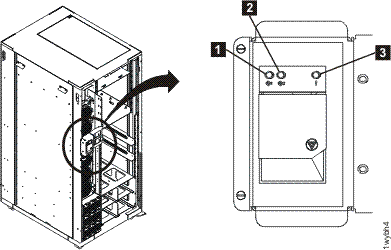
| Index | LED Function | Color | LED Off | LED On | LED Flash |
|---|---|---|---|---|---|
| 1 | Line cord 1 | Green | 1 | 2 | 3 |
| 2 | Line cord 2 | Green | 1 | 2 | 3 |
| 3 | Identify or System Attention | Amber | Normal | Attention4 (Rack-1 only) |
Identify4 |
Notes:
|
|||||
LEDs on the RPC cards
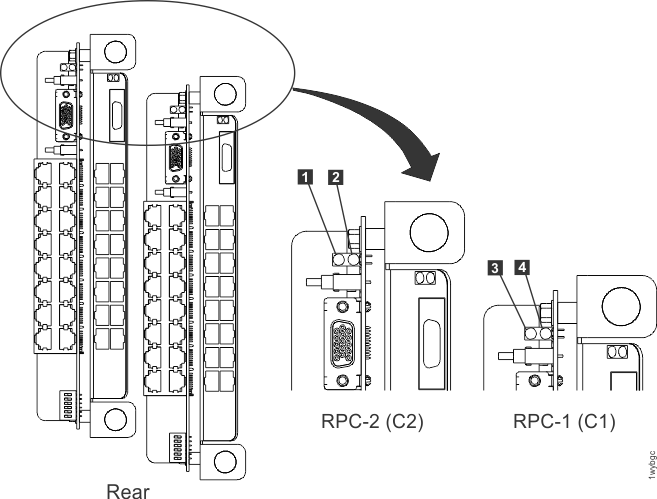
| Index | LED Function | Location | Color | LED Off | LED On | LED Flash |
|---|---|---|---|---|---|---|
| 1 | Operational | C2 | Green | fenced, not booted, or no input power | operational | n/a |
| 2 | Identify | C2 | Amber | normal | 1 | Identify |
| 3 | Operational | C1 | Green | fenced, not booted, or no input power | operational | n/a |
| 4 | Identify | C1 | Amber | normal | 1 | Identify |
Notes:
|
||||||