Storage enclosure LED indicators (Models 961, 96E, 30 SSD slots)
This section contains storage enclosure FRUs that have LED indicators. Each listed assembly is shown with a description of its LEDs. While LED indicators might indicate a failure, they should not be used as a starting point for a repair.
Storage enclosure FRUs with LEDs
| Part name | Reference |
|---|---|
| Storage enclosure midplane (front) | Figure 1 |
| Storage enclosure midplane (rear) | Figure 2 |
| Storage enclosure power supply | Figure 2 |
| Storage enclosure RAID controller card | Figure 3 |
| Storage enclosure solid state disk (SSD) | Figure 1 |
Note: Models 98x do not have the vertical enclosure option.
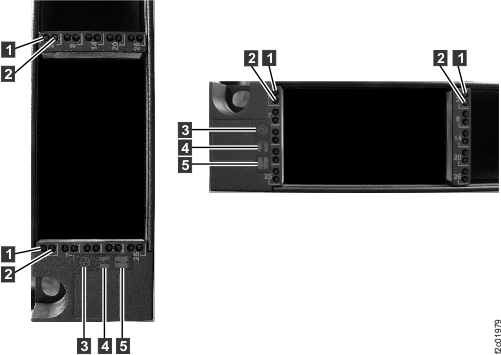
| Index | LED name | LED color | Controlled by | LED state | Description |
|---|---|---|---|---|---|
| 1 | SSD activity | Green | Firmware | Solid on | Ready and idle |
| Blinking | Activity | ||||
| Off | Not ready | ||||
| 2 | Fault / Identify | Amber | Solid on | TBD | |
| Blinking | Identify | ||||
| Off | No fault | ||||
| 3 | Storage enclosure power | Green | Solid on | Power on | |
| Blinking | Standby | ||||
| Off | Power off | ||||
| 4 | Storage enclosure identify | Blue | Solid on | Not valid | |
| Blinking | Identify | ||||
| Off | Not used | ||||
| 5 | Storage enclosure fault | Amber | Solid on | Fault | |
| Blinking | |||||
| Off | Not used |
Note: Models 98x do not have the vertical enclosure option.
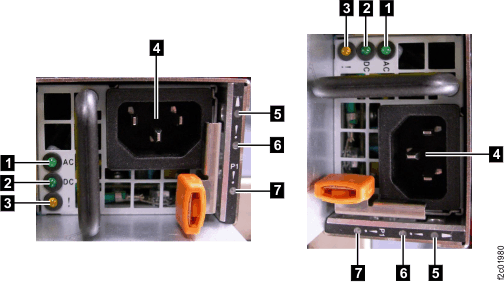
| Index | LED name | LED color | Controlled by | LED state | Description |
|---|---|---|---|---|---|
| 1 | AC input | Green | Power supply | Solid on | Good |
| Blinking | Not valid | ||||
| Off | Out of range | ||||
| 2 | DC output | Green | Power supply | Solid on | Good |
| Blinking | Standby | ||||
| Off | Out of range | ||||
| 3 | Power supply fault and Identify | Amber | Power supply | Solid on | Fault |
| Blinking | Identify | ||||
| Off | Normal | ||||
| 5 | Storage enclosure Identify | Blue | Solid on | Not valid | |
| Blinking | Identify | ||||
| Off | Not used | ||||
| 6 | Storage enclosure Fault | Amber | Solid on | Fault | |
| Blinking | |||||
| Off | Not used | ||||
| 7 | Storage enclosure Midplane fault | Amber | Solid on | Not valid | |
| Blinking | Identify | ||||
| Off | Normal |
Note: Models 98x do not have the vertical enclosure option.
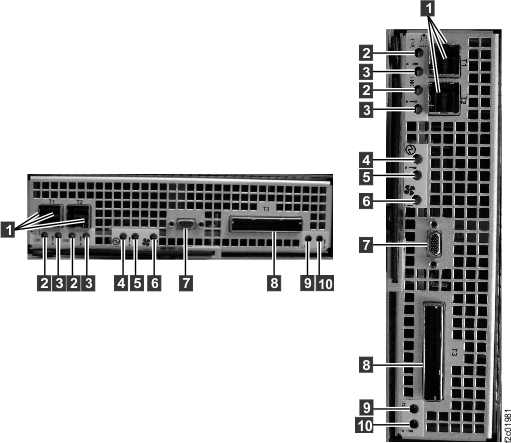
| Index | LED name | LED color | Controlled by | LED state | Description |
|---|---|---|---|---|---|
| 2 | SAS port Link (not used) | Solid on | Ready | ||
| Blinking | Not valid | ||||
| Off | Not ready | ||||
| 3 | SAS port Identify (not used) | Solid on | Not valid | ||
| Blinking | Identify | ||||
| Off | Normal | ||||
| 4 | Raid controller card power | Solid on | Normal | ||
| Blinking | Not valid | ||||
| Off | No power | ||||
| 5 | Raid controller card Fault/Identify | Solid on | |||
| Blinking | Identify | ||||
| Off | Normal | ||||
| 6 | Raid controller card Fault/Identify | Solid on | |||
| Blinking | Identify | ||||
| Off | Normal | ||||
| 9 | PCIe Link | Green | Solid on | Ready | |
| Blinking | Not valid | ||||
| Off | Not ready | ||||
| 10 | PCI link Fault/Identify | Amber | Solid on | ||
| Blinking | Identify | ||||
| Off | Normal |