X336 management console server LED indicators
This section contains information about LEDs that are on the X336 management console server. Although the condition of LEDs might indicate a failure, the LEDs should not be used as a starting point for a repair.
LEDs on the front of the X336 server
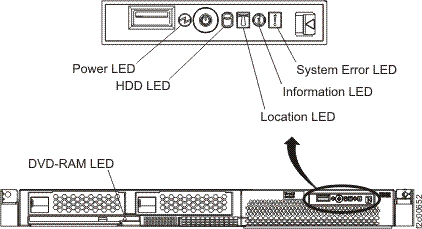
- DVD-RAM LED: On = The DVD-RAM drive is in use.
- Information LED: On = A non-critical event has occurred and is identified in the error log.
- Location LED: Use this blue LED to visually locate the server if it is in a location with numerous other servers. You can use IBM Director to light this LED remotely.
- Power LED: On = Input power (ac) and output power (dc)
are present in the server. Flashing = The server is in power
off state. Off = Input power is not present, the power supply
has failed, or the LED itself has failed. A power LED is also on the
rear of the server.Note: To remove all electrical power from the server, you must disconnect the power cord from the electrical outlet.
- System Error LED: On = A system error has occurred. An LED on the Light Path Diagnostics panel on the system board is also lit to help isolate the error. A system error LED is also on the front of the server.
LEDs on the rear of the X336 server
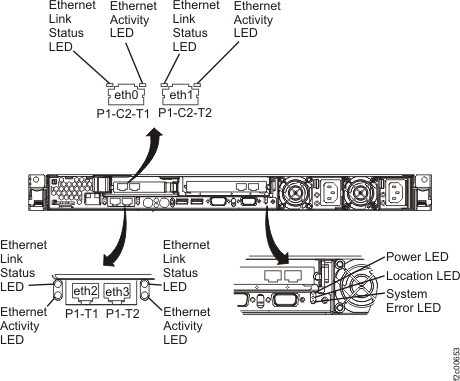
- Ethernet Activity LED: On = The Ethernet link is bad. Off = Ethernet activity is not occurring. Flashing = Ethernet activity is occurring.
- Ethernet Link Status LED: On = The Ethernet link is okay. Off = The Ethernet link is bad.
- Location LED: Use this blue LED to visually locate the server if it is in a location with numerous other servers. You can use IBM Director to light this LED remotely. (Not used on the DS8000®.)
- Power LED: On = Input power (ac) is present at the server.
Off = Input power (ac) is not present, the power supply has failed,
or the LED itself has failed. A power LED is also on the front of
the server.Note: To remove all electrical power from the server, you must disconnect the power cord from the electrical outlet.
- Power Input LED: On = Input power (ac) is present at the server. Off = Input power is not present at the server. A power LED is also on the front of the server.
- Power Output LED: On = The power supply is providing output power (dc) to the server. Off = The power supply is not providing output power (dc) to the server.
- System Error LED: On = A system error has occurred. An LED on the Light Path Diagnostics panel on the system board is also lit to help isolate the error. A system error LED is also on the front of the server.