MAP496B Recovery actions for special PCIe-related I/O enclosure errors (2U) (Model 983)

This MAP lists SRCs that require special repair actions to be completed by the service representative or the next level of support.

MAP496B Section-1

Procedure

  1. Does the FRU list, in the serviceable event, that sent you here contain a symbolic FRU similar to Invalid-MTMS-cpssebay**?
  2. When the FRU list contains a symbolic FRU similar to Invalid-MTMS-cpssebay**, the location code is invalid and cannot be used to determine the failing I/O enclosure (2U).
  3. To determine the cpssebay** value from the symbolic FRU of Invalid-MTMS-cpssebay**, use the first column of Table 1.
    Table 1. Symbolic FRU location to type-location conversion (Models 983)
    Symbolic FRU location code Location code Type location Logical I/O enclosure number Physical I/O enclosure (2U) in Model 983
    cpssebay02 1G3 1600-1G3 2 First
    cpssebay03 1G4 1600-1G4 3
  4. Determine the location code in Table 1 second column for the symbolic FRU location code in the FRU list.
  5. Convert the three-character location code from the previous step to a physical location of the I/O enclosure (2U) in the rack.
    1. I/O enclosure number 2/3 is the first I/O enclosure (2U). It is always in the rack that contains the CEC enclosures. See Figure 1.
    Figure 1. I/O enclosure (2U) locations code (rear) (model 983) 1G3, 1G4
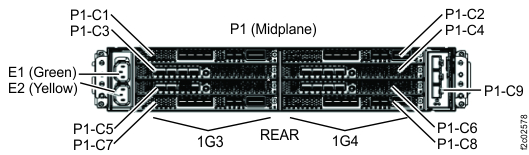
    I/O enclosure (2U) locations code (rear) (model 983) with logical IG3, 1G4
  6. Contact your next level of support. This situation should not occur with the I/O enclosure (2U) and requires special analysis.

MAP496B Section-2

Procedure

  1. Find your SRC in Table 2.
    Table 2. Repair actions for special SRCs
    SRCs that require special repairs
    SRCs Action
    BE1E2197 A CEC to CEC path heartbeat timeout was reported by CEC1 (LPAR ESS11). Go to MAP496B Section-3.
    BE1E2198 A CEC to CEC path heartbeat timeout was reported by CEC0 (LPAR ESS01). Go to MAP496B Section-3.
    BE1E25AA A single CEC to I/O enclosure PCIe link fault was detected during a CEC service action. Go to MAP496B Section-3.
    BE1E25AB Multiple CEC to I/O enclosure PCIe link faults were detected during a CEC service action. Go to MAP496B Section-3.
    BE370012 PCIe I/O enclosure discovery failure (missing I/O enclosure). Go to MAP496B Section-4.
    BE38256B PCIe enclosure discovery/configuration failure. Could not initialize path from local server to I/O enclosure. Go to MAP496B Section-3.
    BE38256C I/O enclosure FPGA update image corrupted on local server. Contact your next level of support.
    BE38256D PCIe I/O enclosure FPGA error. Contact your next level of support.
    BE38256E PCIe I/O enclosure MTMS unknown/invalid. Contact your next level of support.
    BE38256F PCIe I/O enclosure mis-cabling detected. Go to MAP496B Section-3.
    BE382572 Error occurred during I/O enclosure error data collection. Go to MAP496B Section-3.
    BE382575 PCIe I/O Enclosure discovery/configuration failure: I/O Enclosure missing. Go to MAP496B Section-5.
    BE38257B PCIe interface to PCIe I/O enclosure down. Go to MAP496B Section-3.
    BE382563 Multi-PCIe link degraded detected on the local server. Contact your next level of support.
    BE382566 PCIe I/O enclosure discovery/configuration failure. Go to MAP496B Section-3.
    BE382567 Invalid server config. Contact your next level of support.
    BE382574 One LPAR cannot communicate the I/O enclosure; a system failover is required. Go to MAP496B Section-3.
    BE382575 PCIe I/O enclosure discovery failure (missing an I/O enclosure). Go to MAP496B Section-4.
    BE3825D2 CEC error data collection from I/O enclosure failed due to PCIe link problem. Go to MAP496B Section-3.
    BE3825D3 CEC error data collection from I/O enclosure failed due to PCIe link problem. Go to MAP496B Section-3.
    BE3825EC IO enclosure PCIe adapter unreachable from one CEC. Go to MAP496B Section-3.
    BE3825ED IO enclosure PCIe adapter unreachable from one CEC. Go to MAP496B Section-3.
    Any other SRC Contact your next level of support.
  2. Use the Action column entry to continue the repair.

MAP496B Section-3

About this task

The serviceable event FRU list that sent you here contains one or more cables and possibly more FRUs.
Important: Both ends of each PCIe cable appear in the FRU list. Only the first cable location code is available to select for repair or replace for each cable in the FRU list. The subsequent CBLCONT location code shows where a cable continues to connect to, but is not available to select for repair or replace.

Procedure

  1. Inspect both ends of each PCIe cable that is listed in the FRU list. See Figure 2, Table 3, Figure 3, and Table 4.
    1. Do not plug or unplug the cable.
    2. The CBLCONT location code that is listed is the port on the I/O enclosure where the cable is supposed to be connected.
    3. Observe the body of the cable to ensure that it is not damaged.
    Figure 2. PCIe cables, set 1 (Model 983) (rear view)
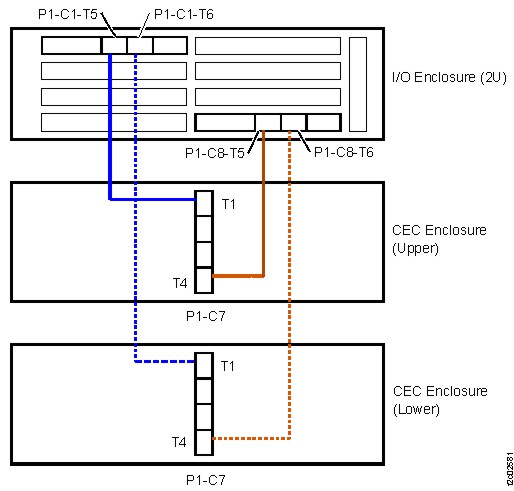
    Model 983 (rear view)
    Table 3. PCIe cables, set 1 (Model 983)
    From CEC Enclosure To I/O Enclosure
    XC1-P1-C7-T1 1G3-P1-C1-T5
    XC1-P1-C7-T4 1G4-P1-C8-T5
    XC2-P1-C7-T1 1G3-P1-C1-T6
    XC2-P1-C7-T4 1G4-P1-C8-T6
    Figure 3. PCIe cables, set 2 (Model 983) (rear view)
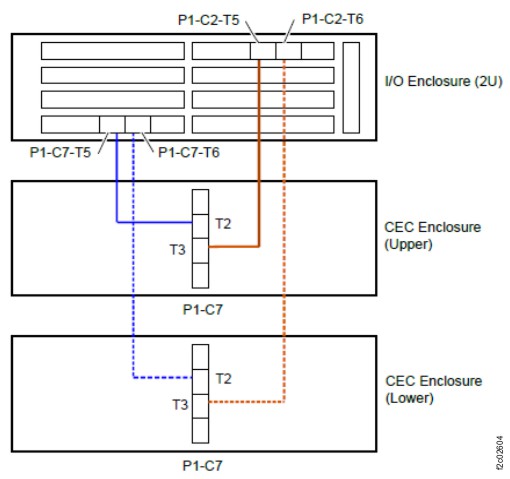
    PCIe cables, second set, Model 983
    Table 4. PCIe cables, set 2 (Model 983)
    From CEC Enclosure To I/O Enclosure
    XC1-P1-C7-T2 1G3-P1-C7-T5
    XC1-P1-C7-T3 1G4-P1-C2-T5
    XC2-P1-C7-T2 1G3-P1-C7-T6
    XC2-P1-C7-T3 1G4-P1-C2-T6
  2. Is the PCIe cable properly plugged and not damaged?
    • Yes, go to the next step.
    • No, go to step 5
  3. The cable is properly plugged and is not damaged.
    Did you reach this step after replacing both the I/O enclosure (2U) adapter (PCIe and SAS device) and the I/O enclosure (2U) midplane assembly?
    • No, go to the next step.
    • Yes, a pseudo-repair of the I/O enclosure (2U) adapter (PCIe and SAS device) might recover this condition. Complete the following steps:
      1. Return to the screen that sent you here.
      2. To the question, "What was the result of using the service procedure from Infocenter?" click Problem not fixed and then click Next.
      3. To the question, "Did you exchange any parts,?" click No and then click Next.
      4. To the question, "Did you isolate the problem,"? click Yes and then click Next.
      5. The current repair action ends, but the serviceable event is left open. Use Exchange Parts menu to complete a pseudo-repair of the I/O enclosure (2U) adapter (PCIe and SAS device). You do not need to uncable and remove the adapter:
        • Storage Facility Management > storage facility > Exchange Parts
  4. The I/O enclosure (2U) adapter (PCIe and SAS device) and the I/O enclosure (2U) midplane assembly have not been replaced.
    1. Return to the screen that sent you here.
    2. To the question, "What was the result of using the service procedure from Infocenter?" click Problem not fixed and then click Next.
    3. To the question, "Did you exchange any parts?" click No and then click Next.
    4. To the question, "Did you isolate the problem"? click No and then click Next.
    5. The next FRU in the list is displayed. Continue the repair by replacing the remaining FRUs until the problem is fixed. Exit this MAP.
  5. The cable is incorrectly plugged or damaged. Did a failed IO enclosure installation lead you to this MAP?
    • Yes
      1. Exit this repair.
      2. Retry the original MES installation with cables properly connected.
    • No, the incorrect plugging of the cable or damage to the cable occurred during a repair, or during an upgrade of the I/O enclosure PCIe and PCN card.
      1. Return to the screen that sent you here.
      2. To the question, "What was the result of using the service procedure from Infocenter?" click Problem not fixed and then click Next.
      3. To the question, "Did you exchange any parts?" click No and then click Next.
      4. To the question, "Did you isolate the problem?" click No and then click Next.
      5. When the next FRU in the list is displayed, pretend that the other FRUs in the previous FRU list are not available onsite to be replaced.
      6. When asked if the FRU is available to be replaced, answer no. This answer causes each FRU in the list to be displayed until the incorrectly plugged cable or the damaged cable is displayed.

        When the incorrectly plugged cable or the damaged cable is displayed, do a normal FRU replace.

      7. When the repair is complete, exit this MAP.

MAP496B Section-4

Procedure

  1. Observe the FRU list in the serviceable event details that sent you here. It includes one or more of the following FRUs:
    • I/O enclosure (2U) adapter (PCIe and SAS device)
    • I/O enclosure (2U) adapter (PCIe)
    • I/O enclosure (2U) midplane assembly
  2. Display open serviceable events that need repair. Is there any other serviceable event with either FRUs determined in step 1 or with other FRUs such as power supply or fan from this I/O enclosure?
    • Yes, exit this MAP and attempt to repair that serviceable event first.

      If that repair does not correct this problem, return here and continue with the next step.

      If that repair does correct this problem, remember to also close this serviceable event.

    • No, go to the next step.
  3. Inspect both ends of all PCIe cables that are associated with the I/O enclosure (2U) listed in the FRU list, that is, intended to be connected to this I/O enclosure (2U).
    1. Do not plug or unplug the cables.
    2. Refer to Figure 3, check each end of both cables that are intended to be connected to this I/O enclosure (2U) to see whether they are properly plugged into the correct connector.
    3. Observe the body of the cable to ensure that it is not damaged.
    Are the PCIe cables to the I/O enclosure (2U) properly plugged and not damaged?
    • Yes, go to the next step.
    • No, go to step 5.
  4. You reached this step because the cables are properly plugged and are not damaged.
    1. Return to the screen that sent you here.
    2. To the question, "What was the result of using the service procedure from Infocenter?" click Problem not fixed and then click Next.
    3. To the question, "Did you exchange any parts?" click No and then click Next.
    4. To the question, "Did you isolate the problem?" click No and then click Next.
    5. The next FRU in the list is displayed. Continue the repair by replacing the remaining FRUs until the problem is fixed.

      Exit this MAP.

  5. At least one cable is incorrectly plugged or damaged. Did a failed IO enclosure installation lead you to this MAP?
    • Yes
      1. Exit this repair.
      2. Retry the original MES installation with cables properly connected.
    • No, the incorrect plugging of the cable or damage to the cable occurred during a repair, or during an upgrade of the I/O enclosure PCIe and PCN card.
      1. Return to the screen that sent you here.
      2. To the question, "What was the result of using the service procedure from Infocenter?" click Problem not fixed and then click Next.
      3. To the question, "Did you exchange any parts?" click No and then click Next.
      4. To the question, "Did you isolate the problem?" click No and then click Next.
      5. The next FRU in the list is displayed. Continue the repair on this FRU, but when instructed to replace the FRU, do not replace that FRU, but instead replace the damaged cables that are connected to the I/O enclosure.
      6. If the repair completes successfully, exit this MAP. Otherwise, contact your next level of support.

MAP496B Section-5

About this task

The serviceable event FRU list that sent you here occurred during an MES installation of an I/O enclosure (2U) adapter (PCIe).

This MAP section is only for SRC BE382575. This SRC occurs when both upper and lower CEC enclosures PCIe interfaces (shown in Figure 4) cannot read the needed information from the I/O enclosure (2U) adapter (PCIe) that is being installed. A failure of a single interface creates a different SRC.

Procedure

  1. Were you sent here during an MES to install an I/O enclosure (2U) adapter (PCIe)?
    • Yes. Go to the next step.
    • No. Stop and call the next level of support.
  2. In the FRU list that sent you here, is there a FRU displayed that has most of the FRU fields empty?
    • Yes. Go to the next step.
    • No. Stop and call the next level of support.
  3. Ensure that the two PCIe cables that are being installed are properly connected at both ends. Refer to the location code label at each end of the cables. Check for visual damage to the cables or connectors. See Figure 4.
    Were visual symptoms or incorrect cable connections found for both cables?
    • Yes. Go to step 4.
    • No. Go to step 5.
    Figure 4. PCIe cables, set 2 (Model 983) (rear view)
    PCIe cables, second set, Model 983
  4. There is a PCIe cable problem. Do the following actions.
    1. Exit this MAP.
    2. Unplug both PCIe cables at both ends.
    3. Restart the MES install process.
    4. Ensure the cables are correctly connected.
    5. The MES should complete successfully.
  5. There is an I/O enclosure (2U) adapter (PCIe) problem affecting both interfaces.
    1. Ensure that the adapter is fully seated with the jackscrew and ensure that it is not angled.
    2. If no problem is found, the adapter needs to be replaced.
    3. Exit this MAP.
    4. Remove the failing adapter.
    5. Restart the MES install process.
    6. When directed, install the new adapter.
    7. If it fails with the same error, call the next level of support.