This section contains information about LEDs that are on
the T530 laptops. This information is also in the Hardware Maintenance
Manual ThinkPad® T530, T530i, and W530, which is included on the
service documentation CD that is part of the ship group. The CD should
be stored in the document box at the front upper left corner of Rack-1.
Although the condition of LEDs might indicate a failure, the LEDs
should not be used as a starting point for a repair.
Status indicators
The system status indicators,
shown in Figure 1,
show the status of the computer. Table 1 lists the definitions
of the status indicators. Figure 1. ThinkPad T530 laptop status indicators
Table 1. Status
indicators
Status indicator
Definition
Speaker mute
Orange:
The speaker is on mute. To mute or unmute the speakers, press
the speaker mute button.
Microphone mute
Orange:
The microphone is on mute. By default, when the microphone is
on mute, none of the recording devices is available.
Wireless LAN, WAN or Bluetooth status
Green:
The wireless LAN feature (the IEEE 802.11 b/g standard, 802.11
a/b/g, or 802.11n), wireless WAN feature, or Bluetooth feature is
on.
Blinking green:
Data is being transmitted.
Device access
Blinking green:
Data is being read from or written to the hard disk drive, the
solid state drive, or the device in the Serial Ultrabay™ Enhanced
bay.
Power on
Green:
The computer is on and ready to use. This indicator stays lit
whenever the computer is on and is not in sleep mode.
Slow-blinking green:
The computer is in sleep mode.
Fast-blinking green:
The computer is entering sleep mode or hibernation mode, or is
resuming normal operation.
Serial Ultrabay Enhanced device status
Green:
A Serial Ultrabay Enhanced device is installed and in use.
Blinking green:
A Serial Ultrabay Enhanced device is being detached.
Off:
A Serial Ultrabay Enhanced device is ready to be attached or detached.
Fingerprint reader status
Green:
The fingerprint reader is ready to take fingerprint.
Blinking green once:
The fingerprint is being authenticated or has been authenticated.
Blinking green:
The fingerprint reader is ready take fingerprint in power-on authentication
state.
Blinking amber:
The fingerprint could not be authenticated.
Steady amber for 15 seconds:
The power-on authentication feature is going to be disabled after
three bad fingerprint swipes.
Color sensor status
Green:
The display color calibration has completed. When the computer
lid opens, the indicator turns off.
Blinking green:
Display colors are being calibrated.
Battery status
Green:
The battery charge level is 80% or more.
Blinking green:
The battery charge level is between 20% and 80%, and charging
is continuing. When the battery charge level reaches 80%, the battery
status indicator stops blinking, but the charging might continue until
the battery is 100% charged.
Slow-blinking orange:
The battery charge level is between 5% and 20%.
Quick-blinking orange (0.5 second off every 1.5 seconds:
The battery charge level is 5% or less.
Fast-blinking orange (0.25 second off every 0.5 second):
An error has occurred with the battery.
Off:
The battery is fully charged or detached, or the computer is powered
off.
Note: If the computer is operating on battery power,
the battery status indicator does not work while the computer is turned
off or is in sleep mode or hibernation mode.
Sleep status
Green:
The computer is in sleep mode.
Blinking green:
The computer is entering sleep mode or hibernation mode, or is
resuming normal operation.
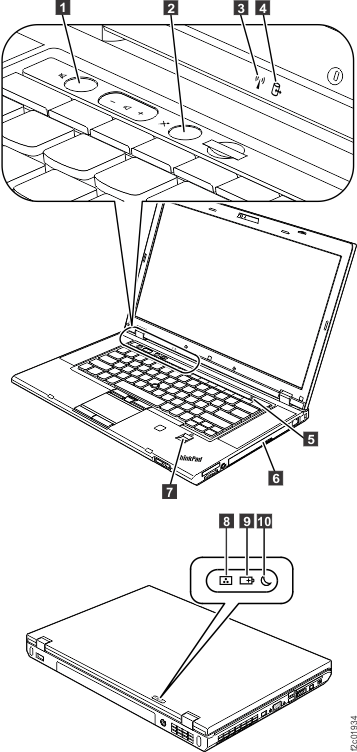
 Speaker mute
 Microphone mute
 Wireless LAN, WAN or Bluetooth status
 Device access
 Power on
 Serial Ultrabay Enhanced device status
 Fingerprint reader status
 Color sensor status
 Battery status
 Sleep status