Routing and connecting the Rack-2 PCIe and PCN cables to Rack-1
Procedure
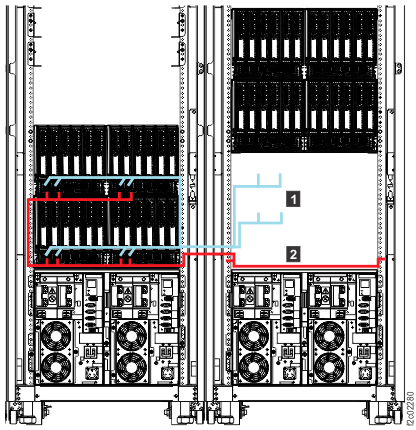
Note: The following figure shows an overview of the Rack-2 to Rack-1 routing of the PCIe
1 and PCN 2 cables. Models 985 and 85E are
shown, routing for other models is similar.
Do not route or connect the cables until directed in later steps.
At the rear of Rack-2, uncoil the PCIe and PCN cables that are coiled behind the I/O
enclosures.
At the rear of Rack-2, route the PCIe and PCN cables to Rack-1 through the lower access hole at
the side of the rack.
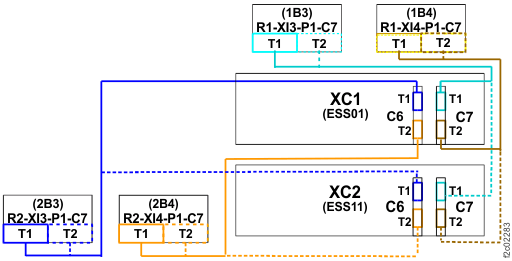
At the rear of Rack-1, route and connect the PCIe cables to the proper CEC enclosure
connectors. Use the location code label on each cable to determine the correct connector.
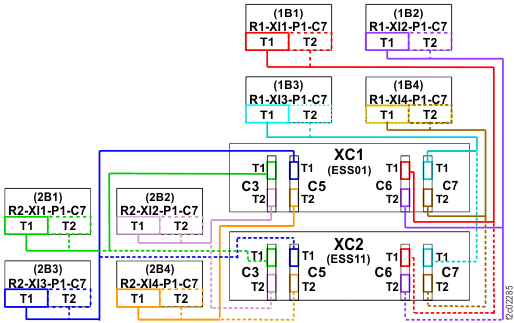
CEC enclosure locations to connect Rack-2 to model 984:
XC1-P1-C6-T1 (upper CEC)
XC1-P1-C6-T2 (upper CEC)
XC2-P1-C6-T1 (lower CEC)
XC2-P1-C6-T2 (lower CEC)
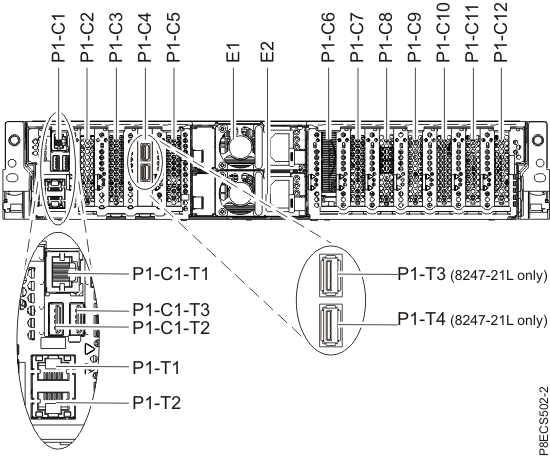
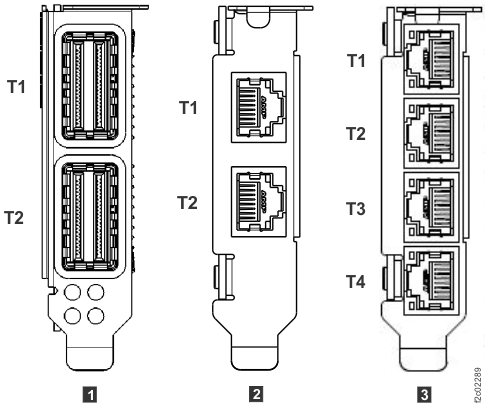
Note: For further information on model 984 CEC enclosure locations and PCIe cabling, refer
to Figure 3, Figure 4, and Figure 5, at the end of this section.
CEC enclosure locations to connect Rack-2 to model 985 or 986:
XC1-P1-C3-T1 (upper CEC)
XC1-P1-C3-T2 (upper CEC)
XC1-P1-C5-T1 (upper CEC)
XC1-P1-C5-T2 (upper CEC)
XC2-P1-C3-T1 (lower CEC)
XC2-P1-C3-T2 (lower CEC)
XC2-P1-C5-T1 (lower CEC)
XC2-P1-C5-T2 (lower CEC)
Note: For further information on model 985 or 986 CEC enclosure locations and PCIe
cabling, refer to Figure 7, Figure 8, and Figure 9, at the end of this section.
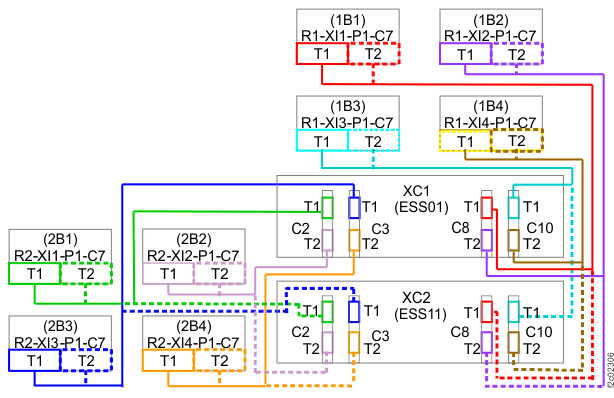
CEC enclosure locations to connect model Rack-2 to model 988:
XC1-P1-C2-T1 (upper CEC)
XC1-P1-C2-T2 (upper CEC)
XC1-P1-C3-T1 (upper CEC)
XC1-P1-C3-T2 (upper CEC)
XC2-P1-C2-T1 (lower CEC)
XC2-P1-C2-T2 (lower CEC)
XC2-P1-C3-T1 (lower CEC)
XC2-P1-C3-T2 (lower CEC)
Note: For further information on model 988 CEC enclosure locations and PCIe cabling, refer to Figure 8, Figure 11, and Figure 12 at the end of this
section.
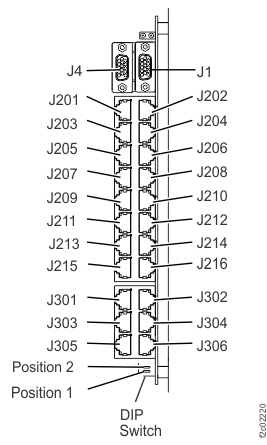
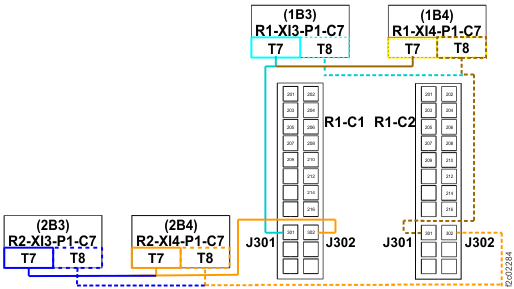
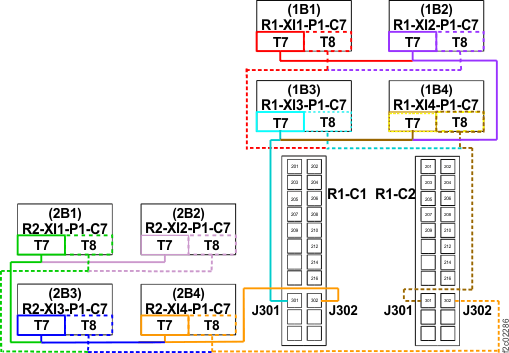
At the rear of Rack-1, route and connect the PCN cables to the proper RPC connectors. Use the
location code label on each cable to determine the correct connector. One cable goes to R1-C1-J302
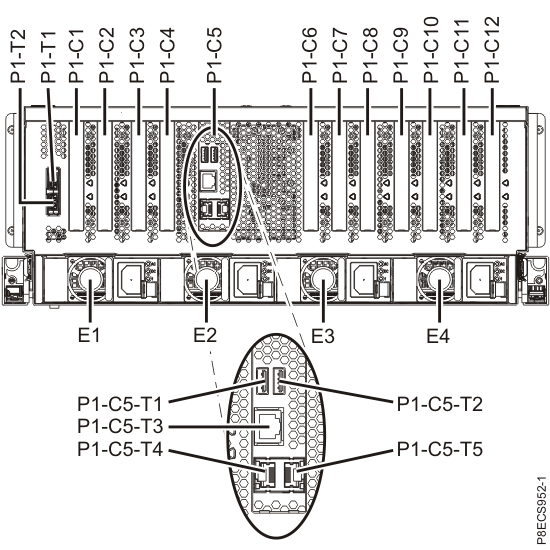
(left RPC, facing rear), the other goes to R1-C2-J302 (right RPC, facing rear). See Figure 2.
Note: For further information on PCN cabling refer to Figure 6 (model 984) or Figure 10 (models 985, 986, 988), at the end
of this section.
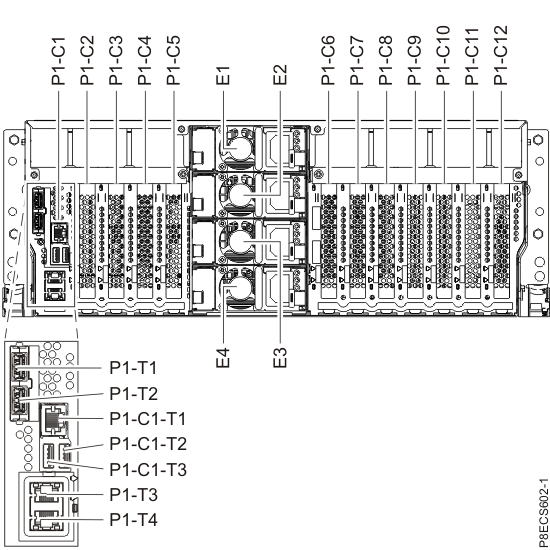
Figure 2. Location codes for the RPC card (Model 98x)
Use cable ties to secure the cables to the cable brackets in both racks.