Exchange the UEPO switch and cable assembly
Before you begin
 Use approved ESD procedures to prevent damage.
Attention:
- This procedure is not a stand-alone procedure. Customer disruption and damage to the hardware might occur when microcode and power boundaries are not in the proper conditions for this service action.
- If a serviceable event FRU repair directed you to this procedure, the microcode and power boundaries are already set.
- If a serviceable event FRU repair did not direct you to this procedure, see MAP1230 Replace a FRU without using a serviceable event.
Notes:
- All the cables and FRUs to be removed must be uniquely identified so they can be reinstalled correctly.
- If an installed earthquake resistance kit prevents you from accessing this FRU, refer to MAP1600.
Remove the UEPO switch and cable assembly
About this task
The UEPO switch and cable assembly is:
- The red UEPO switch is at the front of the rack above the Battery service module (BSM) sets.
- The UEPO cable is permanently attached to the rear of the UEPO switch.
- The UEPO switch and cable are two separate circuits. The switch is a double pole - single throw switch. There is one set of contacts and dedicated wires for each DC-UPS UPS.
- The DC-UPS sends a low voltage DC signal to the UEPO switch. That signal must be returned to the DC-UPS DSU to allow it to power on. If the UEPO signal loop is open (UEPO switch tripped or a cable problem), the DC-UPS DSU will not power on at all. All LEDs will be off.
- Each rack has its own UEPO switch.
Procedure
- Open the left rear cover. Remove the two screws
 that secure the right rear cover (trained
service personnel access area only).
that secure the right rear cover (trained
service personnel access area only).
Open the right rear cover. (Figure 1)Note: The screws must be reinstalled when the cover is closed to prevent customer access.Figure 1. Removing retaining screws on right rear machine cover 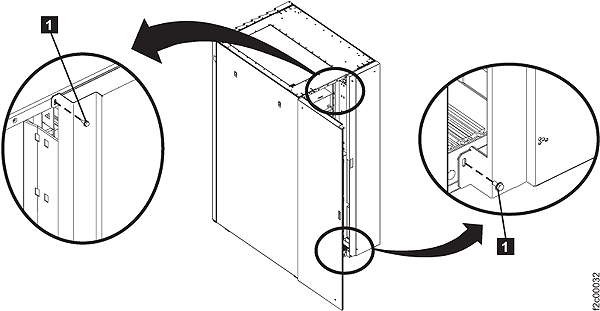
-
Unfasten and then
rotate all six power distribution units (PDUs) away from the rear of the rack.
Figure 2. Power distribution units in normal position (rack rear view) 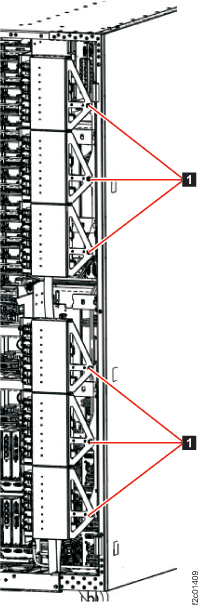
- Use two PDU service tools to hold the PDUs in the open
position. (Figure 3 and Figure 4).
- The PDU service brackets are stored in the Rack-1 front upper left documents enclosure.
- The upper three PDUs swing out as a group because they
are held together by a removable PDU alignment bracket.
The lower three PDUs are similar. - The PDU service tool should be installed on the middle PDU of each group of three.
-
The PDU service tool bottom tab
 is inserted between the upper
and lower PDUs.
is inserted between the upper
and lower PDUs.
-
The PDU service tool fingers and
 straddle the PDU support
bracket.
straddle the PDU support
bracket.
- Figure 4 shows the tool properly installed. The tool is delicate, do not put unnecessary force on the PDU group.
Figure 3. PDU service tool 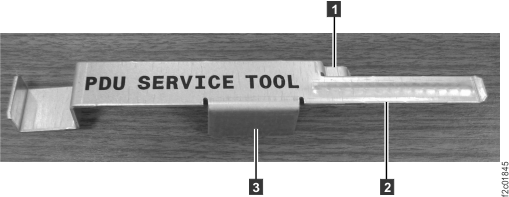
Figure 4. PDU service tool installed 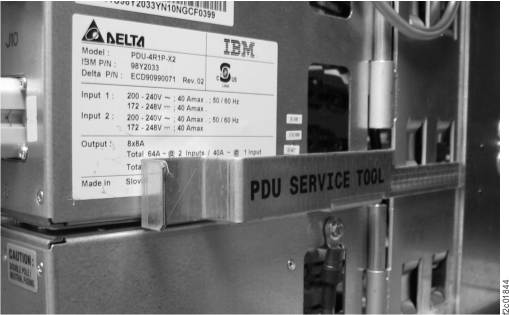
-
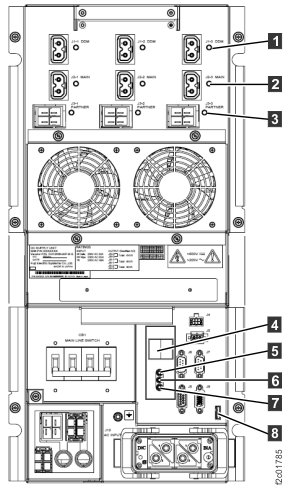
At the rear of the rack, set the CB1 MAIN LINE SWITCH (Figure 5) to Off (down) for the upper and lower DC-UPS DSUs.
Figure 5. Location codes for the DC-UPS (Models 961, 96E) (rear) 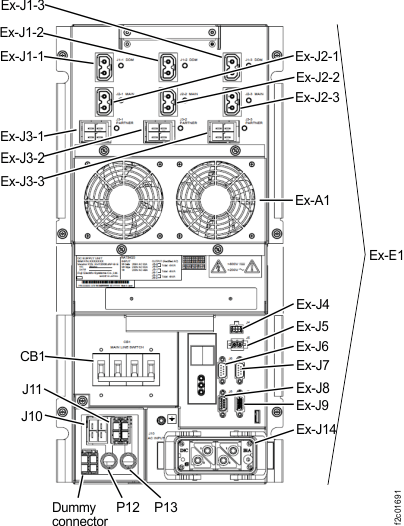
-
At the front of the rack remove the UEPO switch and cable assembly. See Figure 6.
- Remove the four screws securing the UEPO switch.
- Remove the cable retention hardware as needed and then remove the UEPO switch and cable assembly from the rack.
Figure 6. UEPO switch 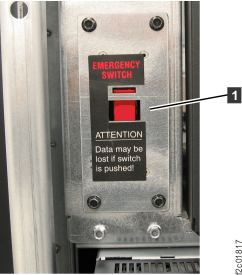
Install the UEPO switch and cable assembly
Procedure
-
Do both the upper and lower DC-UPS
DSUs have the LOCAL AC LED
 (Figure 7) indicators lit?
- Yes, continue at the next step.
- No, ensure the cable is properly connected to the DC-UPS DSU. Ensure the UEPO switch is in the normal position. If needed, use an ohm meter to check for less than one ohm resistance between the UEPO cable pins when disconnected from the Ex-J5 connector.
Figure 7. LEDs on the DC-UPS DC Supply Unit (DSU) (Models 961, 96E, 98x, 8xE three-phase), rear of rack