Exchange the storage enclosure power supply
Before you begin
 Use approved ESD procedures to prevent damage.
Attention:
- This procedure is not a stand-alone procedure. Customer disruption and damage to the hardware might occur when microcode and power boundaries are not in the proper conditions for this service action.
- If a serviceable event FRU repair directed you to this procedure, the microcode and power boundaries are already set.
- If a serviceable event FRU repair did not direct you to this procedure, see MAP1230 Replace a FRU without using a serviceable event.
Notes:
- All the cables and FRUs to be removed must be uniquely identified so they can be reinstalled correctly.
- If an installed earthquake resistance kit prevents you from accessing this FRU, refer to MAP1600.
Remove the storage enclosure supply
Before you begin
Attention: Power supplies are hot-pluggable FRUs. Ensure that you only remove one power
supply at a time.
Procedure
-
At the rear of the rack, observe the partner power supply, which is not being replaced, in this
storage enclosure. See Figure 1. The input power
good LED
 on the partner
power supply must be lit before you go to the next step. This ensures that the storage enclosure
remains powered while the failing power supply is removed. If the power good LED is not lit, DO NOT
CONTINUE. Instead, contact your next level of support.
on the partner
power supply must be lit before you go to the next step. This ensures that the storage enclosure
remains powered while the failing power supply is removed. If the power good LED is not lit, DO NOT
CONTINUE. Instead, contact your next level of support.
- DC input good
 DC output good
 Identify/attention
 Not used
Figure 1. Storage enclosure power supply LEDs 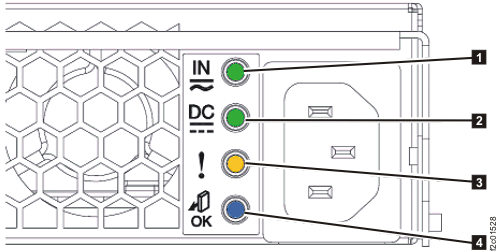
-
Observe the storage enclosure power supply that is being replaced.
- The input power LED
and the output power LED
remain lit even though the HMC screen indicates that the FRU was powered off. This is normal.
- The power LEDs are off after the input power cord is disconnected in the next step.
- The input power LED
-
If microbays are located
behind the affected storage enclosure, move one or both microbays to the service position as needed
to allow access to the storage enclosure.
Note: Do not disconnect any microbay cables.
-
Press the release tabs toward the center of the microbay. See Figure 2.
- Slide the microbay back to the service position. See Figure 2.
Figure 2. Microbays C1 (left, in operating position) and C2 (right, in service position) 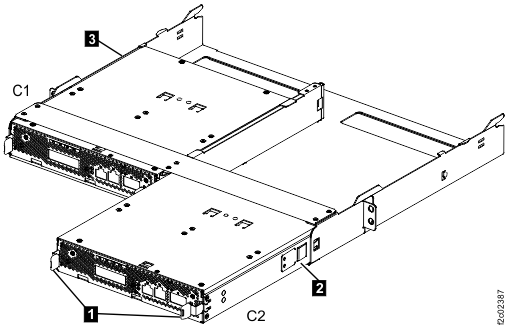
-
Press the release tabs
-
At the power supply being replaced, release the power input cable from the retention bracket
and disconnect it. See Figure 3.
Note: After the power input cable is disconnected, storage enclosure fans in the other power supply shift from low to high speed.
Figure 3. Rear view of the power supply 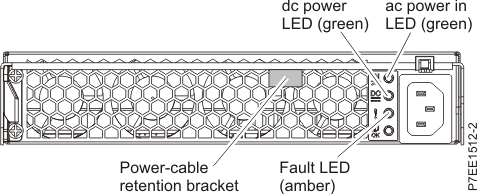
-
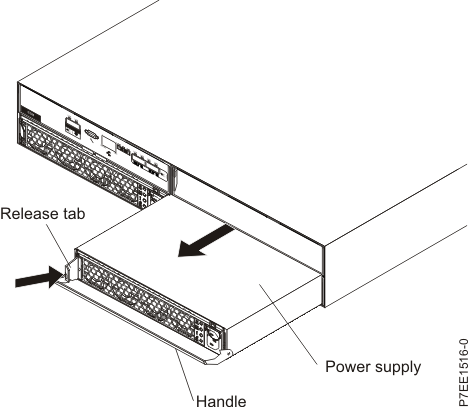
Push the orange release tab to the right, and pull the power supply latch handle out and down.
See Figure 4.
Figure 4. Removing the power supply