Cabling and connecting the management console to the customer network
Before you begin
HMC network settingsin the Configuring the customer network settings topic.
Attention: Do
not connect the Ethernet cable until you have entered the network settings that are provided by the
customer.
Procedure
-
Have you already set the customer Ethernet connection settings?
- No, skip this step. Go to the next step.
- Yes, do the following to route and connect the customer Ethernet cable to the management console (or to both management consoles, as required).
-
Route the Ethernet cable 2 through the tailgate, up or down the
right side of the rack to the rear eth2 connector. Use the supplied hook-and-loop fasteners to
secure the cable. Refer to Figure 1.
Figure 1. Routing customer host, customer network, and power cables, top or bottom Note: Figure shows top or bottom exit routing of host cables 1 , network cables 2 , and power cables 3 .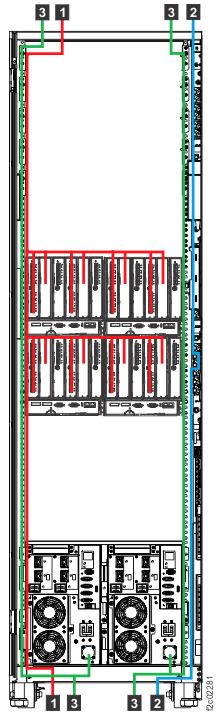
-
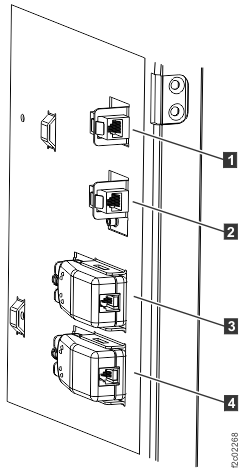
Connect the cable to the customer Ethernet port (eth2) connector, which is at the rear right
side of the rack. The upper connector 1 is for MC 1. The lower
connector 2 is for MC 2.
See Figure 2.Note: If the customer requests the Media Access Control (MAC) address of the HMC port they connect to, refer to MAP6010 Displaying the HMC MAC address for the customer connection.
Figure 2. Model 98x management console customer modem (where applicable) and Ethernet connectors, rear of rack