MAP3080 Invalid loop configuration detected by Fibre Channel device adapter
The Fibre Channel device adapter has detected an invalid loop configuration.
MAP3080 Section-1 FCIC isolation procedure
Procedure
-
Display and repair any serviceable events related to loop failures. Verify that the FCIC loop
cables are plugged correctly. See Figure 1 and Figure 2.
If no problems are found, return to the repair or storage enclosure installation action that sent you here and replace the Fibre Channel device adapter card.
Figure 1. Model 941/94E storage enclosure locations 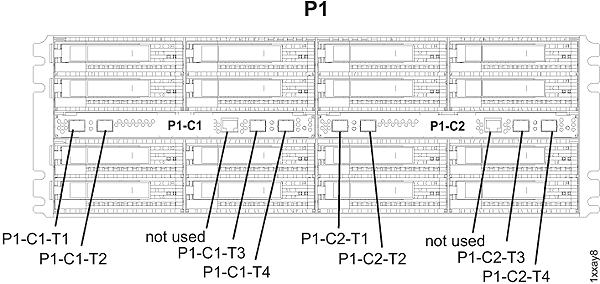
Figure 2. Model 951/95E, 961/96E, and 981/98x storage enclosure locations 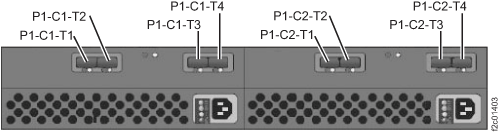
MAP3080 Section-2 Device adapter isolation procedure
Procedure
-
Two or more FC-AL cables are reported as cross-connected at the device adapter card that is
listed in the FRU list. At the device adapter card that is listed in the FRU list, observe the FC-AL
cable labels. See Figure 3, Figure 4, or Figure 5.
Note: If the FRU list contains FC-AL cables, they are listed for informational purposes only. Any cables that are listed should be in pairs. If an odd number of cables is listed, look for an FC-AL cable that is not connected to the DA card and is hanging free. In all cases, continue with this procedure as if the cables were not listed.
Are the cables cross-connected?
- Yes, go to step 2 for device adapter repair.
- Yes, go to step 3 for storage enclosure installation.
- No, stop and contact your next level of support. This might be a false error.
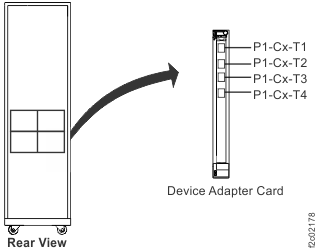
Figure 3. Model 941/94E, location codes for the device adapter card 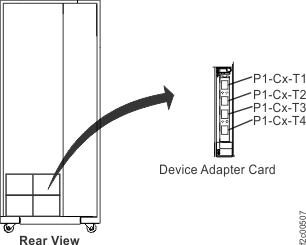
Figure 4. Model 951/95E, 961/96E location codes for the device adapter card 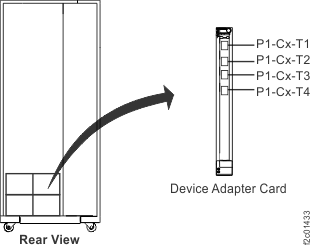
Figure 5. Models 98x, location codes for the device adapter card