MAP3260 SRC BE34009B FCAL cable check detected cross connected cables at an FCIC card
Use this MAP to determine whether or not a cable is correctly connected.
About this task
MAP3260 Section-1
Procedure
- The FCAL cables listed in the FRU list are reported as
incorrectly connected at the FCIC card end in a storage enclosure.
The FRU list displays the location code for each end of the cable in the format:
- Device adapter card connector: U1400.rBn.sssssss-P1-Cx-Ty
- FCIC card connector: U2nnn.D01.sssssss-P1-C2-Tx (model 941/94E)
- FCIC card connector: U2nnn.D02.sssssss-P1-C2-Tx (model 951/95E/961/96E/98x)
Figure 1. Storage enclosure locations (model 941/94E) 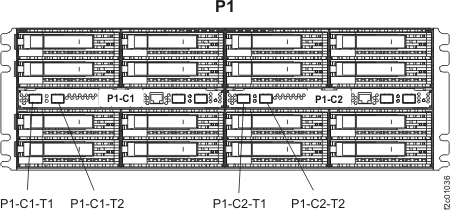
Figure 2. Storage enclosure locations rear (model 951/95E/961/96E/98X) 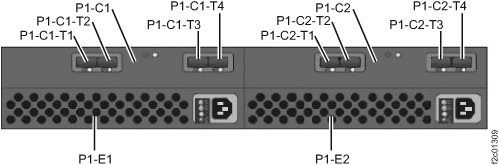
Find the FCIC card end of each FCAL cable listed in the FRU list.
Are the cables correctly connected?- Yes, stop and contact your next level of support. This may be a false error.
- No, go to the next step.