MAP4820 Performing a slow boot of a CEC enclosure
This procedure provides guidance on how to perform a slow boot of a CEC enclosure.
Before you begin
Note: This procedure must only be used if you were sent here
from elsewhere in maintenance package.
MAP4820 Section-1
Procedure
-
Verify that the CEC enclosure is already powered
off. At the rear of the CEC enclosure, observe the power supplies. See Figure 1.
Are the DC GOOD (output) LEDs
 lit continuously?
- Yes, do not continue with the next step. Return to the procedure that sent you here.
- No, continue with the next step.
For Figure 1: is the LED for AC
GOOD
is the LED for AC
GOOD- is the LED for DC
GOOD
 is the LED for
IDENT
is the LED for
IDENT
Figure 1. CEC Enclosure Power Supply LEDs (Model 951 shown, LEDs similar for other models) 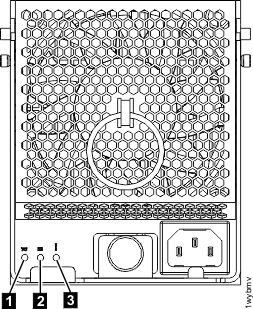
-
Use the CEC enclosure control panel to set the CEC enclosure to perform a slow boot on the next power
on.
See Figure 2.
- On the CEC enclosure control panel, use the increment or decrement button to scroll to function 02.
- Press Enter (the middle button) to start function 02. The current IPL type (with pointer) and speed is displayed.
- Use the increment or decrement button to scroll through the IPL types and speeds.
- When manual is shown, press Enter (the middle button) to select the IPL type of manual. The current IPL type and speed (with pointer) is displayed.
- Use the increment or decrement button to scroll through the IPL speeds.
- When S is shown, press Enter (the middle button) to select the IPL speed of slow.
- To exit function 02, press Enter (the middle button) multiple times until just 02 is displayed.
Figure 2. CEC enclosure control panel (Models 921, 922, 932, 932, 9A2, 9B2, 941, 951) 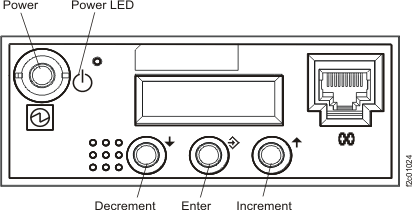
Figure 3. CEC enclosure control panel assembly (Model 961) 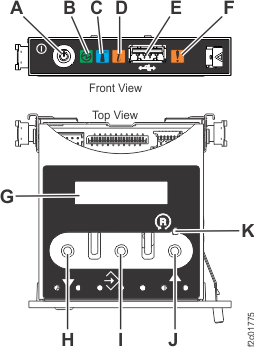
- H: Decrement button
- I: Enter button
- J: Increment button
Figure 4. CEC enclosure control panel assembly (Models 98x) 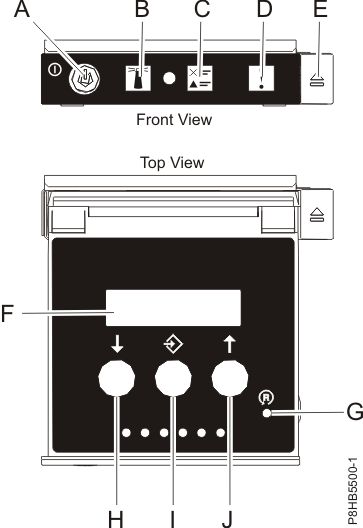
- H: Decrement button
- I: Enter button
- J: Increment button
-
On the CEC enclosure control panel, press the Power push-button to power on the CEC enclosure. See Figure 2, Figure 3
 , or Figure 4
.
, or Figure 4
.