MAP4840 CEC enclosure fails to power off during CEC enclosure parts exchange
You were sent to this procedure during the replacement of a CEC enclosure FRU.
Before you begin
Warning: This procedure must be used only when you are sent
here from elsewhere in maintenance package.
About this task
MAP4840 Section-1
Procedure
-
Verify that the managed system is powered off. At the rear of the storage facility, view the CEC enclosure power supplies. See Figure 1.
Are the DC GOOD (output) LEDs
 lit solid?
- No, the CEC enclosure is already powered off. Return to the on-screen panel that sent you here and continue with the replacement process.
- Yes, continue with the next step.
Figure 1. CEC enclosure power supply LEDs (Model 951 shown, LEDs similar for Model 961) 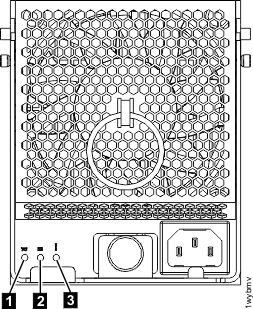
-
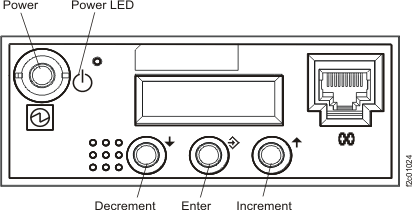
Attempt to power off the SF-managed system (CEC enclosure) by using the CEC enclosure control panel. Perform the following steps.
Refer to Figure 2.
Note: If the CEC enclosure control panel is inoperative, contact your next level of support.
- Press the Increment button until 02 is displayed.
-
Press Enter. Display shows:

-
Press Enter. Display shows:

-
Press the Increment button. Display shows:

-
Press Enter. Display shows:

-
Press Enter. Display shows:

- Press Enter. Display shows 02 only.
- Press the Power push-button and hold it until you see the power down sequence start.
- Wait until the CEC enclosure is powered down (Power On light is flashing).
-
Reset the SF-managed system (CEC enclosure) to Normal mode. Repeat steps a through d. The display now shows:
- Press Enter three times. Display now shows 02 only.
- Continue with step 3.
Figure 2. CEC enclosure control panel (Models 921, 922, 932, 932, 9A2, 9B2, 941, 951)