MAP4980 Encryption and key management server SRCs and repairs
The encryption key management server works with IBM encryption-enabled storage components (drives, device adapter, and functional code) in generating, protecting, storing, and maintaining encryption keys that are used to encrypt information that is written to and decrypt information that is read from storage media. Encryption gives the customer an added layer of protection for their data. The combination of data encryption on the DS8000® and the customer data encryption key stored on the customer's encryption key management server external to the DS8000 ensures that if the DS8000 or any drives with encrypted data are stolen, data cannot be accessed. With TCT encryption, the data is protected while in transit from the DS8000 to the cloud server and while it is stored on the cloud server.
About this task
To enable data-at-rest encryption, you must have encryption-capable drives along with supporting encryption software stack that is installed on the DS8000. The customer must configure at least two encryption key management servers.
To enable TCT encryption, you must configure a cloud server with appropriate network connection along with supporting encryption software that is installed on the DS8000. The customer must configure at least two encryption key management servers.
- Encryption key server
- Key server
- IBM Security Key Lifecycle Manager
- IBM Tivoli Key Lifecycle Manager key server
- Gemalto Safenet Key Secure server
MAP4980-Section 1
About this task
| SRC | SRC Description | Service action/machine state when serviceable event is generated | Action |
|---|---|---|---|
| BE14CFE0 | The DS8000 could not retrieve keys from any of the configured encryption key management server(s). | Dual cluster IML |
If the problem persists, contact your next level of support. |
| BE14CFE1 | The DS8000 regained access to customer encryption key management servers. An automatic dual partition (LPAR) reboot was initiated. No further action is needed. | Dual cluster IML | This is an informational serviceable event. |
| BE14CFE5 | The DS8000 detected a potential key store corruption and recovered by an automatic reboot of the partitions (LPARs). | Dual cluster IML | This is an informational serviceable event. |
| BE14CFEA | The DS8000 detected that periodic key retrieval failed for one or more configured encryption key management server(s). | Periodic key retrieval |
Note: This serviceable event does not indicate loss of access to data due to inability to retrieve
keys from the affected server, as long as the storage facility did not report BE14CFE0 serviceable
event. It is important to resolve this serviceable event immediately to prevent any potential loss
of access after a storage facility IPL.
If the problem persists, contact your next level of support. |
| BE14CFEB | The DS8000 detected that fewer than the minimum required number of key servers are configured for periodic key retrieval. | Periodic key retrieval |
If the problem persists, contact your next level of support. |
| BE14CFF5 | An invalid encryption-capable SFI configuration has been detected. A valid certificate is not installed on the SFI or the SFI does not have a homogeneous configuration of encryption-capable drives. | Field install when drive certify is initiated | Customer has received a DS8000 with an invalid configuration for encryption-capable SFI. Contact next level of support for problem determination and resolution. |
| BE14E004 | The DS8000 cannot retrieve encryption keys from the customer's encryption key management server because the DS8000 could not detect any active encryption key management server paths. Suspected configuration error. | Dual cluster IML; Periodic key retrieval |
|
| BE14E008 | The DS8000 cannot retrieve encryption keys from the customer's encryption key management server(s) because of communication errors between the DS8000 management console (HMC) and encryption key management servers. A suspected network error. | Dual cluster IML; Periodic key retrieval – ESSNI is running on the HMC but is encountering a socket open error with the encryption key management servers. |
|
| BE14E009 | The DS8000 cannot retrieve encryption keys from the configured encryption key management server because of communication errors between the DS8000 partitions (LPARs) and the management console (HMC). | Dual cluster IML; Periodic key retrieval |
|
| BE14E00B | The DS8000 cannot retrieve encryption keys from the configured encryption key management server. A command timeout occurred between DS8000 partitions (LPARs) and the management console (HMC). | Dual cluster IML; Periodic key retrieval | Contact your next level of support for resolution. |
| BE14E011 | All configured encryption key management servers cannot provide one or more keys requested by the DS8000. | Dual cluster IML; Periodic key retrieval | Contact your next level of support for resolution. |
| BE14E012 | The DS8000 cannot unwrap the group key by using a data key that is received from any configured encryption key management servers. | Dual cluster IML; Periodic key retrieval |
|
| BE14E013 | The DS8000 detected that the data key signature calculated does not match the expected value. | Dual cluster IML; periodic key retrieval. | Contact your next level of support for resolution. |
| BE14E0F1 | The DS8000 cannot access the customer's encryption key management server. | Dual cluster IML |
|
| BE14E1F6 | The DS8000 partitions (LPARs) were activated without access to the customer’s encryption key management servers. Encryption key management key servers are now available and the DS8000 partitions (LPARs) must be re-cycled to allow data access. | DS8000 partitions regained access to encryption key management servers. However, a dual cluster reboot and IML was not attempted because of a service action in progress. | Dual cluster IML could not be attempted on the DS8000 partitions because of the service action in
progress. The DS8000 partitions must be
re-IMLed (shutdown and rebooted) by using the following steps:
Valid state should be "quiesce." Click Quiesce SFI, then monitor by refreshing the panel. When valid state is "shutdown," click Shutdown SFI, then monitor by refreshing the panel. When valid state is "resume," click Resume SFI, then monitor by refreshing the panel. |
| BE14E3F7 | DS8000 data encryption key repository reported a permanent error. Failure to read record or certificate. | Contact your next level of support for resolution. | |
| BE14EA0B | The DS8000 cannot retrieve encryption keys from some of the configured encryption key management servers. A command timeout has occurred between DS8000 partitions (LPARs) and the management console (HMC). | Periodic key retrieval | Contact your next level of support for resolution. |
| BE14EA11 | One or more configured encryption key management servers are unable to provide the key(s) requested by the DS8000. | Periodic key retrieval |
If the problem persists, contact your next level of support. |
| BE14EA12 | The DS8000 cannot unwrap the group key by using a data key received from one or more configured encryption key management servers. | Periodic key retrieval |
If the problem persists, contact your next level of support. |
| BE14EA13 | The DS8000 detected that the calculated data key signature does not match the expected value. | Periodic key retrieval | Contact your next level of support for resolution. |
| BE14EAF1 | The DS8000 failed to communicate with the encryption key management server. If the communication continues to fail after four hours, a request for service will occur. |
|
|
| BE14EAF2 | The DS8000 has failed to communicate with the encryption key management server for four hours. | Refer to actions for BE14EAF1. | |
| BE14EAF3 | The DS8000 failed to communicate with the encryption key management server by using an SSL link. If the communication continues to fail after four hours, a request for service will occur. | Refer to actions for BE14EAF1. If connectivity works with an unencrypted link but fails when using an SSL link, a likely cause is an untrusted certificate. Contact your next level of support. |
|
| BE14EAF4 | The DS8000 has failed to communicate with the encryption key management server for four hours, by using an SSL link. | Refer to actions for BE14EAF1. If connectivity works with an unencrypted link but fails when using an SSL link, a likely cause is an untrusted certificate. Contact your next level of support. |
|
| BE316023 | A severe software error has been discovered. | Contact your next level of support for resolution. | |
| BE31CFE8 | A severe software error has been discovered. | Contact your next level of support for resolution. | |
| BE31F004 | Failed to initialize the replacement encryption-capable drive to the existing configured encryption group during its repair. The likely cause is a drive hardware problem. | Access credential migration failed after drive repair during the drive resume operation. Access credential migration was initiated
because of one of the following conditions:
|
Use this procedure to do software checks before replacing the drive:
|
| BE34009E | An encryption-capable drive was not cryptographically erased during a drive repair, drive install, rank removal, or recovery after a failed rank creation. | A drive repair; storage enclosure/drive Install MES operation; rank removal appeared successful to the customer. Recovery after a failed rank creation. |
|
| BE34009F | One or more encryption-capable drives were not automatically cryptographically erased after the customer removed one or more ranks. | This serviceable event is generated when a SF Discontinue utility queries the cryptographically erase status of all FDE drives and detects that one ore more drives are security degraded. | This condition is only detected during a check for a storage facility removal process. If the customer removed all their data and logical configuration including ranks, the encrypted drives should have been automatically cryptographically erased. Contact your next level of support for resolution. |
| BE3400A2 | Failed to initialize the replacement encryption-capable drive to the existing configured encryption group during its repair. The existing encryption group is inaccessible. | RAS initiated an issraid exchange Smart rebuild. | Perform the following software checks before replacing the drive:
|
| BE3400A3 | Adding or replacing an encryption-capable drive and the drive FRU is already in a configured state. A cryptographic erase could not be initiated. | This should not occur during any RAS-initiated service action. A probable cause for this serviceable event is a cryptographic erase that was attempted on a drive that stores customer data during manual recovery. | Contact your next level of support for resolution. |
| BE3400B3 | Hourly health checks on the partitions detected one or more encryption-capable drives inaccessible (security degraded). | This serviceable event is generated during a RAS hourly health check running on the partitions. | Perform the following software checks:
|
| Other SRCs | Contact your next level of support for resolution. |
- A drive pseudo repair means performing a drive repair by using the Exchange FRU option and continuing through the repair without unseating and reseating the drive.
- The customer can use either the DS CLI or DS Storage
Manager to query the list of configured encryption key management
servers and the path status of each configured encryption key management
server:
- DS CLI: The customer can enter the lskeymgr command to obtain the list
of configured encryption key management servers and the path status of each configured encryption
key management server. Sample lskeymgr output:
dscli> lskeymgr Date/Time: July 31, 2018 4:14:13 PM PDT IBM DSCLI Version: 7.8.50.417 DS: - ID state status keyprotocol addr port type keygrp ============================================================================ 1 active normal KMIP vinz.tuc.stglabs.ibm.com 5696 TCT 2 2 active normal KMIP zuul.tuc.stglabs.ibm.com 5696 TCT 2 3 active normal KMIP keyhler.tuc.stglabs.ibm.com 5696 DAR 1 4 active normal KMIP keyppard.tuc.stglabs.ibm.com 5696 DAR 1 dscli> - DS Storage Manager : The customer can use the key manager option to obtain the list of
configured encryption key management servers and the path status of each configured encryption key
manager server. Figure 1 shows an example of a key manager window.
Figure 1. Window: Key Managers 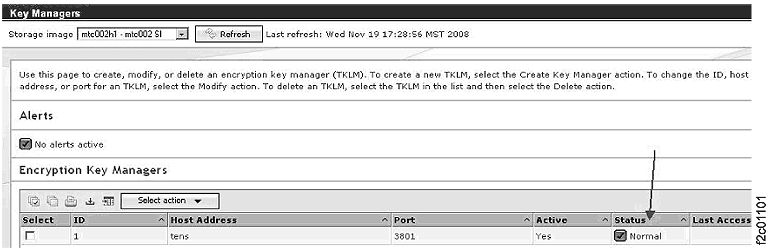
- DS CLI: The customer can enter the lskeymgr command to obtain the list
of configured encryption key management servers and the path status of each configured encryption
key management server.
- IBM support or service representative can use the
Manage Storage Facility Image (SFI) Resources utility to determine
the state of the configured encryption group. Figure 2 shows the encryptionGroupsStates
value {3,0} indicating that the customer configured encryption group
is accessible. To display the Manage SFI Resources utility:
- From the navigation area, click
- From the Task area, select
Figure 2. Window: Manage SFI Resources 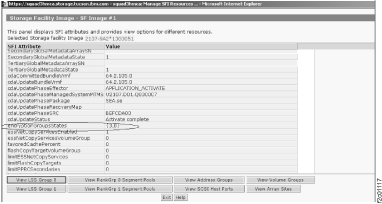
-
Figure 3 shows an example of a serviceable event text with
encryption key management server error code detected by the DS8000. Figure 4 is a continuation of Figure 3 that
shows additional serviceable event text.
Figure 3. Window: Manage Serviceable Events 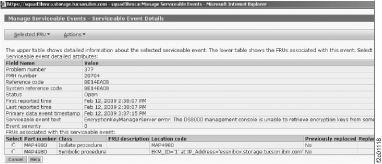
Figure 4. Window: Manage Serviceable Events (continued) 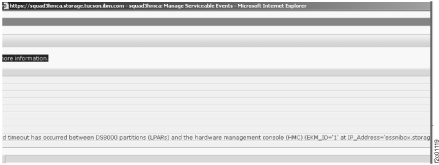
- The DS8000 partitions that
reported BE14E004, BE14E008, or BE14E009 will query for encryption key management servers
connectivity every 12 minutes. When connectivity is regained, a dual cluster IML (that is, a
shutdown; reboot; IML) will be attempted if, and only if, both of the following are true:
- There is no service action in progress
- There is no access to customer data; that is, IML is "complete" but global data is inaccessible due to lack of encryption key management server access
Note: The BE14CFE1 serviceable event is auto-closed along with any other BE14E0xx serviceable events that are reported against the same partitions. - Figure 5 shows a sample serviceable
event with an encryption key management server ID and IP address in the location code field of the
serviceable event.
Figure 5. Window: Serviceable Event with an ID and an IP address in the location code field 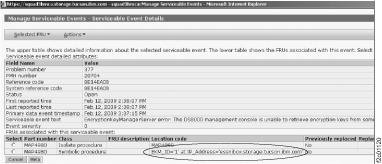
- Example of the key server utilities
and retrieval status.
Figure 6. Window: Key Server Utilities Test Key Retrieval panel 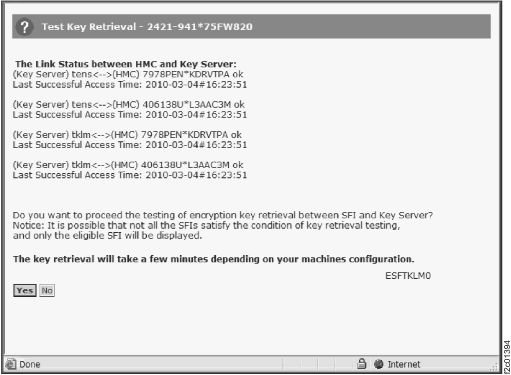
Figure 7. Window: Test Key Retrieval status 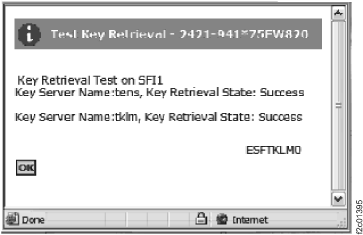
- Upon successful resolution of the BE14xxxx serviceable event, the serviceable event has to be closed manually.
- The customer can use either the DS CLI or the DS Storage Manager to
query DS8000 data encryption certificate expiration status.
- DS CLI:
-
The customer can enter the showkeygrp command to determine whether a customer-generated certificate is installed on the DS8000 storage facility and its expiration status is stored in certificateexpiry field.
Sample showkeygrp output:dscli> showkeygrp 1 Date/Time: February 18, 2016 5:07:08 PM EST IBM DSCLI Version: 0.0.0.0 DS: IBM.2107-75NR641 ID 1 numranks 0 numpools 0 state accessible reckeystate disabled reckeydate - datakeydate 02/18/2016 17:06:39 EST grpstatus normal mgrstatus normal label - label2 - certificate CUSTOMER certificateexpiry 02/19/2016 00:19:25 EST uuid 548229806B8C57ACC41732383052286EBC9670006C45911641A3C062C8FFC2FA keyprotocol KMIP dscli> - DS Storage Manager:
- The customer can use the Setting->Security->Encryption window to determine whether a
customer-defined certificate is installed on the DS8000 storage facility and its expiration status.
Figure 8 shows an example of the DS
Storage Manager Encryption page with a customer-defined certificate expiration date.
Figure 8. Window: Setting->Security->Encryption 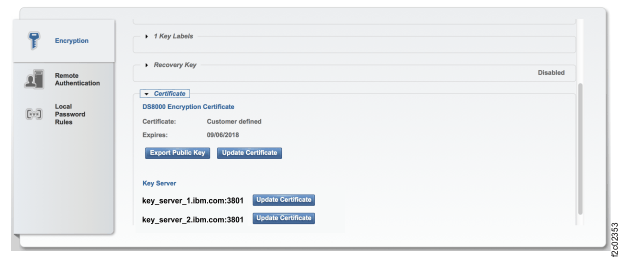
- The customer can use DSCLI to determine whether
encryption key management server protocol is TLS-enabled IPP, TLS-enabled KMIP, or another protocol.
- DSCLI:
- The customer can issue the showkeymgr command and query the
protocol, keyprotocol, and
certificate fields to determine this information. Ask the customer to refer to
the DSCLI documentation to get further information on the showkeymgr
command.Sample showkeymgr output for TLS-enabled IPP:
 dscli> showkeymgr 1
Date/Time: February 16, 2017 4:49:05 PM MST IBM DSCLI Version: 7.8.22.45 DS: -
ID 1
State active
Status normal
addr mynode.mydomain.ibm.com
port 441
protocol tls
keyprotocol IPP
certificate mycert_ssl.pem
Sample showkeymgr output for TLS-enabled KMIP:dscli> showkeymgr 1 Date/Time: February 16, 2017 5:41:15 PM EST IBM DSCLI Version: 7.8.30.20 DS: - ID 1 State active Status normal addr mynode.mydomain.ibm.com port 5696 protocol tls keyprotocol KMIP certificate mycert_kmip.pemSample showkeymgr output for non-TLS-enabled IPP:dscli> showkeymgr 1 Date/Time: February 16, 2017 5:36:18 PM EST IBM DSCLI Version: 7.8.30.20 DS: - ID 1 State active Status normal addr mynode.mydomain.ibm.com port 3801 protocol none keyprotocol IPP certificate -
- The customer can use DS CLI or the DS8000
Storage Management GUI to test access to the specified key group.
- DS CLI:
- The customer can issue the managekeygrp -action testaccess command to test access to the
specified key group. Ask the customer to refer to the DS CLI documentation to get further
information on the managekeygrp -action testaccess command.Sample output:
- Initiate
“-testaccess”
dscli> managekeygrp -action testaccess 1 Date/Time: June 20, 2018 1:23:21 PM PDT IBM DSCLI Version: 7.8.50.376 DS: IBM.2107-75DLR51 CMUC00480W managekeygrp: Are you sure that you want to initiate a key retrieval for key group 1? [y/n]: y CMUC00481I managekeygrp: The Test Access action is submitted for key server encryption group 1. dscli> - View “testaccess”
results:
dscli> showkeygrp -access 1
Date/Time: June 20, 2018 1:29:00 PM PDT IBM DSCLI Version: 7.8.50.376 DS: IBM.2107-75DLR51
ID KeyMgr lastaccess lastsuccess              lastfailure
=========================================================
1  1      success    2018-06-20T13:23:32-0700 -
1  2      success    2018-06-20T13:23:32-0700 -
1  3      -          -                        -
1  4      -          -                        -
dscli>
- Initiate
“-testaccess”
- DS8000 Storage Management GUI:
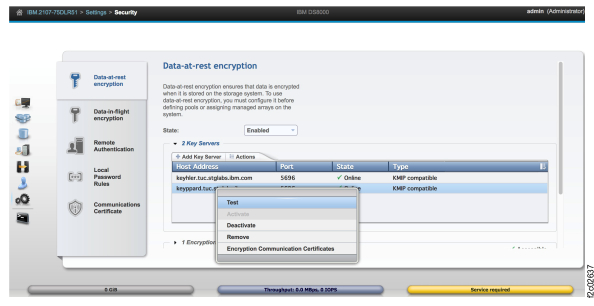
- The customer can select an encryption key management server and click to initiate key retrieval for the chosen key management server. Note: This action can be used only for data-at-rest key groups.See Figure 9 for sample output.
Figure 9. Testing access to a key group