Exchange the disk drive dummy module
Before you begin
 Use approved ESD procedures to prevent damage.
Attention:
- This procedure is not a stand-alone procedure. Customer disruption and damage to the hardware might occur when microcode and power boundaries are not in the proper conditions for this service action.
- If a serviceable event FRU repair directed you to this procedure, the microcode and power boundaries are already set.
- If a serviceable event FRU repair did not direct you to this procedure, see MAP1230 Replace a FRU without using a serviceable event.
Notes:
- All the cables and FRUs to be removed must be uniquely identified so they can be reinstalled correctly.
- If an installed earthquake resistance kit prevents you from accessing this FRU, refer to MAP1600.
Remove the disk drive dummy module
Procedure
-
Gently press the top latch
 up to release the disk drive
dummy module (DDM) handle. See Figure 1.
up to release the disk drive
dummy module (DDM) handle. See Figure 1.
-
Pull the handle
 out
and down. This action partly ejects the disk drive dummy module out of its slot. See Figure 1
out
and down. This action partly ejects the disk drive dummy module out of its slot. See Figure 1
Figure 1. Unlatching and latching the drive 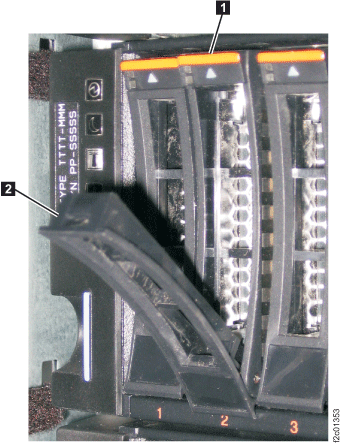
- Gently slide the disk drive dummy module straight out of
the slot. See Figure 2.
(The disk drive module is shown).
Figure 2. Sliding the drive out of and into the slot 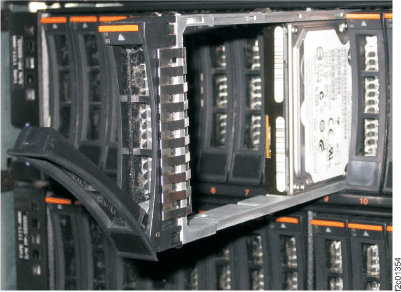
Install the disk drive dummy module
Procedure
- Before installing the disk drive dummy module, open the disk drive dummy module handle by pressing the top latch up and pulling the handle open. See Figure 1.
- Hold the disk drive dummy module upright as you place it into the slot in the storage enclosure. Gently slide the disk drive dummy module fully into the slot. The module stops before it is fully seated. See Figure 2.
- Gently push the disk drive dummy module handle up and in until it is latched closed.
- Verify that the front of the new disk drive dummy module is aligned with the other DDMs and disk drive dummy modules in the storage enclosure.
- Exit this service information center parts exchange procedure and return to the procedure that sent you here.