Powering on the expansion rack

Procedure

  1. Remove the lockout tag and/or device that was applied to each customer mainline AC voltage circuit breaker, then switch on the customer circuit breaker.
  2. Switch on both customer circuit breakers for this rack.
  3. At the rear of the expansion rack, switch both the CB1 main line switches to On (up).
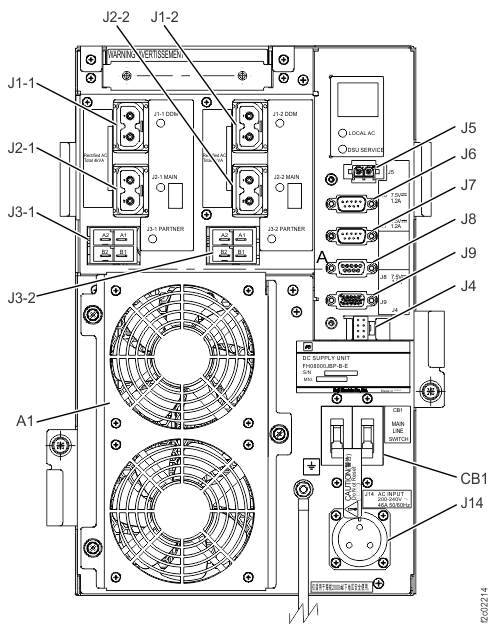
    Figure 1. Location codes for the DC-UPS (Models 98x and 8xE, single-phase power) (rear)
    Location codes for the DC-UPS (Models 98x) (rear)
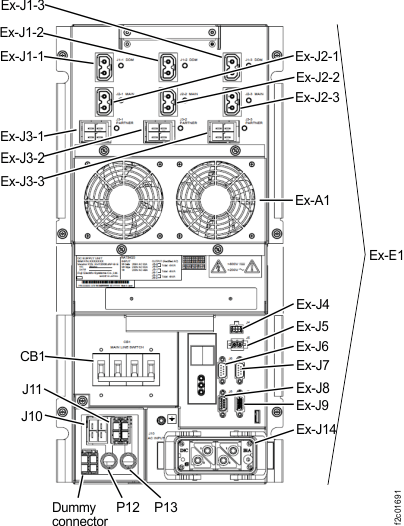
    Figure 2. Location codes for the DC-UPS (Models 98x and 8xE, three-phase power) (rear)
    Location codes for the DC-UPS (three-phase Models 98x) (rear)
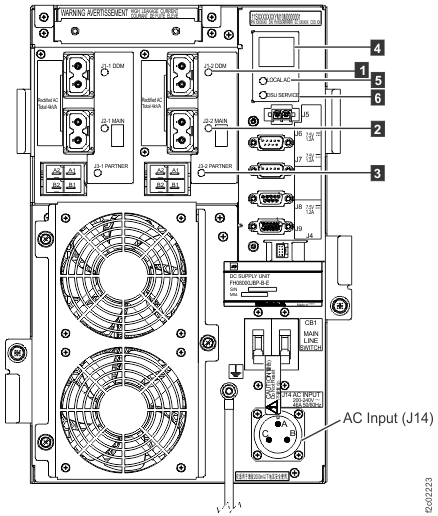
    Figure 3. LEDs on the DC-UPS DC Supply Unit (DSU) (Models 98x, 8xE single-phase), rear of rack
    LEDs on the DC-UPS DC Supply Unit (DSU) (Models 98x, 8xE), rear of rack
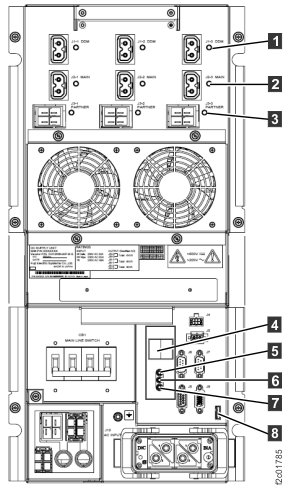
    Figure 4. LEDs on the DC-UPS DC Supply Unit (DSU) (Models 961, 96E, 98x, 8xE three-phase), rear of rack
    LEDs on the DC-UPS DC Supply Unit (DSU), rear of rack
  4. Wait 2 minutes for the DC-UPS to stabilize and then continue to the next step.
  5. Observe the LED indicators and digital status display at the upper right (single-phase) or lower right (three-phase) of both DSUs. Use Table 1 to find the condition that applies.
    Note: Other LED indicators might be on or flashing ("J1-1 DDM", for example). For this step, we are concerned only with the LOCAL AC and DSU SERVICE LEDs and the digital status display.
    Table 1. LED indicators when CB1 main line switch is on
    LOCAL AC (input)  5  Figure 3 or Figure 4 DSU Service  6  Figure 3 or Figure 4 Digital Status Display  4  Figure 3 or Figure 4 Action
    On Off Blank Normal condition, continue with the next step.
    On Off Two-character status code other than Blank. Go to MAP21A1 DC-UPS fault isolation during installation.
    Off Off
    • Blank (if both DSUs in the rack have loss of input power or both have input phase setting misplugged)
    • I1 (on affected DSU, if only one DSU in the rack has loss of input power)
    • Three-phase: Check the DC-UPS input phase selection setting on both DC-UPSs. Ensure that they are the same. If the setting does not match the customer power type, the DC-UPS will not power on and will not be damaged. Refer to Checking customer power type and DC-UPS input phase selection settings.
      Note: If the customer power type is three-phase high voltage (380 - 415 V), you must use the provided five-wire mainline power cables. If four-wire mainline power cables are used, the DC-UPS may need to be replaced.
    • Single-phase, and three-phase with correct input phase selection: Customer input power fault, see MAP2051 Loss of AC Input to a single DC-UPS DC supply unit (DSU)
      Note: If both DC-UPSs are failing, then repeat the customer voltage checks done previously.
  6. Are you installing Rack-2?