Exchange the RPC card to DC-UPS cable
Before you begin
 Use approved ESD procedures to prevent damage.
Attention:
- This procedure is not a stand-alone procedure. Customer disruption and damage to the hardware might occur when microcode and power boundaries are not in the proper conditions for this service action.
- If a serviceable event FRU repair directed you to this procedure, the microcode and power boundaries are already set.
- If a serviceable event FRU repair did not direct you to this procedure, see MAP1230 Replace a FRU without using a serviceable event.
Notes:
- All the cables and FRUs to be removed must be uniquely identified so they can be reinstalled correctly.
- If an installed earthquake resistance kit prevents you from accessing this FRU, refer to MAP1600.
Remove the RPC card to DC-UPS cable
Procedure
- Disconnect the cable at the RPC card connector. See Table 1 and Figure 1.
-
The cable is a Y-cable; it goes from an RPC card to both DC-UPS. There are two cables, one per RPC, for each
rack.
Table 1. RPC to DC-UPS cables. Note: RPC end might be labeled "Cn-Pxx". DC-UPS end may be labeled "En-Px".From RPC port RPC card (facing rear) To DC-UPS connector To DC-UPS connector DC-UPS Rack-1 C1-J201 Left R1-E1-J6 R1-E2-J6 C2-J201 Right R1-E1-J7 R1-E2-J7 DC-UPS Rack-2 C1-J203 Left R2-E1-J6 R2-E2-J6 C2-J203 Right R2-E1-J7 R2-E2-J7 DC-UPS Rack-3 C1-J205 Left R3-E1-J6 R3-E2-J6 C2-J205 Right R3-E1-J7 R3-E2-J7 DC-UPS Rack-4 C1-J207 Left R4-E1-J6 R4-E2-J6 C2-J207 Right R4-E1-J7 R4-E2-J7 DC-UPS Rack-5 C1-J209 Left R5-E1-J6 R5-E2-J6 C2-J209 Right R5-E1-J7 R5-E2-J7 Figure 1. Location codes for the RPC card (Model 98x) 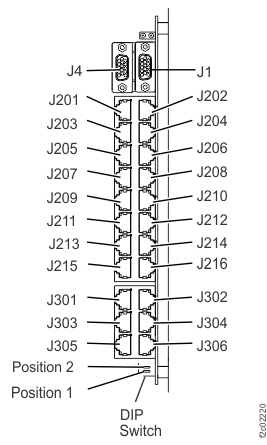
-
The cable is a Y-cable; it goes from an RPC card to both DC-UPS. There are two cables, one per RPC, for each
rack.
-
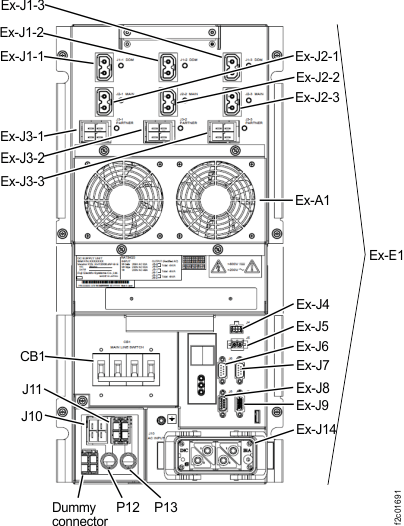
At rear of the affected rack, disconnect the cable from the J6 or J7 connector as appropriate
on both DC-UPS. For model 98x single-phase, see Figure 2 and Table 1. For model 98x three-phase,
see Figure 3 and Table 1.
Figure 2. Location codes for the DC-UPS (Model 98x, single-phase power) (rear) 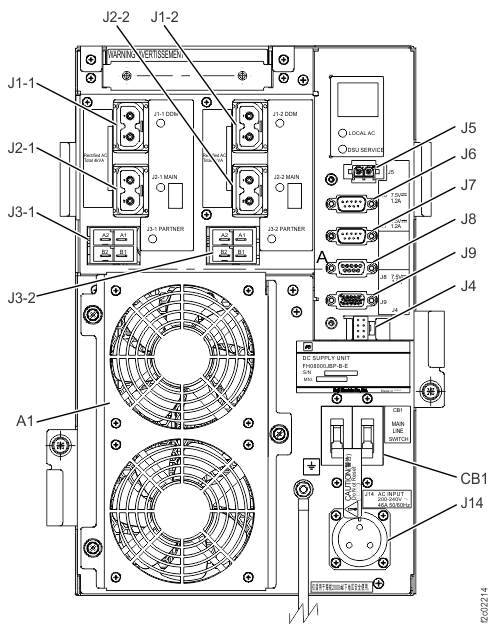
Figure 3. Location codes for the DC-UPS (Models 98x, three-phase power) (rear)