MAP2730 Visual symptoms for Ethernet switch tray (switches, fans, power junction assemblies) (Model 961)
Determine rack version
Procedure
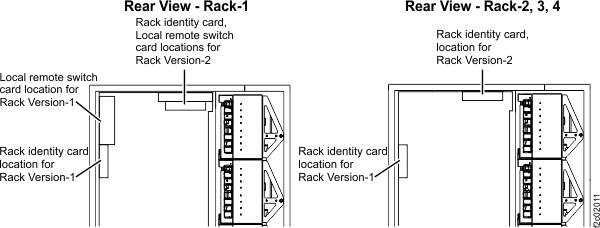
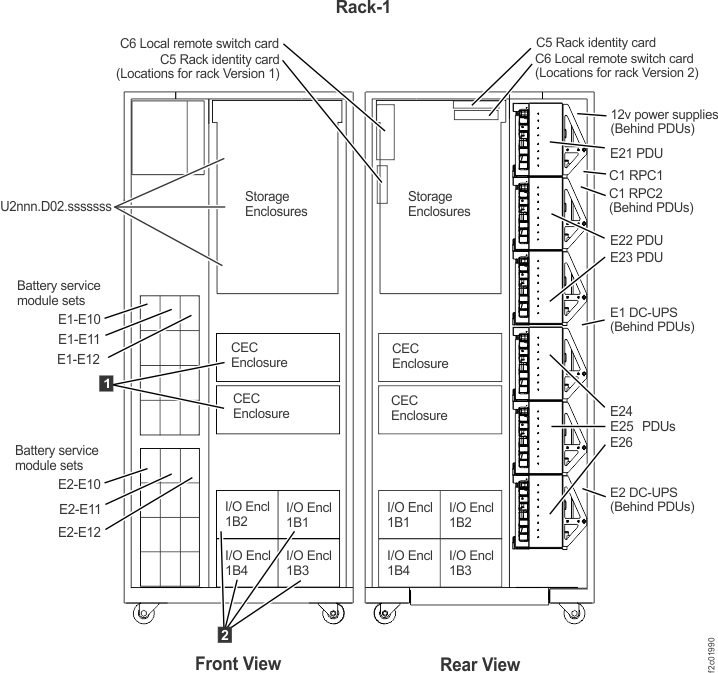
- At the rear of Rack-1, observe the location of the Rack identity and Local remote switch cards. See Figure 1.
- Version 1, the cards are vertical and mounted to the left sidewall, go to MAP2730 Section-1 Model 961 Rack Version 1.
- Version 2, the cards are horizontal and mounted to the top of the rack, go to MAP2730 Section-2 Model 961 Rack Version 2.

MAP2730 Section-1 Model 961 Rack Version 1
Procedure
- Display open serviceable events and display the details
to determine the listed FRUs.
Are there any open serviceable events listing FRUs related to the visual symptom you are here to repair, including power distribution units (PDUs)?
- Yes, exit this MAP and repair the related serviceable events. Return here if the visual symptom still exists after all related serviceable events have been repaired.
- No, go to the next step.
- At the front of Rack-1, does the management console ThinkPad laptop have
power?
- Yes, go to the next step.
- No, go to MAP2730 Section-6 HMC ThinkPad laptop does not have power.
- At the rear of Rack-1, observe the following to ensure
these cables are correctly connected and have no visual damage.
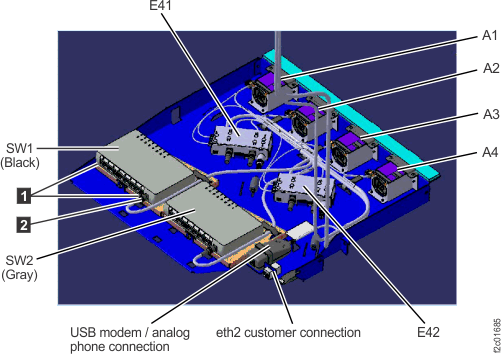
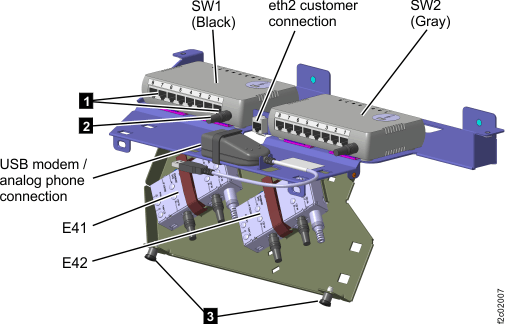
- Ethernet switches SW1, SW2 power cable
. See Figure 2. - Ethernet switch tray fans A1, A2, A3, A4 (Figure 2).
- Power junction assemblies (PJAs) E41 and E42 (Figure 2) on the Ethernet switch tray.
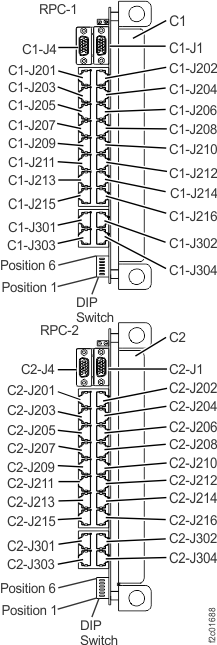
- RPC card connectors C1-J4 and C2-J4 (Figure 3).
- 12V power supplies E32, E33, E35, E36 (Figure 10).
Are any cables disconnected or visually damaged?
- No, go to the next step.
- Yes, go to MAP2730 Section-4 FRU replace when FRU is not listed in open serviceable event.
Figure 2. Ethernet switch tray locations (Model 961 rack version 1 rear) 
Figure 3. Location codes for the RPC cards (Model 961) 
- Ethernet switches SW1, SW2 power cable
- At the front of Rack-1, on the laptop tray, observe the
following to ensure these cables are correctly connected and have
no visual damage.
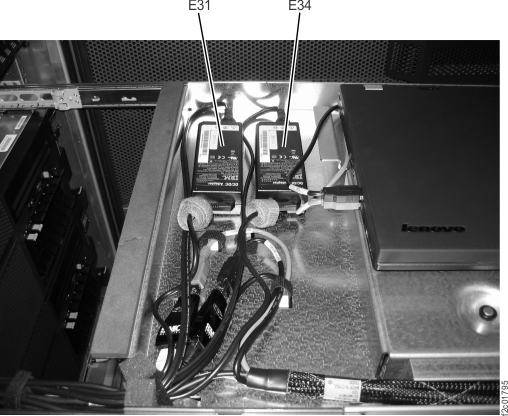
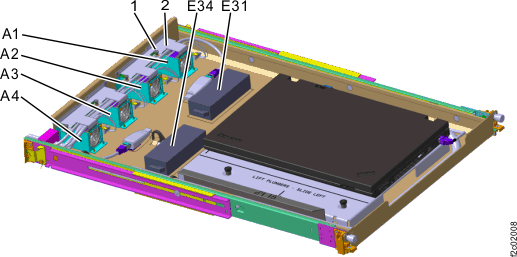
- 20V power supplies E31, E34 (Figure 4).
- 20V power input connector at the laptop.
Are any cables disconnected or visually damaged?
- No, go to the next step.
- Yes, reconnect the cable and ensure the laptop is available for use. Then exit this MAP.
Figure 4. Power supply, 20V (laptop tray at front of rack) locations (Model 961 rack version 1) 
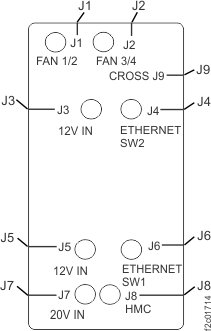
- Observe the LEDs on top of both PJAs (E41 and E42). Refer
to Figure 2 and Figure 5.
Are any of the PJA LED indicators not lit?
- No. your visual symptoms are not covered in this MAP procedure. Exit this MAP.
- Yes, go to MAP2730 Section-5 PJA LED not lit.
Figure 5. Power junction assembly (PJA) locations 
- Go to MAP2730 Section-3 Unplugged or visually damaged cable.
MAP2730 Section-2 Model 961 Rack Version 2
Procedure
- Display open serviceable events and display the details
to determine the listed FRUs.
Are there any open serviceable events listing FRUs related to the visual symptom you are here to repair, including power distribution units (PDUs)?
- Yes, exit this MAP and repair the related serviceable events. Return here if the visual symptom still exists after all related serviceable events have been repaired.
- No, go to the next step.
- At the front of Rack-1, does the management console ThinkPad laptop have
power?
- Yes, go to the next step.
- No, go to MAP2730 Section-6 HMC ThinkPad laptop does not have power.
- At Rack-1, observe the following to ensure these cables
are correctly connected and have no visual damage.
- Rack-1 rear, Ethernet switches SW1, SW2 (power cable only, this MAP is not used for Ethernet port visual symptoms). See Figure 6.
- Rack-1 rear, power junction assemblies (PJAs) E41 and E42 (Figure 6) on the Ethernet switch tray
- Rack-1 rear, RPC card connectors C1-J4 and C2-J4 (Figure 3)
- Rack-1 rear, 12V power supplies E32, E33, E35, E36 (Figure 10)
Are any cables disconnected or visually damaged?
- No, go to the next step.
- Yes, go to MAP2730 Section-4 FRU replace when FRU is not listed in open serviceable event.
Figure 6. Ethernet switch tray locations (Model 961 rack version 2 rear) 
Figure 7. Laptop tray locations (Model 961 rack version 2 front) 
Figure 8. Location codes for the RPC cards (Model 961) 
- At the front of Rack-1, on the laptop tray, observe the
following to ensure these cables are correctly connected and have
no visual damage:
- 20V power supplies E31, E34 (Figure 7)
- 20V power input connector on the laptop
- Fans A1, A2, A3, A4 (Figure 7)
Are any cables disconnected or visually damaged?
- No, go to the next step.
- Yes, reconnect the cable and ensure the laptop is available for use. Then exit this MAP.
- Observe the LEDs on top of both PJAs (E41 and E42). Refer
to Figure 2, Figure 6, and Figure 5.
Are any of the PJA LED indicators not lit?
- No. your visual symptoms are not covered in this MAP procedure. Exit this MAP.
- Yes, go to MAP2730 Section-5 PJA LED not lit.
Figure 9. Power junction assembly (PJA) locations 
- Go to MAP2730 Section-3 Unplugged or visually damaged cable
MAP2730 Section-3 Unplugged or visually damaged cable
Procedure
- A cable was found unplugged or visually damaged. Note: If more than one cable is affected, read the following procedures for each cable to determine whether they can be repaired at the same time or must be repaired individually. If you are not sure, do them individually.
- Determine the location code to use for the pseudo repair
later in this procedure.
- Use Table 1, first column and find the fan or PJA or RPC that the unplugged or damaged cable would be connected to.
- Determine location code to use for the pseudo repair. If your cable is for the RPC card, ensure you read Note 1 in Table 1.
- Go to the next step.
Table 1. Cable unplugged from repair Cable is unplugged from: Location code to use: Fan A1 A1 Fan A2 A2 Fan A3 A3 Fan A4 A4 PJA, E41 (left) E41 PJA, E42 (right) E42 RPC-1 (upper) E411 RPC-2 (lower) E421 SW1 (left Ethernet switch) 2 SW2 (right Ethernet switch) 2 Notes:- 1. To reconnect the Cx-J4 cable to an RPC card, you will use the PJA location code, not the RPC location code for the pseudo repair later in this procedure. There is no need put the entire RPC card in service mode to reconnect this cable. Using the PJA as the service boundary is adequate.
- 2. An Ethernet switch that is powered off should create an open serviceable event to display and repair. If there is not a related open serviceable event, go to MAP7000 Entry point For storage facility private network problems.
- Is the fan FRU with the disconnected cable listed in an
open serviceable event FRU list?
- Yes, use that serviceable event FRU list to do a pseudo repair of the fan. When directed to replace the fan FRU, connect or replace the cable as needed. If the repair failed, the timestamps of the serviceable event will have been updated or a new related serviceable event will have been opened. If the repair was successful, exit this MAP and ensure all related serviceable events are closed.
- No, note the location code you determined in Table 1. Then go to MAP2730 Section-4 FRU replace when FRU is not listed in open serviceable event.
MAP2730 Section-4 FRU replace when FRU is not listed in open serviceable event
Procedure
- If you are here to replace or reconnect a cable, read the
following before continuing to the next step:
- These cables are not listed in the Show Rack FRUs window you will use in the next step.
- You will select a FRU that the cable connects to in
the Show Rack FRUs window. The possible FRUs are:
- Ethernet switch tray fan
- Power junction assembly
- RPC card
- You will do a pseudo repair which means when you are prompted to replace the FRU you selected, you will only replace or reconnect the cable.
- Continue at the next step.
- Use the Exchange Parts option to do a pseudo-replace of
the FRU.
- From the navigation area, click Storage Facility Management > storage facility.
- From the bottom Task area, click Exchange Parts > Exchange Rack Components.
- In the Show Rack Enclosures window, select the enclosure location code that contains AE2, and click Show FRUs.
- In the Show Rack FRUs window, select the FRU location code, and click Exchange FRU.
- When directed to replace the FRU, replace the FRU, or connect the cable, or replace the cable as appropriate.
- If the repair failed, a new open serviceable event is created or a time-stamp on an existing related open serviceable event is updated.
- When the repair is successful, ensure all related serviceable events are closed.
MAP2730 Section-5 PJA LED not lit
About this task
Procedure
- To continue the repair on the E41 PJA (left)
use Table 2.
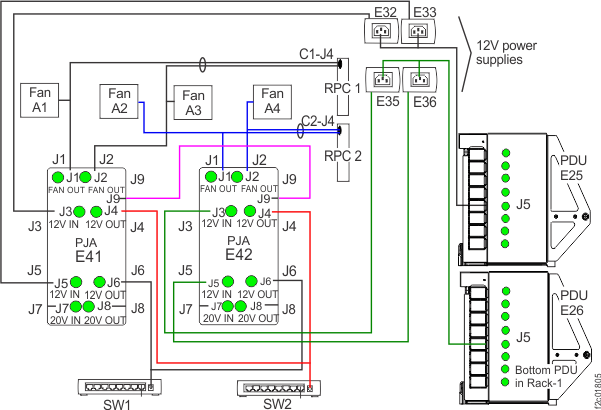
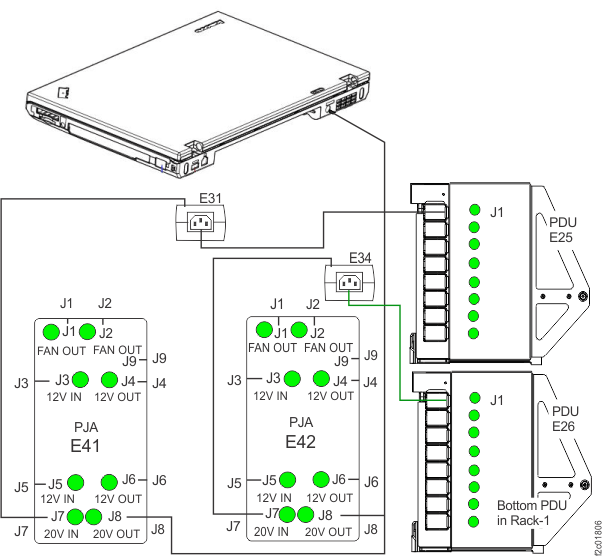
To continue the repair on the E42 PJA (right) use Table 3.Start at the top of the table and find your first visual symptom. Refer to Figure 10 for location codes.Figure 10. 12V power distribution 
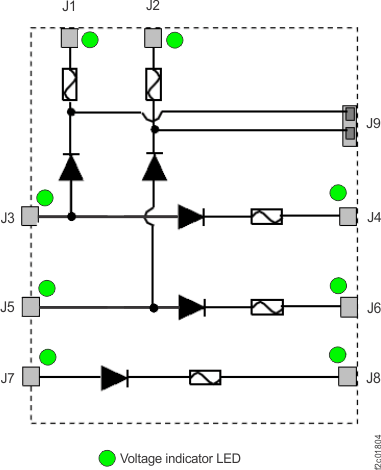
Figure 11. PJA internal diodes, fuses, LEDs 
Figure 12. Base rack locations, front and rear 
- PJA LED E41-J1 is not lit.
Is PJA LED E41-J3 lit?
- Yes, the E41 PJA has an internal failure and must be replaced. Replace the E41 PJA by using MAP2730 Section-4 FRU replace when FRU is not listed in open serviceable event.
- No, ensure that the PJA to PJA cable is connected to the J9 connector at both ends. E41-J1 receives power from E41-J3 and E41-J9. There is a double fault. Return to step 1 and isolate the problem for LED E41-J3 not lit.
- PJA LED E41-J2 is not lit. (Figure 10)
Is LED E41-J5 lit?
- Yes, the PJA has an internal failure and must be replaced. Replace the E41 PJA by using MAP2730 Section-4 FRU replace when FRU is not listed in open serviceable event.
- No, ensure that the PJA to PJA cable is connected to the J9 connector at both ends. E41-J2 receives power from E41-J5 and E41-J9. There is a double fault. Return to step 1 and isolate the problem for LED E41-J5 not lit.
- PJA LED E41-J4 is not lit. (Figure 10)
Is PJA LED E41-J3 lit?
- Yes, the PJA has an internal failure and must be replaced. Replace the E41 PJA by using MAP2730 Section-4 FRU replace when FRU is not listed in open serviceable event.
- No, return to step 1 and isolate the problem for LED E41-J3 not lit.
- LED E41-J6 is not lit. (Figure 10)
Is PJA LED E41-J5 lit?
- Yes, the PJA has an internal failure and must be replaced. Replace the E41 PJA by using MAP2730 Section-4 FRU replace when FRU is not listed in open serviceable event.
- No, return to step 1 and isolate the problem for LED E41-J5 not lit.
- LED E41-J3 is not lit. (Figure 10) The PJA E41-J3 connector receives power from the output cable of the E32 12V power supply in the rack rear upper right. The power supply does not have any LEDs. Ensure that the power supply input cable is plugged and ensure that the other end is plugged to the E25-J5 PDU connector.
- If the PDU E25-J5 green LED is lit, the possible failing FRUs are the E32 12V power supply and the PDU to 12V power supply cable.
- If the PDU E25-J5 green LED is not lit, and J6, J7, J8 are lit, the PDU port fuse has failed and is not repairable. Ensure that the output cable is not shorted to ground, and then replace the E25 PDU by using MAP2730 Section-4 FRU replace when FRU is not listed in open serviceable event.
- If the PDU E25-J5, J6, J7 and J8 green LEDs are not lit, there is a problem with the lower half of the E25 PDU receiving power from the DC-UPS DC supply unit (DSU). There should be an open serviceable event for that problem with MAP2710 in the FRU list. Exit this MAP and repair that serviceable event.
- LED E41-J5 is not lit. (Figure 10) The PJA E41-J5 connector receives power from the output cable of the E33 12V power supply in the rack rear upper right. The power supply does not have any LEDs. Ensure that the power supply input cable is plugged and ensure that the other end is plugged to the E25-J5 PDU connector.
- If the PDU E25-J5 green LED is lit, the possible failing FRUs are the E33 12V power supply and the PDU to 12V power supply cable.
- If the PDU E25-J5 green LED is not lit, and J6, J7, J8 are lit, the PDU port fuse has failed and is not repairable. Ensure that the output cable is not shorted to ground, and then replace the E25 PDU by using MAP2730 Section-4 FRU replace when FRU is not listed in open serviceable event.
- If the PDU E25-J5, J6, J7 and J8 green LEDs are not lit, there is a problem with the lower half of the E25 PDU receiving power from the DC-UPS DC supply unit (DSU). There should be an open serviceable event for that problem with MAP2710 in the FRU list. Exit this MAP and repair that serviceable event.
- LED E41-J7 is not lit. (Figure 10)
The PJA E41-J7 connector receives power from the output cable of the E31 20V power supply on the management console tray. See Figure 4 and Figure 13. The power supply does not have any LEDs. Ensure that the power supply input cable is plugged and ensure that the other end is plugged to the E25-J1 PDU connector. See Figure 13.
- If the PDU E25-J1 green LED is lit, the possible failing FRUs are the E31 20V power supply and the PDU to 20V power supply cable.
- If the PDU E25-J1 green LED is not lit, and J2, J3, J4 are lit, the PDU port fuse has failed and is not repairable. Ensure that the output cable is not shorted to ground, and then replace the E25 PDU by using MAP2730 Section-3 FRU replace when FRU is not listed in open serviceable event.
- If the PDU E25-J1, J2, J3 and J4 green LEDs are not lit, there is a problem with the upper half of the E25 PDU receiving power from the DC-UPS DC supply unit (DSU). There should be an open serviceable event for that problem with MAP2710 in the FRU list. Exit this MAP and repair that serviceable event.
- LED E41-J8 is not lit. (Figure 10)
Is PJA LED E41-J7 lit?- Yes, the PJA has an internal failure and must be replaced. Replace the E41 PJA by using MAP2730 Section-4 FRU replace when FRU is not listed in open serviceable event.
- No, return to step 1 and isolate the problem for LED E41-J7 not lit.
- E42-J1 PJA LED is not lit. (Figure 10)
Is PJA LED E42-J3 lit?
- Yes, the E42 PJA has an internal failure and must be replaced. Replace the E42 PJA by using MAP2730 Section-4 FRU replace when FRU is not listed in open serviceable event.
- No, ensure the PJA to PJA cable is connected to the J9 connector at both ends. E42-J1 receives power from E42-J3 and E42-J9. There is a double fault. Return to step 1 and isolate the problem for LED E42-J3 not lit.
- E42-J2 PJA LED is not lit. (Figure 10)
Is E42-J5 PJA LED lit?
- Yes, the PJA has an internal failure and must be replaced. Replace the E42 PJA by using MAP2730 Section-4 FRU replace when FRU is not listed in open serviceable event.
- No, ensure that the PJA to PJA cable is connected to the J9 connector at both ends. E42-J2 receives power from E42-J5 and E42-J9. There is a double fault. Return to step 1 and isolate the problem for LED E42-J5 not lit.
- E42-J4 PJA LED is not lit. (Figure 10)
Is E42-J3 PJA LED lit?
- Yes, the PJA has an internal failure and must be replaced. Replace the E42 PJA by using MAP2730 Section-4 FRU replace when FRU is not listed in open serviceable event.
- No, return to step 1 and isolate the problem for LED E42-J3 not lit.
- E42-J6 PJA LED is not lit. (Figure 10)
Is E42-J5 PJA LED lit?
- Yes, the PJA has an internal failure and must be replaced. Replace the E42 PJA by using MAP2730 Section-4 FRU replace when FRU is not listed in open serviceable event.
- No, return to step 1 and isolate the problem for LED E42-J5 not lit.
- E42-J3 PJA LED is not lit. (Figure 10) The E42-J3 PJA connector receives power from the output cable of the E35 12V power supply in the rack rear upper right. The power supply does not have an LED. Ensure that the power supply input cable is plugged and ensure that the other end is plugged to the E26-J5 PDU connector.
- If the PDU E26-J5 green LED is lit, the possible failing FRUs are the E35 12V power supply and the PDU to 12V power supply cable.
- If the PDU E26-J5 green LED is not lit, and J6, J7, J8 are lit, the PDU port fuse has failed and is not repairable. Ensure that the output cable is not shorted to ground, and then replace the E26 PDU by using MAP2730 Section-4 FRU replace when FRU is not listed in open serviceable event.
- If the PDU E26-J5, J6, J7 and J8 green LEDs are not lit, there is a problem with the lower half of the E26 PDU receiving power from the DC-UPS DC supply unit (DSU). There should be an open serviceable event for that problem with MAP2710 in the FRU list. Exit this MAP and repair that serviceable event.
- E42-J5 PJA LED is not lit. (Figure 10) The E42-J5 PJA connector receives power from the output cable of the E36 12V power supply in the rack rear upper right. The power supply does not have an LED. Ensure that the power supply input cable is plugged and ensure that the other end is plugged to the E26-J5 PDU connector.
- If the PDU E26-J5 green LED is lit, the possible failing FRUs are the E36 12V power supply and the PDU to 12V power supply cable.
- If the PDU E26-J5 green LED is not lit, and J6, J7, J8 are lit, the PDU port fuse has failed and is not repairable. Ensure that the output cable is not shorted to ground, and then replace the E26 PDU by using MAP2730 Section-4 FRU replace when FRU is not listed in open serviceable event.
- If the PDU E26-J5, J6, J7 and J8 green LEDs are not lit, there is a problem with the lower half of the E26 PDU receiving power from the DC-UPS DC supply unit (DSU). There should be an open serviceable event for that problem with MAP2710 in the FRU list. Exit this MAP and repair that serviceable event.
- LED E42-J7 is not lit. (Figure 10) The PJA E42-J7 connector receives power from the output cable of the E34 20V power supply on the management console tray. See Figure 4 and Figure 13. The power supply does not have any LEDs. Ensure that the power supply input cable is plugged and ensure that the other end is plugged to the E26-J1 PDU connector. See Figure 13.
- If the PDU E26-J1 green LED is lit, the possible failing FRUs are the E34 20V power supply and the PDU to 20V power supply cable.
- If the PDU E26-J1 green LED is not lit, and J2, J3, J4 are lit, the PDU port fuse has failed and is not repairable. Ensure that the output cable is not shorted to ground, and then replace the E26 PDU by using MAP2730 Section-4 FRU replace when FRU is not listed in open serviceable event.
- If the PDU E26-J1, J2, J3 and J4 green LEDs are not lit, there is a problem with the upper half of the E26 PDU receiving power from the DC-UPS DC supply unit (DSU). There should be an open serviceable event for that problem with MAP2710 in the FRU list. Exit this MAP and repair that serviceable event.
- LED E42-J8 is not lit. (Figure 10)
Is PJA LED E42-J7 lit?- Yes, the PJA has an internal failure and must be replaced. Replace the E42 PJA by using MAP2730 Section-4 FRU replace when FRU is not listed in open serviceable event.
- No, return to step 1 and isolate the problem for LED E42-J7 not lit.
MAP2730 Section-6 HMC ThinkPad laptop does not have power
About this task
Procedure
- At the rear of Rack-1, observe the J8 green LED on both
PJAs . (Figure 13) Find
the condition that applies:
- J8 green LED is lit on both PJAs, go to the next step.
- J8 green LED is lit on one PJA. This is most likely a failed LED indicator and the PJA should be replaced. Determine the location code of the PJA and then go to MAP2730 Section-4 FRU replace when FRU is not listed in open serviceable event.
- J8 green LED is not lit on both PJAs. There is a separate problem for each PJA that must be fixed. Go to MAP2730 Section-5 PJA LED not lit.
Figure 13. 20V power distribution (Power connects to right side of some laptop models) 
- The laptop should automatically power on when customer power is present and the DC-UPS DC supply unit (DSU) mainline input circuit breakers CB1 are on (up). There is a small accessory card plugged into the docking connector on the bottom of the laptop that provides this function. Go to MAP6000 Entry point for analyzing management console problems.