MAP7000 Entry point For storage facility
private network problems
This MAP provides guidance on repairing all network problems with the storage facility private network.
MAP7000 Section-1
Procedure
Private network problems can be caused by management console (HMC) or CEC enclosure problems or UPS
(Model 983 only) that directly or indirectly affect their Ethernet ports.
Display open serviceable events and repair any that might be related before you go to the next
step.
If the storage complex has two active HMCs (primary MC 1 and secondary MC 2), ensure that you
have displayed open serviceable events on both HMCs.
Serviceable events with the following SRCs are displayed only on the HMC that created them; they
are not replicated on the other HMC:
BE17xxxx
BEB0001x
BEB10012
BEB20010
BEB20020
BEB20021
BEFxxxxx
Exxxxxxx
Use Table 1 to
find your purpose for using this MAP.
Table 1. Entry for storage facility private network
problems
Purpose
Go to:
You were sent here to use the Network Topology Tool to verify the connectivity
of both storage facility private networks (gray and
black)
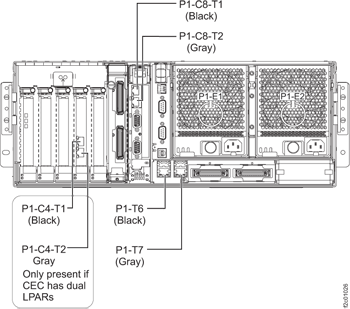
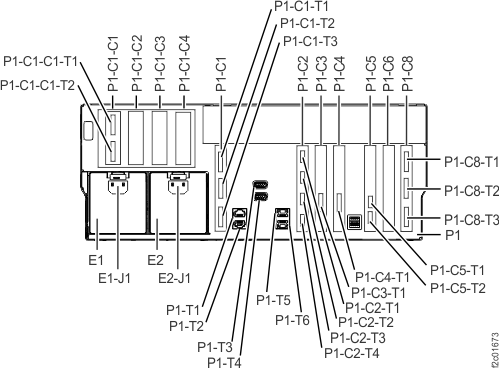
For models 921/931, 922/932, and 9A2/9B2 see Figure 1.
CEC enclosureservice processor (FSP), black cable to P1-C8-T1 and
gray cable to P1-C8-T2.
CEC enclosure integrated Ethernet ports on the I/O
planar for base LPAR, black cable to P1-T6, and gray cable to P1-T7.
CEC enclosure Ethernet ports on PCI Ethernet card
(only on models 9A2/9B2, with two LPARs per CEC), black cable to P1-C4-T1 and gray cable to
P1-C4-T2.
At the rear of each Rack-1 managed by this HMC, ensure that the private network Ethernet cables
are connected to the Ethernet switches. Then go to step
9.
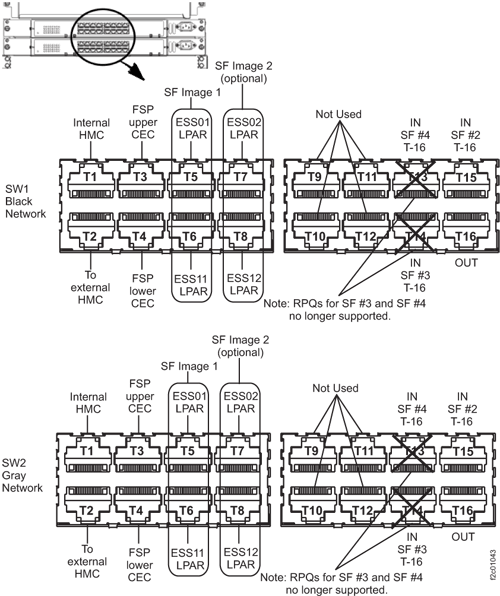
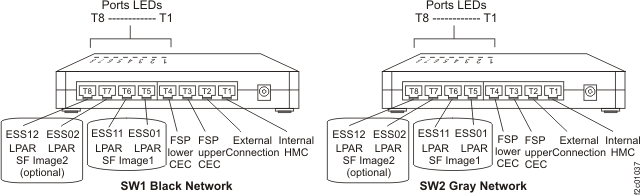
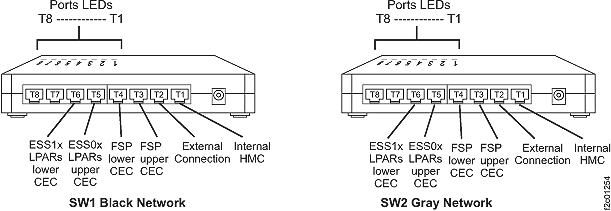
See the following figures:
Models 921/931, 922/932, 9A2/9B2 with 16-port Ethernet switches: Figure 7.
Figure 9. 8-port Ethernet switch port
designations (SW1, SW2-Tx) Model 941, Model 951, and Model 961
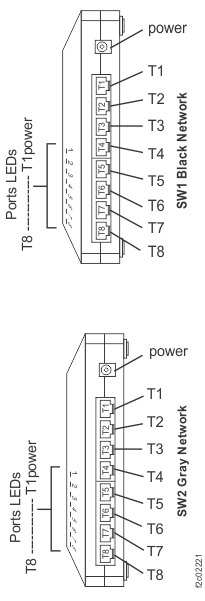
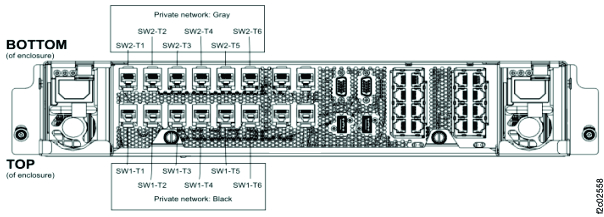
Figure 10. 8-port Ethernet switch port locations, Model 98x
Note: Upper switch SW1 is "black" network; lower switch SW2 is "gray" network.
Note for Models 98x:
The primary HMC (HMC1) connects to SW1-T8 and SW2-T8. The secondary HMC (HMC2) connects to SW1-T7 and SW2-T7.
SW1-T3 to upper CEC upper FSP ("HMC1") connection
SW1-T4 to lower CEC upper FSP ("HMC1") connection
SW1-T5 to upper CEC upper LPAR connection (XC1-C10-T1)
SW1-T6 to lower CEC upper LPAR connection (XC2-C10-T1)
SW2-T3 to upper CEC lower FSP ("HMC2") connection
SW2-T4 to lower CEC lower FSP ("HMC2") connection
SW2-T5 to upper CEC lower LPAR connection (XC1-C10-T2)
SW2-T6 to lower CEC lower LPAR connection (XC2-C10-T2)
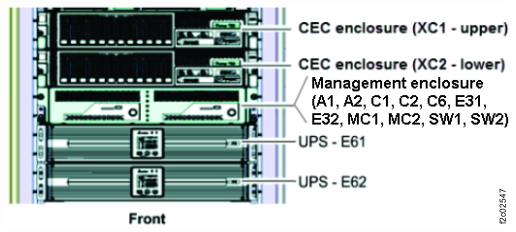
At the front of the rack containing the Model 983, slide the management enclosure (see Figure 11) out to the service position and remove
the top cover.
Note: The management enclosure is below the two CEC enclosures.
Fully loosen the left and right captive thumb screws.
Slide the management out fully so the sliding rails lock into place.
At the rear of the top cover, fully loosen the left and right captive thumb screws.
Slide the cover back until it will lift off.
Figure 11. Management enclosure (front)
At the management enclosure:
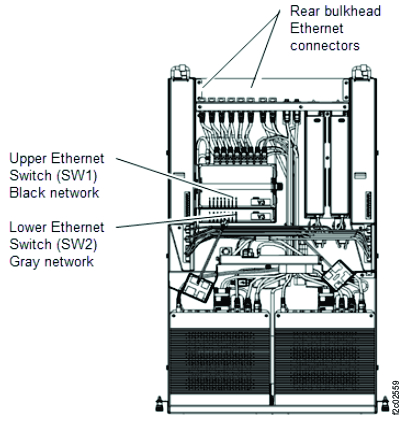
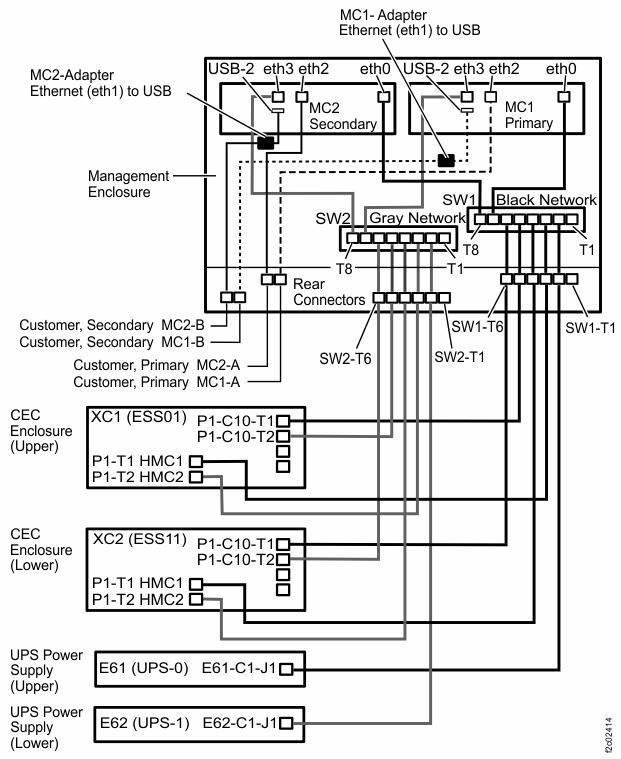
Ensure that the private network Ethernet cables are connected to the rear of both Ethernet
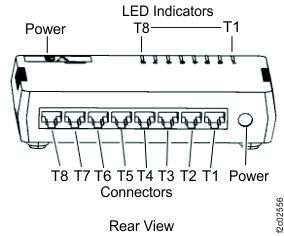
switches, the inside and outside of the rear bulkhead connectors. See Figure 12, Figure 13, Figure 14, and Figure 15.
Note: To access the rear of the lower Ethernet switch, you can remove the hold down bracket for the
upper Ether switch and pivot it up out of the way. The Ethernet and power cables are long enough to
allow this to be done with the switch in use.
Figure 12. Management enclosure Ethernet cables, top viewFigure 13. Management enclosure Ethernet cables, rear view standing at front of rack while looking
downFigure 14. Management enclosure rear viewFigure 15. Ethernet switch, LEDs and connectors, rear view (Model 983)
Not including the serviceable event that sent you here, are there any open serviceable events
for the CEC, HMC, or Ethernet switches that are related to the private network?
Yes, exit this MAP and repair them now. After you have made the repairs, return to MAP7000 Section-1 to determine if the problem that sent you here has already been
corrected.
No, continue to the next step.
Is the SRC = BE193001?
No, it is most likely safe to delay the repair of any open serviceable event that is not related to the private network.
Go to MAP7000 Section-3 Visual Checks.
Perform the visual checks that are specified in Table 2. If you
find problems, take the action that is indicated.
Procedure
Use Table 2 to check each
storage facility that is managed by this HMC.
Table 2. Visual checklist
Visual Check
Action
If one or both internal Ethernet switches in this storage complex are not powered on, see the Action column.
Note: For Model 983, at the front of the rack, the Management enclosure must be
out in the service position with the top cover removed to observe the LEDs. The enclosure can be
moved to the service position concurrent with customer activity.
If the CEC enclosure power
supplies at the rear of each CEC enclosure do not have
the green 'Input power' LEDs lit, see the Action column.
Note: A CEC
enclosure will operate normally with only one of its two power supplies having 'Input power' LED
lit. If only one power supply is failing, an open serviceable event should be
present.
If a single CEC enclosure is
failing:
Check that the CEC enclosure power supply black
input cables are connected.
At the front of the rack, observe the CEC enclosure processor regulator cards, which are to the
left of the boot drives (not for rack models 96x, 97x, 98x). If the green
LEDs are not lit, see the Action column.
(Does not apply for model 983.) Check the
Ethernet switch ports that have cables connected that exit the rack and go to an external HMC or
another storage facility. If the port LEDs are not lit properly, see the Action column.
If Rack-1 has 16-port Ethernet switches, check T2 and T15 ports. See Figure 7 and Figure 16.
Check the Ethernet switch ports that have cables that are connected from the
switch to the internal HMC. For both the 16-Port Ethernet switch and 8-Port Ethernet switch, check
the T1 ports. If the port LEDs are not lit properly, see the Action column.
If Rack-1 has 16-port Ethernet switches, see Figure 7.
If Rack-1 has 8-port Ethernet switches, see Figure 8 or
Figure 9.
For 983, both the primary and secondary (if present) HMCs are
internal. Check the T7 ports for HMC1 and T8 ports for HMC2. See Figure 15.
For Model 98x (not 983), both the primary and secondary (if
present) HMCs are internal. Check the T8 ports for HMC1 and T7 ports for HMC2. See Figure 10.
Inspect the Ethernet cables and connectors. Reseat any connection where the Ethernet port LED is
not lit properly.
If there is a USB-to-Ethernet adapter on the Black network, and the Ethernet port LED is not lit
properly, reseat the USB connector on the internal HMC.
If there is a USB-to-Ethernet adapter on the Gray network, and the Ethernet port LED is not lit
properly, reseat the USB connector on the internal HMC.
If the problem is not resolved, contact your next level of support.
None of the visual checks that are listed in this table apply.
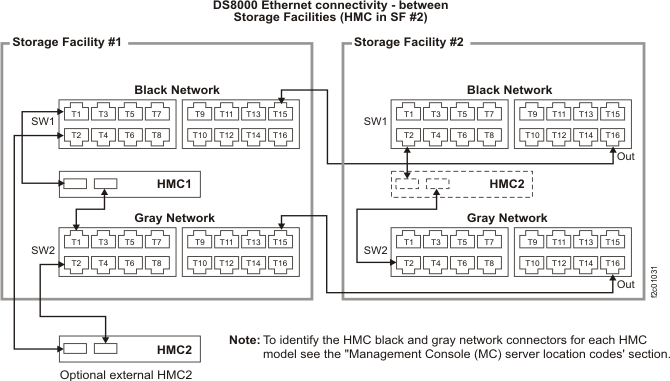
Figure 16. Connectivity
between storage facilities for HMCs using both 16-port Ethernet switches
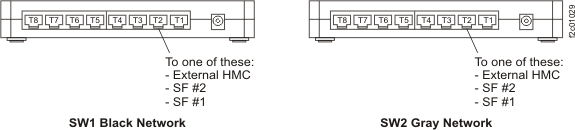
Figure 17. 8-port
Ethernet switch ports used for cables exiting the storage facility
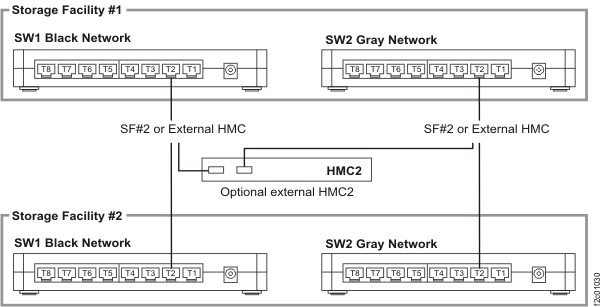
Figure 18. Connectivity
between storage facilities for HMC and both 8-port Ethernet switches
MAP7000 Section-4 Problem with an external connection
Procedure
You are here because you inspected the Ethernet switches and found that one or more link LEDs
were not lit (link LEDs correspond to an externally routed Ethernet cable). Use Table 3 to find the condition of the LEDs and take the appropriate
action.
Table 3. Results of a visual check of the LEDs
Condition of the LED(s)
Action
LEDs for both links to an external management console are not lit.
Go to MAP1500 Ending a service action to close the serviceable event and, save the network topology, and ensure
good subsystem status.
MAP7000 Section-5 SRC=B3xxxxxx
Procedure
Most storage facility private network problems
are reported with SRCs of BEB1xxxx. There are a few exceptions where the problems are reported with
SRCs of B3xxxxxx that are from the eServer™ products. When this occurs, use Table 4 to determine the equivalent storage facility BEB1xxxx SRC and/or the appropriate
action.
Table 4. Actions for B3xxxxxx SRCs
SRC in serviceable event and
definition
Equivalent storage facility SRC
and definition
Action
B3010002 - HMC or partition connection monitoring fault
If MAP7000 Section-3 Visual Checks does not list a visual symptom, you are instructed to use
the Network Topology Tool to determine which network fails.
If the black network fails, substitute SRC BEB10021 in place of B3030001
If the gray network fails, substitute SRC BEB10022 in place of B3030001
B3030002 - A single partition HMC link has failed.
BEB10041 (black) Network Surveillance LINK_PART_HMC_REDUND: Single HMC lost link to single
partition on a system, the path through the 172.16-BLACK network is not available, the other network
is ok
BEB10042 (gray) - Network Surveillance LINK_PART_HMC_REDUND: Single HMC lost link to single
partition on a system, the path through the 172.17-GRAY network is not available, the other network
is ok
BEB10043 - Not sure which network lost link.
The B3030002 SRC does not specify which private network (black or gray) has failed.
If MAP7000 Section-3 Visual Checks does not list a visual symptom, you are instructed to use
the Network Topology Tool to determine which network fails.
If the black network fails, substitute SRC BEB10041 in place of B3030002.
If the gray network fails, substitute SRC BEB10042 in place of B3030002.
B3030003 - Multiple partition HMC links have failed.
BEB10050 - Network Surveillance LINK_M_PART_HMC: Single HMC lost links to
multiple partitions on single system; both paths are not available; FSP to HMC link is still
working
B3030004 - All partition links for a single system to HMC have failed.
BEB10060 - Network Surveillance LINK_A_PART_HMC: Single HMC lost links to all
partitions on single system; both paths are not available; FSP to HMC link is still working
B3030008 - One HMC link to more than one HMC occurred.
BEB10100 - Network Surveillance LINK_HMC_HMC: Lost HMC to HMC links; both
paths are not available BEB10101 - Network Surveillance: The Partner HMC is in
the Offline state in the HMC peer domain BEB10102 - Network Surveillance: The Partner
HMC is not properly configured in the HMC peer domain
B303000A - The HMC host links to all managed systems.
BEB10130 - Network Surveillance LINK_HMC_ALL: Lost HMC link to multiple HMCs;
both paths are not available. This does not apply to the storage facilitymanagement console (HMC).
If MAP7000 Section-3 Visual Checks does not list a visual symptom, you are instructed to use
the Network Topology Tool to determine which network fails.
If the black network fails, substitute SRC BEB10011 in place of B303000E
If the gray network fails, substitute SRC BEB10012 in place of B303000E
B303000F - A single partition HMC link failure has occurred on a redundant
path.
BEB10041 (black) Network Surveillance LINK_PART_HMC_REDUND: Single HMC lost link to single
partition on a system, the path through the 172.16-BLACK network is not available, the other network
is ok
BEB10042 (gray) Network Surveillance LINK_PART_HMC_REDUND: Single HMC lost link to single
partition on a system, the path through the 172.17-GRAY network is not available, the other network
is ok
BEB10043 Not sure which network has lost link.
The B303000F SRC does not specify which private network (black or gray) failed.
If MAP7000 Section-3 Visual Checks does not list a visual symptom, you are instructed to use
the Network Topology Tool to determine which network fails.
If the black network fails, substitute SRC BEB10041 in place of B303000F
If the gray network fails, substitute SRC BEB10042 in place of B303000F
B3030010 - A single HMC link to one HMC failure has occurred on a redundant
path.
B3100500 - Device Driver Message: mmm dd hh:mm:ss DR-RC02-OPENSYS kernel:
e1000: ethN: e1000_watchdog_task: NIC Link is Down Model 98x: DR-RC02-OPENSYS kernel: r8169: ethN: r8169_watchdog_task: NIC
Link is Down
BEB10011 (black) Network Surveillance NIC_FAILURE: Single HMC physical link unavailable on
ethernet port - eth0 (172.16-BLACK network)
BEB10012 (gray) Network Surveillance NIC_FAILURE: Single HMC physical link unavailable on
ethernet port - eth3 (172.17-GRAY network)
The B3100500 SRC does not specify which private network (black or gray) has failed.
If MAP7000 Section-3 Visual Checks does not list a visual symptom, you are instructed to use the
Network Topology Tool to determine which network fails.
If the black network fails, substitute SRC BEB10011 in place of B3100500
If the gray network fails, substitute SRC BEB10012 in place of B3100500
BEB10014 (black) Network Surveillance NIC_FAILURE: Single HMC physical link unavailable on
ethernet port - eth0 on the USB adapter (172.16-BLACK network)
BEB10015 (gray) Network Surveillance NIC_FAILURE: Single HMC physical link unavailable on
ethernet port - eth3 on the USB adapter (172.17-GRAY network)
The B3100501 SRC does not specify which private network (black or gray) has
failed.
If MAP7000 Section-3 Visual Checks does not list a visual symptom, you are instructed to use the
Network Topology Tool to determine which network fails.
If the black network fails, substitute SRC BEB10014 in place of B3100501
If the gray network fails, substitute SRC BEB10015 in place of B3100501
MAP7000 Section-6 Model 983 UPS network error
Procedure
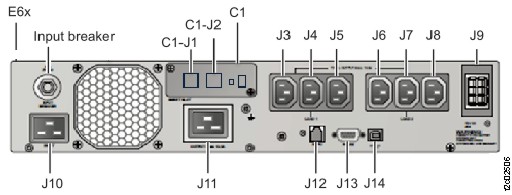
Locate the UPS listed in the serviceable event FRU list. See Figure 19.
Note: The UPS (Model 983 only) does not have FRU identify indicators so the UPS serial number must
be used to ensure that the correct UPS is being repaired.
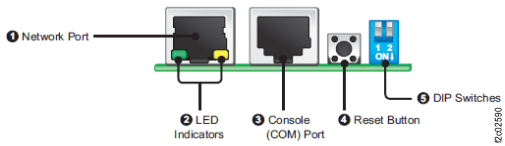
Figure 23. LEDs for the UPS network card (Model 983)
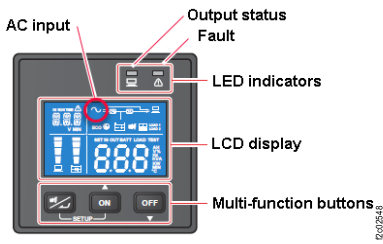
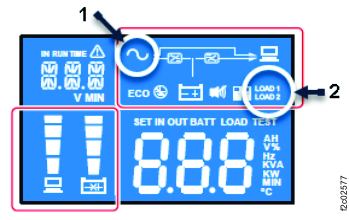
At the front of the rack, observe the UPS control panel. See Figure 24. Is the AC icon lit? See Figure 25.
Yes, go to step 4. The possible
failing FRUs are the UPS network card, the Ethernet switch, or the cable coupler and the two
Ethernet cables. Exit this MAP and replace FRUs until the problem is repaired.
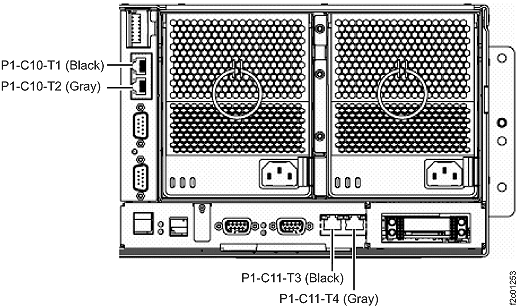
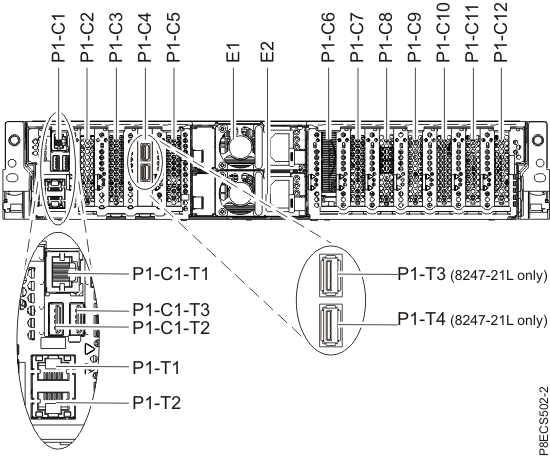
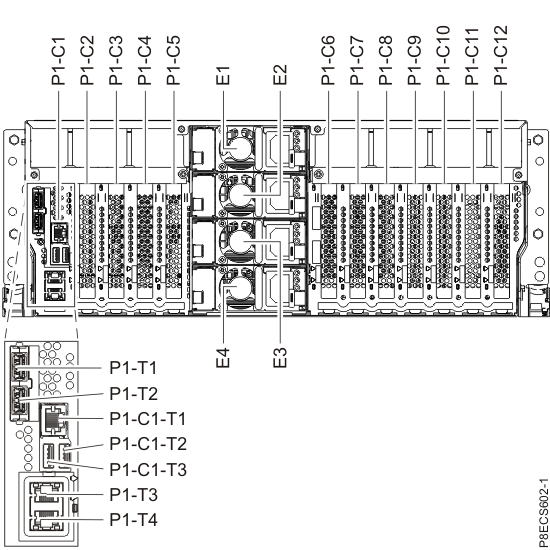
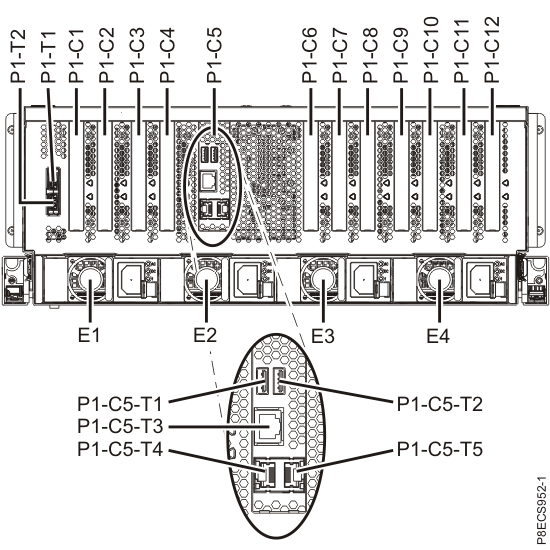
 Note for Models 98x:The primary HMC (HMC1) connects to SW1-T8 and SW2-T8. The secondary HMC (HMC2) connects to SW1-T7 and SW2-T7.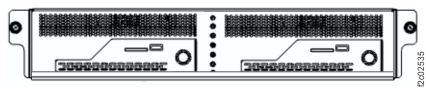

 lit? See Figure 25.