Exchange the RIO cable
Before you begin
 Use approved ESD procedures to prevent damage.
Attention:
- This procedure is not a stand-alone procedure. Customer disruption and damage to the hardware might occur when microcode and power boundaries are not in the proper conditions for this service action.
- If a serviceable event FRU repair directed you to this procedure, the microcode and power boundaries are already set.
- If a serviceable event FRU repair did not direct you to this procedure, see MAP1230 Replace a FRU without using a serviceable event.
Notes:
- All the cables and FRUs to be removed must be uniquely identified so they can be reinstalled correctly.
- If an installed earthquake resistance kit prevents you from accessing this FRU, refer to MAP1600.
Note: Both
ends of the RIO cable use the same connector.
Remove the RIO cable
Procedure
- The I/O enclosure end of RIO cable
was quiesced. At the front of the rack, unplug the two black power
cables to the I/O enclosure located in step 1.
Figure 1. I/O enclosure black power cables 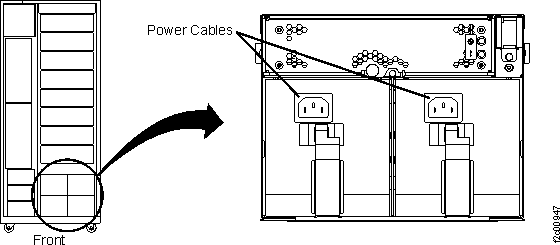
- Remove the RIO cable
 . Either end of the cable can be unplugged
first.
. Either end of the cable can be unplugged
first.
- Grab the black body of the RIO cable and gently push it into the RIO connector. (This makes it easier to unlatch the blue release handle.)
- While maintaining a gentle inward push, pull the RIO cable connector blue release handle towards you.
- When the blue release handle is free, unplug the cable.
Figure 2. RIO cable at I/O enclosure 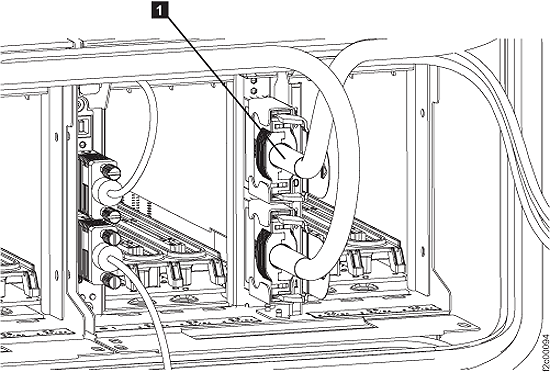
Figure 3. RIO cable at CEC enclosure 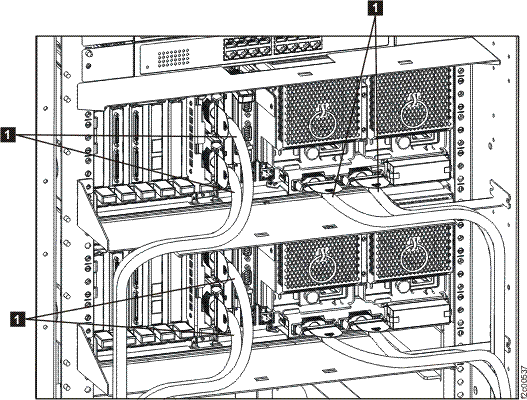
Install the RIO cable
Procedure
- Align the RIO cable connector with the sheet metal guide bracket and then gently push it in until it fully seats and latches.
- Ensure that the connector is properly latched. Do not touch the blue release handle, instead gently pull on the black cable.
- If you unplugged the I/O enclosure black power cables, reconnect them now.
- Exit this service information center parts exchange procedure and return to the procedure that sent you here.