Exchange the PPS (primary power supply)
Before you begin
 Use approved ESD procedures to prevent damage.
Notes:
- All the cables and FRUs to be removed must be uniquely identified so they can be reinstalled correctly.
- If an installed earthquake resistance kit prevents you from accessing this FRU, refer to MAP1600.
DANGER
Hazardous
voltage, current, or energy levels are present inside of a component
to which this label is attached. (L001) 
Remove the primary power supply (PPS)
About this task
Note: It is normal for
various PPS LED indicators to stay lit until the mainline input CB is switched off and the J3
PPS-to-PPS communication cable is disconnected. The communication cable supplies signals and logic
voltages so the PPS control circuitry can stay active in the event of loss of input power to one
PPS.
Procedure
- Two CEs are needed for step 1d.
Figure 1. PPS FRU packaging (Model 941 PPS is shown; Model 951 PPS is similar) 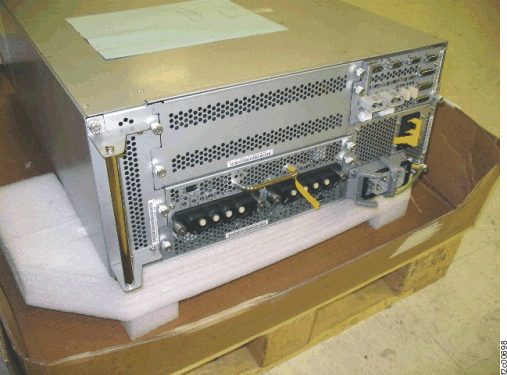
-
Do not use the PPS FAULT LED indicator
 to identify the PPS being
repaired.
to identify the PPS being
repaired.
- When the failing PPS is being repaired, the PPS FAULT LED indicator on the working PPS in
the same rack might be on solid.
The working PPS is indicating that the PPS being repaired is not available for use. - Use the FRU Identify LED indicator
 to identify the PPS being
repaired.
to identify the PPS being
repaired.
Figure 2. LEDs on the PPS (front) 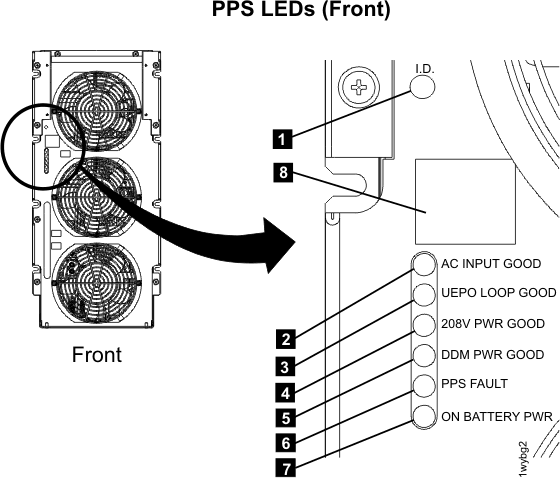
- When the failing PPS is being repaired, the PPS FAULT LED indicator on the working PPS in
the same rack might be on solid.
- If this is an expansion rack and it has old level
sheet metal, the sheet metal baffle
 to the left of the gate and at the
bottom of the storage enclosure chassis might need to be removed to
allow the gate to swing open. Remove the two screws that fasten the baffle to the 19"
rack mount vertical rails. If the baffle is the new level sheet metal,
it has a flexible plastic cutout that bends out of way when the gate
is swung open.
to the left of the gate and at the
bottom of the storage enclosure chassis might need to be removed to
allow the gate to swing open. Remove the two screws that fasten the baffle to the 19"
rack mount vertical rails. If the baffle is the new level sheet metal,
it has a flexible plastic cutout that bends out of way when the gate
is swung open. Figure 3. Air baffle 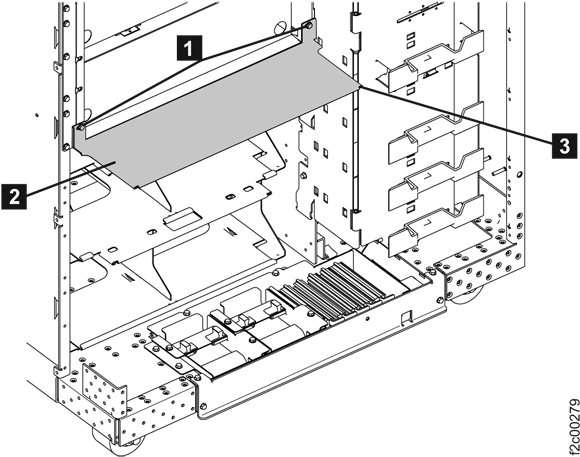
- Remove the two screws and open the 208VDC bus bar gate to the service position. See Figure 4.
Figure 4. 208VDC bus bar gate service position 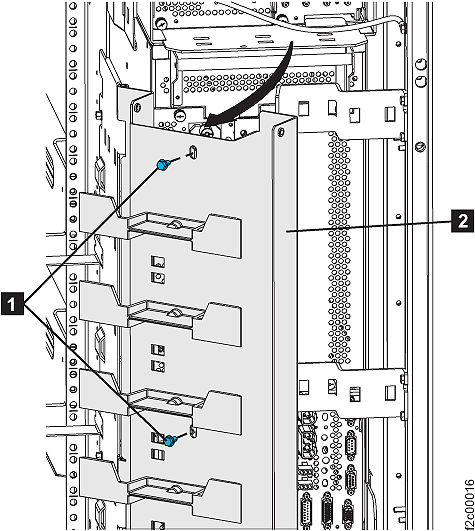
- Remove power and mainline power cord from the
PPS.
-
Set the PPS ac input power module CB00 switch to Off (down) .
-
Disconnect the mainline power cord from the PPS ac input power module. Push the two
release levers .
Figure 5. Removing the AC mainline power cord 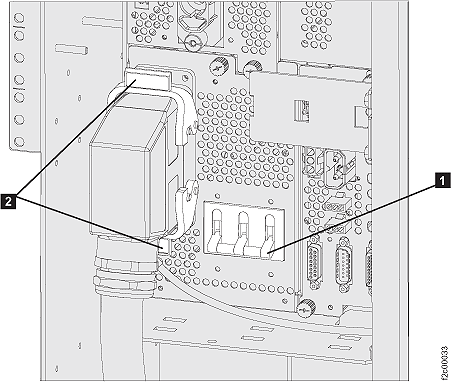
-
If repairing PPS-2 (the lower PPS), remove the cable ties
securing the mainline
power cable to PPS-2 (lower PPS). Remove the screw securing the mainline power cable bracket, and
then remove the mainline power cable bracket . See Figure 6.
Figure 6. Power supply main line 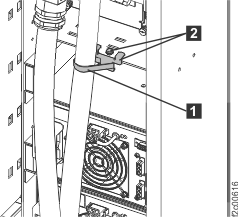
-
Set the PPS ac input power module CB00 switch to Off (down)
- At the rear of the PPS REMAINING IN USE by
the customer, disconnect the
 PPS-to-PPS communication cable at
the bottom right of the PPS sequencer module (see Figure 7).
Notes:
PPS-to-PPS communication cable at
the bottom right of the PPS sequencer module (see Figure 7).
Notes:- Disconnecting the cable from the working PPS will protect the working PPS. Then, when the other end of the cable is disconnected from the PPS being repaired, no pins inside that connector will be able to touch ground and shut down the working PPS that remains in use.
- This removes the remaining logic power from the PPS being repaired, and all PPS LEDs should now be off.
Figure 7. PPS rear view, lower right: PPS-to-PPS communication cable connection 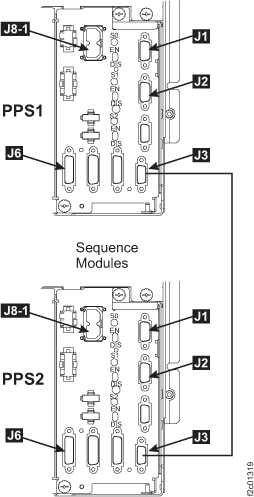
-
At the rear of the PPS BEING REPAIRED, disconnect the PPS-to-PPS communication cable
at the bottom right of the PPS sequencer
module.
-
If replacing the PPS-1 (upper PPS), at the front of the rack (see Figure 8):
- Remove the two screws .
- WARNING: Open the rack operator panel gently. Do not force it!Note: A few racks built before September 2007 may have the cable to the UEPO switch installed without enough free play. Forcing the panel open could cause the cable to break the UEPO switch. If the cable is found to be too tight, adjust the cable so there is free play before continuing.
- Remove the door latch bracket
 .
.
Figure 8. Rack operator panel LED assembly 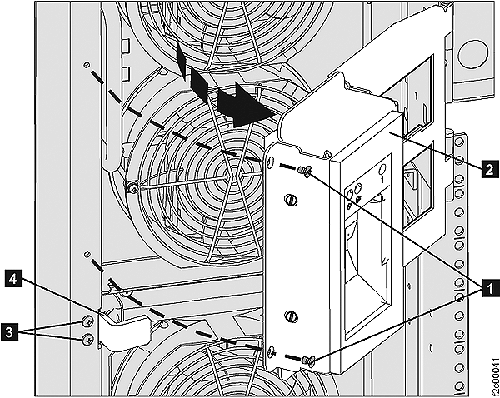
- Remove the two screws
- Remove fans and front modules.
- At the front of the rack, unplug the three fan cables . See Figure 9.
-
Unscrew the eight silver thumbscrews securing the PPS fan assembly . Then, lift the fan assembly up
off the two bottom positioning studs and remove it from the rack. One or more of the PPS LEDs may
now be lit.
Figure 9. Remove fan cables and fan assembly screws 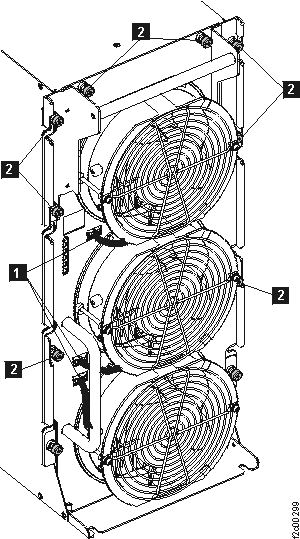
- Remove the 208VDC base module and the PFC module
 . See Figure 10.
- Unplug the three cables from the PFC module.
- Unscrew the two silver thumbscrews securing the modules.
- Use the swing up handles to remove each module.
Figure 10. 208VDC base module and PFC module 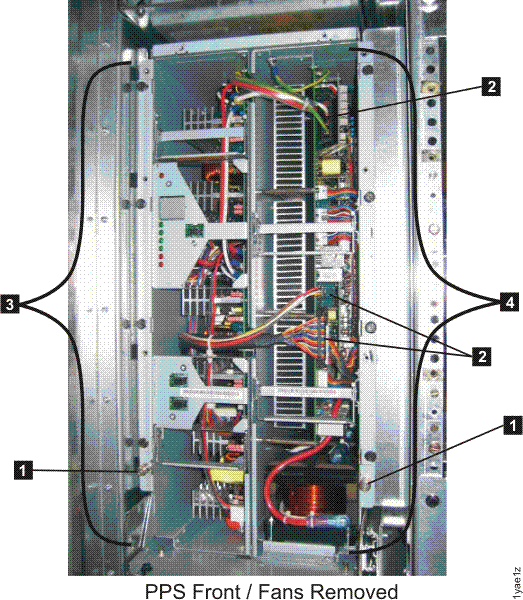
- Unplug the three cables
- At the front of the rack, unplug the three fan cables
-
Slide the PPS out just far enough to allow you to remove the rear modules. This step
is optional if you feel you can remove the PPS rear module(s) with the PPS in the current
position.
-
At the front of the rack, remove the eight hex head screws that fasten the PPS chassis to the
rack . See Figure 11.
Figure 11. Primary power supply (PPS) retaining screws 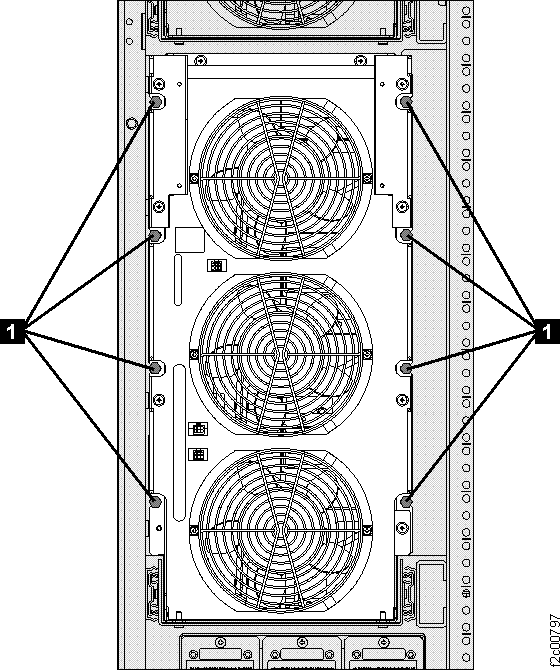
-
Slide the PPS out just far enough to allow you to remove the rear modules. Figure 12 shows the PPS fully forward.
Figure 12. Move PPS to service position 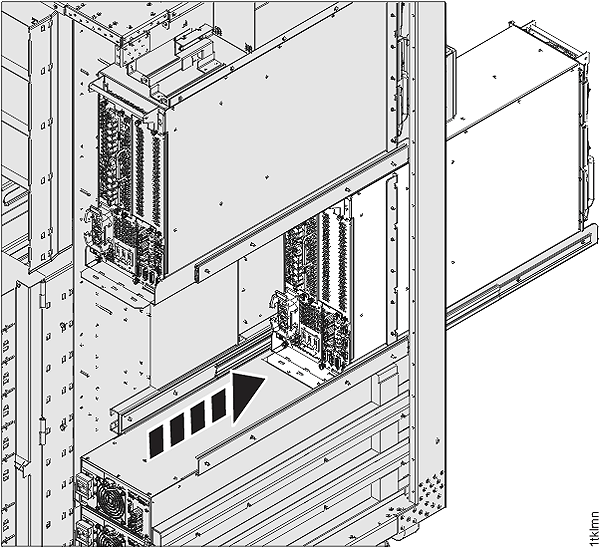
-
At the front of the rack, remove the eight hex head screws that fasten the PPS chassis to the
rack
- Remove rear modules.
- The next steps may require you to remove one or more
cable routing brackets from the rear of the frame so that there is
clearance to remove the PPS modules. Each bracket is held by two screws
that only need to be loosened, not removed, for the bracket to be
moved. See Figure 13.
Figure 13. Cable routing brackets 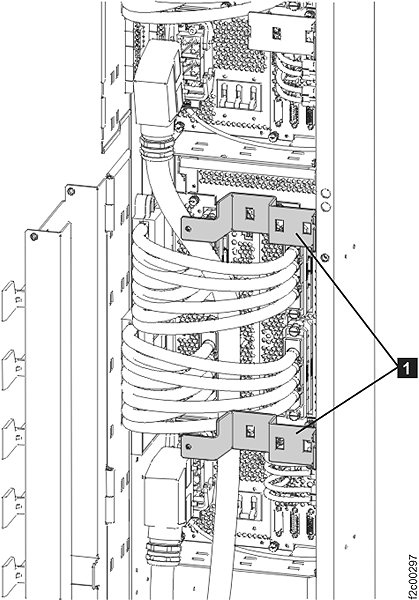
- At the rear of the rack, remove the sequencer module . Move the release lever down and then
slide the module out. See Figure 15.
Note: If the sequencer module slides out about 1 inch (2.5 cm) and then stops, it is hitting the PPS tray tab beneath it. The PPS assembly will need to be moved slightly to the right. At the bottom left of the PPS, insert a screw driver between the PPS tray vertical sheetmetal and the PPS. See Figure 14,. Apply gentle pressure to move the
PPS assembly to the right until the sequencer module releases.
Figure 14. Gently pry PPS assembly to right 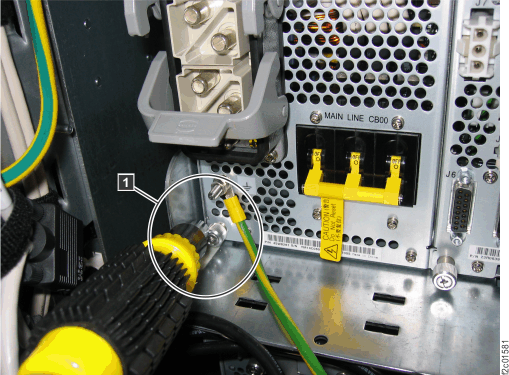
Figure 15. Remove sequencer module 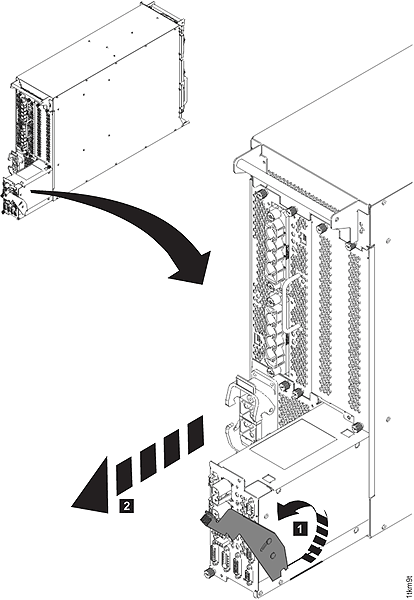
Figure 16. PPS locations (rear) 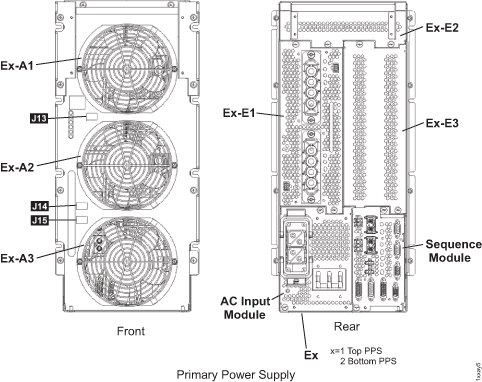
- The next steps may require you to remove one or more
cable routing brackets from the rear of the frame so that there is
clearance to remove the PPS modules. Each bracket is held by two screws
that only need to be loosened, not removed, for the bracket to be
moved. See Figure 13.
Install the primary power supply (PPS)
Procedure
- Install the sequencer module.
See Figure 17
- Ensure the CB00 switch is Off (down).
- Start with the release lever in the down position as you slide the module into the PPS.
- Move the release lever up to fully seat the module.
Figure 17. Install the sequencer module 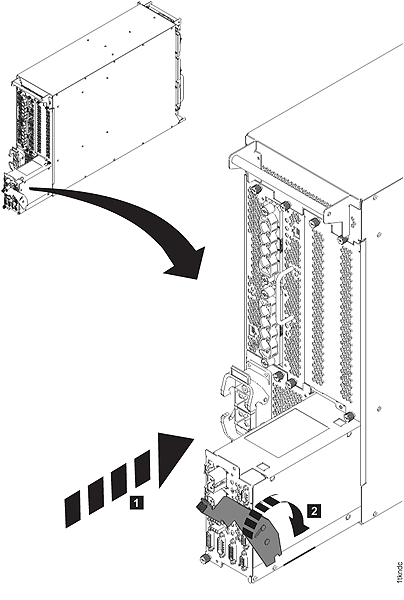
-
If the PPS was moved out to the service position, move it back in to the operating
position.
Figure 18. Move PPS to operating position 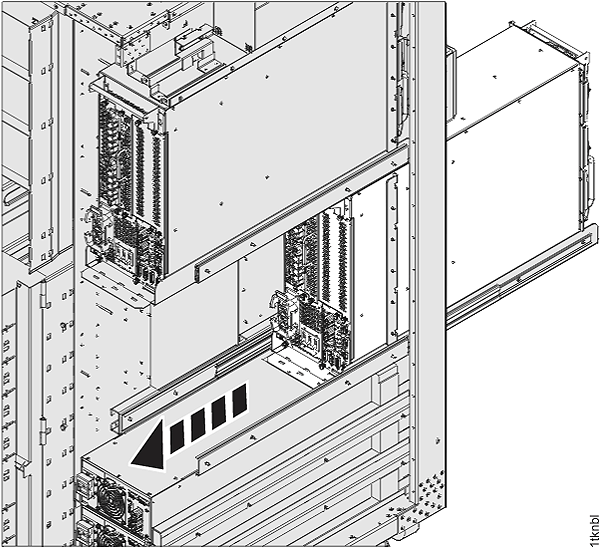
- At the front of the rack, press the slide release levers and then slide the PPS chassis fully into the rack. See Figure 18.
-
Install the eight hex head screws that fasten the PPS chassis to the rack . See Figure 11.
- If you are repairing PPS-2 (lower PPS) FRUs at the rear of the rack, install the PPS-2 bracket (if present).
- Install front modules and fans. See Figure 10.
- Install the 208VDC base module and the PFC module . See Figure 10.
- Screw in the two silver thumbscrews securing the modules.
- Connect the three cables from the PFC module.
-
Place the PPS fan assembly on the two vertical guide pins at the bottom of the PPS and then
tighten the eight silver thumbscrews .
- Connect the three fan cables . See Figure 9.
- Install the 208VDC base module
-
At the rear of the PPS, connect the
 and
and  cables to the sequence
module.
cables to the sequence
module.
Figure 19. PPS rear view, lower right: PPS-to-PPS communication cable connection - Connect the remaining rear cables except
the PPS-to-PPS communication cable and
the mainline power cord.
Note: Install the green/yellow ground wire, ensuring all the contact washers are in place.
Order of installation:- Star washer (closest to chassis)
- Ground lug
- Plain washer
- Split washer
- Nut
-
At the rear of the PPS BEING REPAIRED, connect the PPS-to-PPS communication cable
at the bottom right of the PPS sequencer module.
-
At the rear of the PPS REMAINING IN USE by the customer, connect the PPS-to-PPS communication cable
at the bottom right of the PPS sequencer module.
Note: One or more of the PPS LEDs may now be lit on the PPS being repaired.