A system power control
network (SPCN) might be failing. The SPCN includes the CEC enclosure
service processor card, the I/O enclosure PCIe / SPCN
card, and the SPCN cables.
About this task
Perform the following steps to
service this FRU:
Procedure
Are you here because your system
produced system reference code (SRC) 110000AD?
The 110000AD SRC might be caused by the service processor that
was intentionally reset. An intentional reset is caused by actions
like a pinhole reset, ASMI, or part replacements. An intentional reset
requires no service action.
If your system produced the 110000AD SRC and no intentional reset
was the cause of this SRC, go to the next step.
Are you here
because your system produced system reference code (SRC) 1000911E
with a FRU location of UTMPx.xxx.xxxxxxx? (example: UTMP3.C06.015878R
)
Yes, temporary VPD has been written to an I/O enclosure by
system firmware. This is due to one of the following:
A failed repair of an I/O enclosure PCIe/SPCN card or backplane
assembly
An incorrectly connected SPCN cables (miscable) during a repair
of an I/O enclosure PCIe/SPCN card or backplane assembly
Note: When performing actions in this step, do not use the serviceable
event for SRC 1000911E with FRU location UTMPx.xxx.xxxxxxx for the
repair. Use the Exchange Parts menu or use a serviceable event with
the correct I/O enclosure location code. After successful repair,
you may close the serviceable event for SRC 1000911E.
Retry the repair, performing a pseudo-repair of the FRU you are
repairing (that is, perform all steps but don't actually replace the
FRU). While the repair is in progress, check for correct SPCN cabling
and correct it if necessary.
If the repair fails again, retry the repair with a new FRU.
If the repair fails again, contact your next level of support.
This ends the procedure.
A FRU containing
the SPCN might be failing. The FRU will be the CEC enclosure service
processor card, the I/O enclosure PCIe / SPCN
card, or an SPCN cable. It is possible, but not likely, that the CEC
enclosure I/O backplane assembly could cause the problem.
Yes, the SPCN cable can be hot plugged. Replace or reconnect
the SPCN cable as needed. Then test the SPCN network by doing a pseudo
FRU replacement of the I/O enclosure backplane assembly on one end
of the SPCN cable. Do not replace the I/O enclosure backplane assembly
or disconnect any cables when directed to. Refer to MAP2600 Pseudo FRU exchange needed to reset existing FRU and MAP1245 Finding FRUs by using location codes.
No, go to the next step.
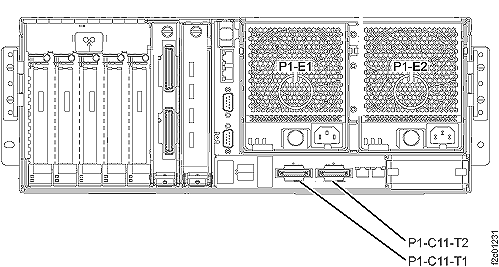
Figure 1. CEC enclosure SPCN cable connectors
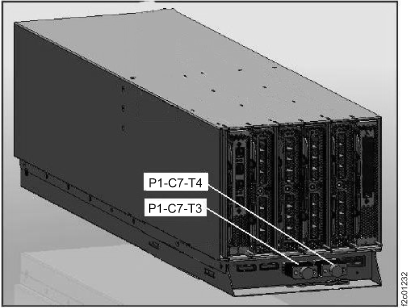
Figure 2. I/O enclosure SPCN cable connectors
Replace the remaining FRUs
listed in the FRU list, in the order that they are listed.
Note: If
you replace the CEC enclosure service processor and it still fails,
and you have replaced all FRUs in the FRU list, you might need to
also replace the CEC enclosure I/O backplane assembly.