Exchange the CEC enclosure power supply
Before you begin
 Use approved ESD procedures to prevent damage.
Attention:
- This procedure is not a stand-alone procedure. Customer disruption and damage to the hardware might occur when microcode and power boundaries are not in the proper conditions for this service action.
- If a serviceable event FRU repair directed you to this procedure, the microcode and power boundaries are already set.
- If a serviceable event FRU repair did not direct you to this procedure, see MAP1230 Replace a FRU without using a serviceable event.
Notes:
- All the cables and FRUs to be removed must be uniquely identified so they can be reinstalled correctly.
- If an installed earthquake resistance kit prevents you from accessing this FRU, refer to MAP1600.
Remove the CEC enclosure power supply
Procedure
- At the rear of the storage facility, view
both CEC enclosure power supplies.
Figure 1. CEC enclosure DC good LEDs 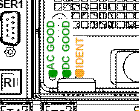
Are both DC GOOD LEDs flashing?
- Yes, continue with the next step.
- No, do not continue with this FRU replacement. Go to MAP4840 CEC enclosure fails to power off during CEC enclosure parts exchange to fix the problem with the CEC enclosure not being in the power off state.
- Remove
all power from the CEC enclosure.
- At the rear of the CEC enclosure, disconnect the power input cables
 to both CEC enclosure power supplies.
 - At the CEC enclosure control panel, observe
the green Power® Present icon,
beneath the white Power button.
- If it is slow flashing, the CEC enclosure is still in the power-off state. DO NOT CONTINUE. Ensure that you have unplugged the power cables.
- If it is off, go to the next step.
Figure 2. CEC enclosure (rear) 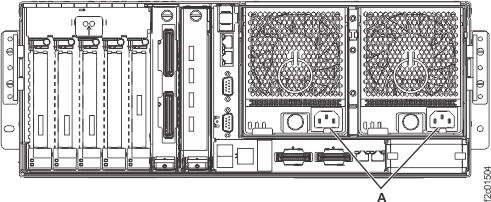
- At the rear of the CEC enclosure, disconnect the power input cables
- Remove the power supply. See Figure 3.
- Push the handle latch to release the handle.
- Lift the handle
 up and into the open position.
 - Using the handle, pull the power supply out of the power supply bay. CAUTION:This part or unit is heavy, but has a weight smaller than 18 kilograms (39.7 pounds). Use care when lifting, removing, or installing this part or unit.
Figure 3. Removing the power supply 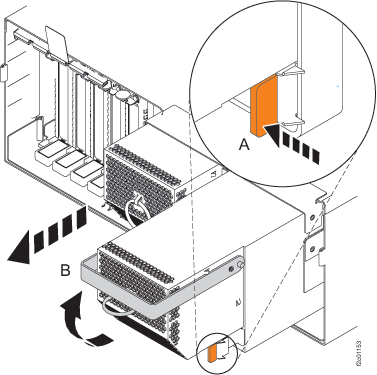
- Push the handle latch